 f2d5aac51d
|
||
|---|---|---|
| .devcontainer | ||
| .github | ||
| docs | ||
| javascript | ||
| models | ||
| pages | ||
| public | ||
| scripts | ||
| src | ||
| tools | ||
| .env.online | ||
| .eslintrc.cjs | ||
| .gitignore | ||
| .prettierrc.cjs | ||
| LICENSE | ||
| Pipfile | ||
| Pipfile.lock | ||
| README-ja.md | ||
| README-zh.md | ||
| README.md | ||
| compress.ts | ||
| index.html | ||
| install.py | ||
| message.html | ||
| package.json | ||
| pnpm-lock.yaml | ||
| style.css | ||
| tsconfig.json | ||
| tsconfig.node.json | ||
| vite-plugin-extension.ts | ||
| vite.config.ts | ||
README.md
3D Openpose Editor (sd-webui-3d-open-pose-editor) [中文版] [日本語版]
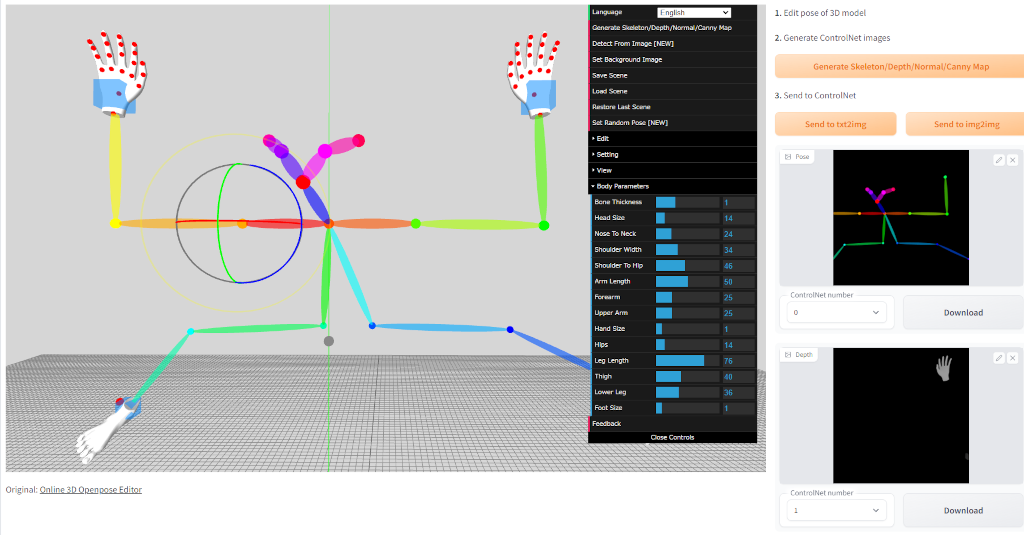
An extension of stable-diffusion-webui to use Online 3D Openpose Editor.
Preview
Installation
- Open the "Extension" tab of the WebUI
- Open the "Available" tab
- If your WebUI is out of date, change the "Extension index URL" to
https://raw.githubusercontent.com/AUTOMATIC1111/stable-diffusion-webui-extensions/master/index.json - Click the "Load from:" button
- Click the "Install" button of 3D Openpose Editor
- Open the "Installed" tab and click the "Apply and restart UI" button
Feature
-
Pose Editing: Edit the pose of the 3D model by selecting a joint and rotating it with the mouse.
-
Hand Editing: Fine-tune the position of the hands by selecting the hand bones and adjusting them with the colored circles.
-
Depth/Normal/Canny Maps: Generate and visualize depth, normal, and canny maps to enhance your AI drawing.
-
Save/Load/Restore Scene: Save your progress and restore it later by using the built-in save and load functionality.
-
Adjust Body Parameters: Adjust various body parameters such as height, weight, and limb lengths to create a custom 3D model.
Usage
Scene Navigation:
- Rotate Scene: Click and hold the blank space, then move the mouse while holding down the left mouse button.
- Move Scene: Click and hold the blank space, then move the mouse while holding down the right mouse button.
Body Manipulation:
- Rotate Body: Click on any joint to select it, then hold down one of the colored circles and move the mouse to rotate the selected joint.
- Hand Editing: Click on the red dot to select the hand bones, then rotate them by holding down one of the red circles and moving the mouse.
Adjust Body Parameters:
- Select Body: Click on the body to select it.
- Open Body Parameters: Click on "Body Parameters" in the menu to adjust the body's parameters.
Adjust Output Resolution:
- Adjust Output Resolution in Menu: Change the "Width" or "Height" in the menu to control the output resolution.
Other Functions:
- Switch to Move Mode: Press the X key to switch to move mode, allowing you to move the entire body.
- Delete Body: Press the D key to delete the entire body.
Credits
- ZhUyU1997 - Online 3D Openpose Editor: Original version