69 lines
4.2 KiB
Markdown
69 lines
4.2 KiB
Markdown
# stable-diffusion-webui-localization-zh_CN
|
||
Simplified Chinese translation extension , Used for [AUTOMATIC1111's stable diffusion webui](https://github.com/AUTOMATIC1111/stable-diffusion-webui)
|
||
|
||
## 简体中文(Simplified Chinese)
|
||
简体中文翻译扩展,适用于 [stable diffusion webui](https://github.com/AUTOMATIC1111/stable-diffusion-webui)
|
||
|
||
QQ交流群 418316375
|
||
|
||
[术语表](Terminology.md)
|
||
|
||
[已知问题](Known-Bug.md)
|
||
|
||
[中文Wiki文档](https://github.com/dtlnor/stable-diffusion-webui-localization-zh_CN/wiki) (编辑中)
|
||
|
||
## 如何安装
|
||
### 1. 通过官方插件列表安装
|
||
此插件可以在 `extension` 选项卡里面通过加载官方插件列表直接安装
|
||
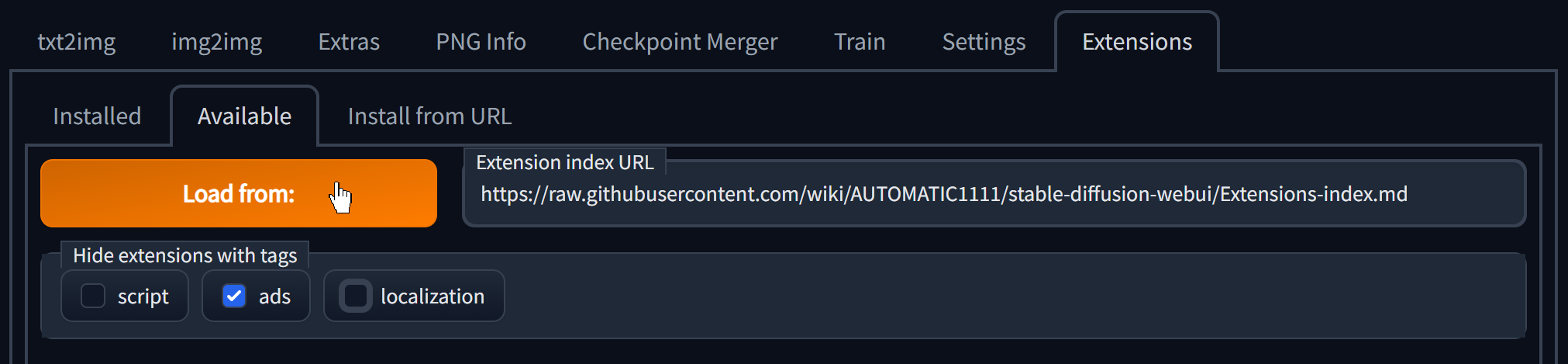
- 点击 `extension` 选项卡,点击 `Avaliable` 子选项卡
|
||
- 先取消勾选 `localization` 选项框
|
||
- 然后点击 `Load From:` 按钮,如下图
|
||
|
||
- 在 `zh_CN Localization` 这一项的右边点击 `install`
|
||

|
||
- 安装完成,跳转到 [如何使用](#如何使用)
|
||
|
||
### 2. 或者,通过网址安装
|
||
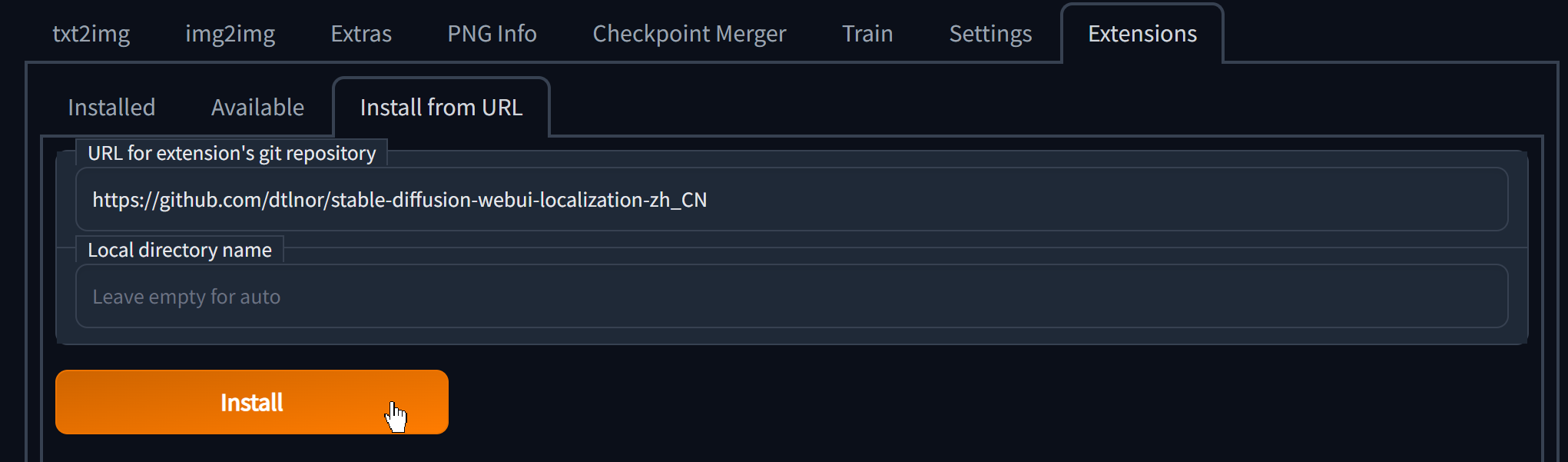
- 点击 `extension` 选项卡,点击 `Install from URL` 子选项卡
|
||
- 复制本 git 仓库网址:
|
||
`https://github.com/dtlnor/stable-diffusion-webui-localization-zh_CN`
|
||
- 黏贴进第一栏,点击 `Install`,如图
|
||
|
||
- 安装完成,跳转到 [如何使用](#如何使用)
|
||
|
||
### 3. 又或者,直接下载然后放在对应路径
|
||
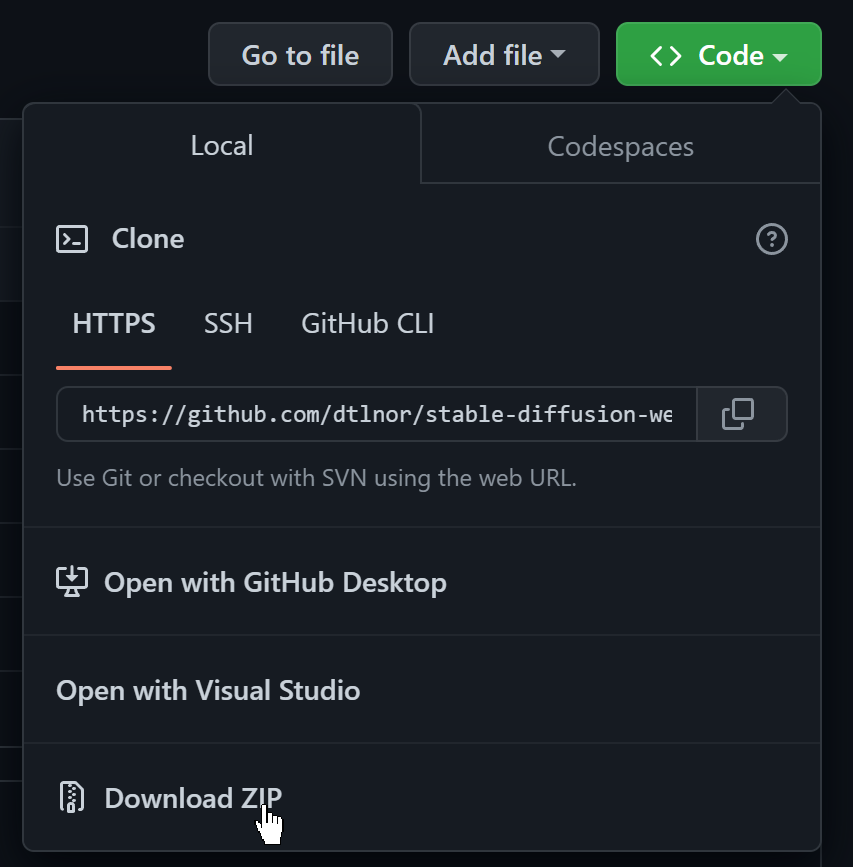
- 下载本 git 仓库为 zip 档案
|
||
|
||
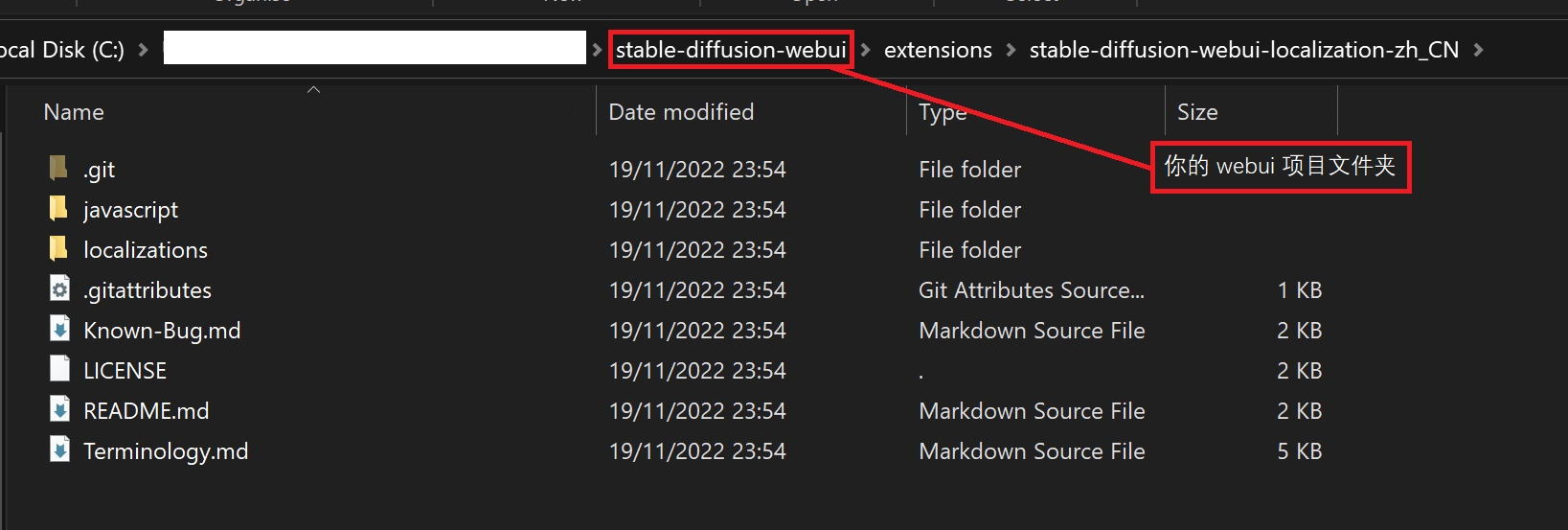
- 解压,并把文件夹放置在 webui 根目录下的 `extensions` 文件夹中,放好之后应该会如下图
|
||
|
||
- 安装完成,跳转到 [如何使用](#如何使用)
|
||
|
||
## 如何使用
|
||
- 确保你安装后有重启程序
|
||
- 或者重启过 UI,比如按过 `Settings` 选项卡中的最右下角的橙色按钮;
|
||
- 或者在确保你在 `Extensions` 选项卡中的 `Installed` 子选项卡中勾选了 zh_CN 扩展,然后按一下 `Apply and restart UI` 橙色按钮
|
||
- 在 `Settings` 选项卡中,于 **`User interface`** 大项中找到 `Localization (requires restart)` 小项,然后在下拉选单中选中 `zh_CN` (如果没有显示就按一下🔄按钮),如图
|
||

|
||
- 然后**记得记得**按一下顶部的 `Apply settings` 橙色按钮,最后再按一下最右下角的 `Restart...` 橙色按钮(或者直接重启)
|
||
- 完成
|
||
|
||
## 已翻译扩展
|
||
[镜像潜空间图像](https://github.com/dfaker/SD-latent-mirroring)
|
||
[Tag自动补全](https://github.com/DominikDoom/a1111-sd-webui-tagcomplete)
|
||
[novelai 转 webui 括号](https://github.com/animerl/novelai-2-local-prompt)
|
||
[dreambooth 插件](https://github.com/d8ahazard/sd_dreambooth_extension)
|
||
[智能预处理](https://github.com/d8ahazard/sd_smartprocess)
|
||
[种子变迁](https://github.com/yownas/seed_travel)
|
||
[关注转移](https://github.com/yownas/shift-attention)
|
||
[美术风格梯度](https://github.com/AUTOMATIC1111/stable-diffusion-webui-aesthetic-gradients)
|
||
[高分辨率修复原图调节强度]( https://github.com/dtlnor/stable-diffusion-webui-conditioning-highres-fix.git)
|
||
[embedding 编辑器](https://github.com/CodeExplode/stable-diffusion-webui-embedding-editor)
|
||
[图库浏览器](https://github.com/yfszzx/stable-diffusion-webui-images-browser)
|
||
[提示词变迁](https://github.com/Kahsolt/stable-diffusion-webui-prompt-travel)
|
||
[随机化](https://github.com/stysmmaker/stable-diffusion-webui-randomize.git)
|
||
[词元分析器(tokenizer)](https://github.com/AUTOMATIC1111/stable-diffusion-webui-tokenizer)
|
||
[通配符](https://github.com/AUTOMATIC1111/stable-diffusion-webui-wildcards)
|
||
|
||
## 已翻译外置脚本
|
||
[embedding 转 png](https://github.com/dfaker/embedding-to-png-script)
|