233 lines
9.5 KiB
Markdown
233 lines
9.5 KiB
Markdown
<ins datetime="2023-01-08">
|
||
<a href="https://github.com/hnmr293/stable-diffusion-webui-dumpunet/commit/2b63a22b8b456b52113ce7df96d685c6cc368a37">commit: 2b63a22</a> にて区切り文字を `;` に変更したので注意。
|
||
</ins>
|
||
|
||
# ブロック別プロンプトで特定の1ブロックにプロンプトを追加してみるテスト
|
||
|
||
ブロック別プロンプトについては以下を参照。
|
||
|
||
[Stable DiffusionのU-Netでブロックごとに異なるプロンプトを与えて画像生成する(ブロック別プロンプト)](https://note.com/kohya_ss/n/n93b7c01b0547)
|
||
|
||
モデルとして [Waifu Diffusion v1.3](https://huggingface.co/hakurei/waifu-diffusion-v1-3) を使用した。
|
||
|
||
全体として、`IN07`, `IN08`, `M00` で変化が大きい。次いで `IN04`, `IN05` だろうか。
|
||
|
||
画像はチェリーピックせず、ランダムシードでn=5で生成したものを観察した。ただし bad hands のみ保存し損ねたのでn=4になっている。
|
||
|
||
## 目次
|
||
|
||
- [生成方法](#生成方法)
|
||
- [bad anatomy](#bad-anatomy)
|
||
- [bad hands](#bad-hands)
|
||
- [monochrome](#monochrome)
|
||
- [monochrome 強調](#monochrome-強調)
|
||
- [monochrome 2ブロック指定](#monochrome-2ブロック指定)
|
||
- [monochrome 2ブロック除外](#monochrome-2ブロック除外)
|
||
- [画像生成条件詳細](#画像生成条件詳細)
|
||
|
||
## 生成方法
|
||
|
||
[Dump U-Net](https://github.com/hnmr293/stable-diffusion-webui-dumpunet) と [Dynamic Prompts](https://github.com/adieyal/sd-dynamic-prompts) を用いて、特定の層のみ追加のプロンプトを導入したときの生成画像の変化を観察した。
|
||
|
||
プロンプトは以下の形式のものを用いた。
|
||
|
||
```
|
||
{% for layer in [ "", "IN00", "IN01", "IN02", "IN03", "IN04", "IN05", "IN06", "IN07", "IN08", "IN09", "IN10", "IN11", "M00", "OUT00", "OUT01", "OUT02", "OUT03", "OUT04", "OUT05", "OUT06", "OUT07", "OUT08", "OUT09", "OUT10", "OUT11" ] %}
|
||
{% if layer == "" %}
|
||
{% prompt %}a cute school girl, pink hair, wide shot, {% endprompt %}
|
||
{% else %}
|
||
{% prompt %}a cute school girl, pink hair, wide shot, (~:{{layer}}:bad anatomy:~){% endprompt %}
|
||
{% endif %}
|
||
{% endfor %}
|
||
```
|
||
|
||
`a cute school girl, pink hair, wide shot, ` の部分をここでは「基準プロンプト」と呼ぶことにする。基準プロンプトは、追加するプロンプトごとに少し調整している。bad hands なら手が画面内に入っていて欲しいので `palms facing viewer` を入れるなど。
|
||
|
||
その他詳細は最後に記載する。
|
||
|
||
## bad anatomy
|
||
|
||
```
|
||
基準プロンプト: a cute school girl, pink hair, wide shot,
|
||
```
|
||
|
||

|
||
|
||
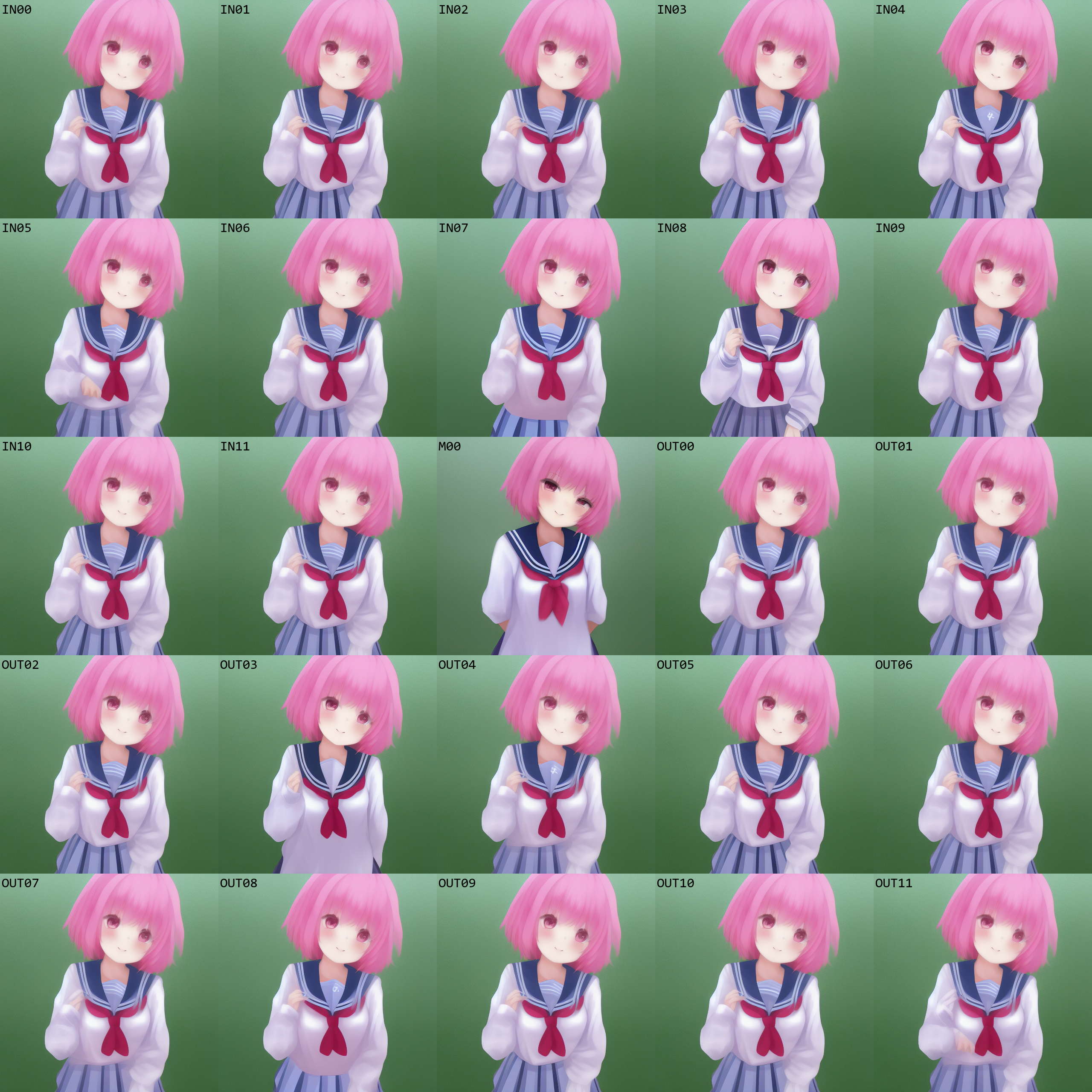
`IN01`, `IN05`, `IN07`, `IN08`, `M00`, `OUT03`, `OUT08` で顕著な変化が見られる。
|
||
|
||
`IN04`, `IN11`, `OUT04`, `OUT05`, `OUT10`, `OUT11` では目の描写に変化が見られる。
|
||
|
||
あとはスカーフが消えているものがある。
|
||
|
||

|
||
|
||
ぱっと見で分かる変化は `IN07` と `M00`。
|
||
|
||
口の形状が細かく変わっている。`IN00` を基準に考えると、`IN01`, `IN04`, `IN07`, `OUT03` が違う。また `IN08` は目のハイライトが無い。
|
||
|
||

|
||
|
||
`M00` は顕著に変化している。
|
||
|
||
`IN04` のみ口が開いている。
|
||
|
||
`IN07`, `IN08` は紫のリボンが赤のリボンタイになっている。
|
||
|
||
`OUT08` は背景が微妙に異なる。
|
||
|
||
|
||
|
||
`M00` は顕著に変化している。
|
||
|
||
`IN01`, `IN04`, `IN07`, `IN08`, `OUT03`, `OUT04`, `OUT08` はフロント布の形状や模様が大きく変わっている。
|
||
|
||
`IN05`, `OUT11` はポーズが異なる。
|
||
|
||
`OUT03` は服の形状が `M00` と類似したものになっている。
|
||
|
||

|
||
|
||
`IN07`, `IN08`, `M00` で顕著に変化している。
|
||
|
||
## bad hands
|
||
|
||
```
|
||
基準プロンプト: a cute school girl, pink hair, palms facing viewer,
|
||
```
|
||
|
||
|
||
|
||
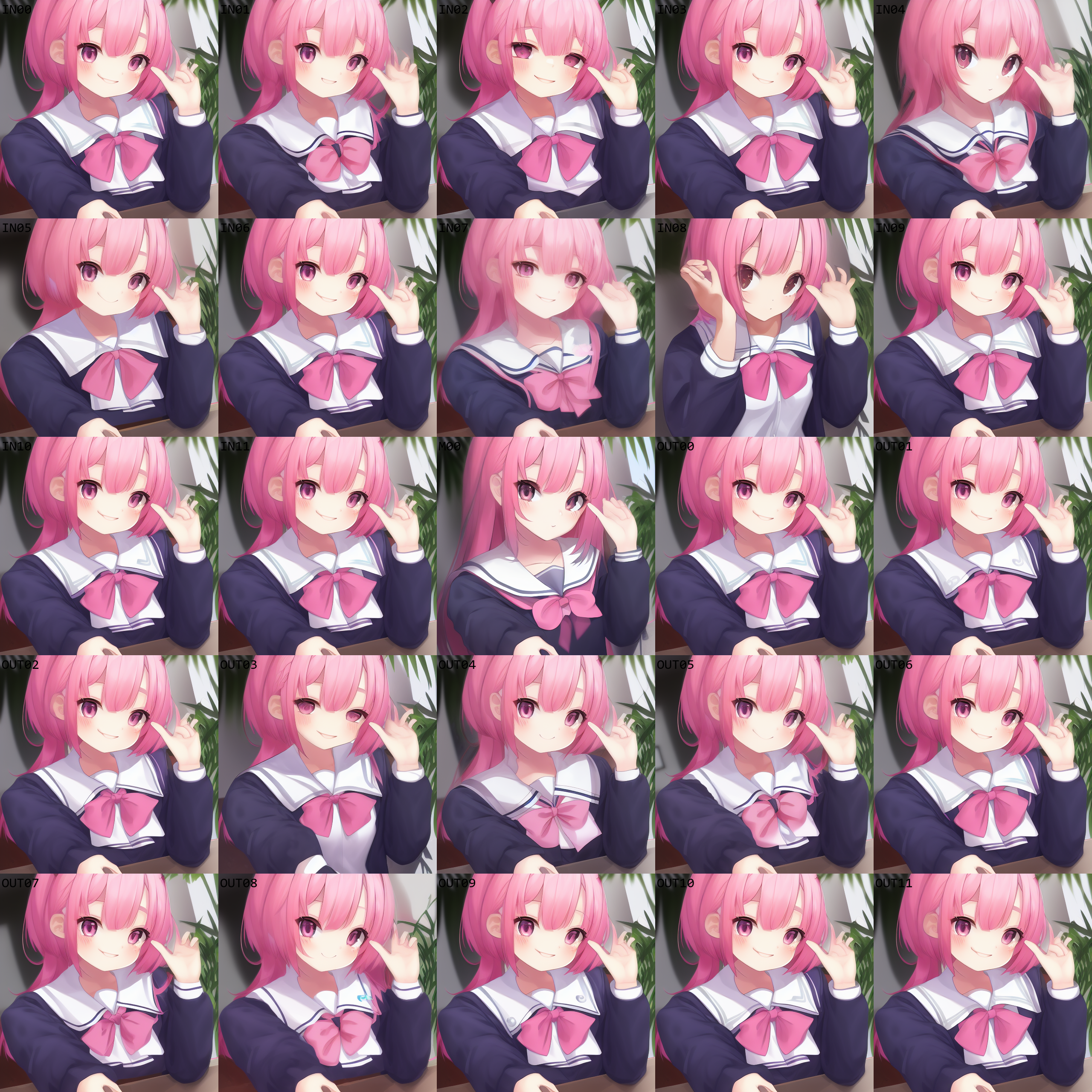
`IN02` は目が変化している。
|
||
|
||
`IN04`, `IN07`, `M00`, `OUT03`, `OUT08` は目、顔の輪郭、襟の形状と模様、リボンが変化している。
|
||
|
||
`IN08` はそれに加えてポーズが変化している。
|
||
|
||

|
||
|
||
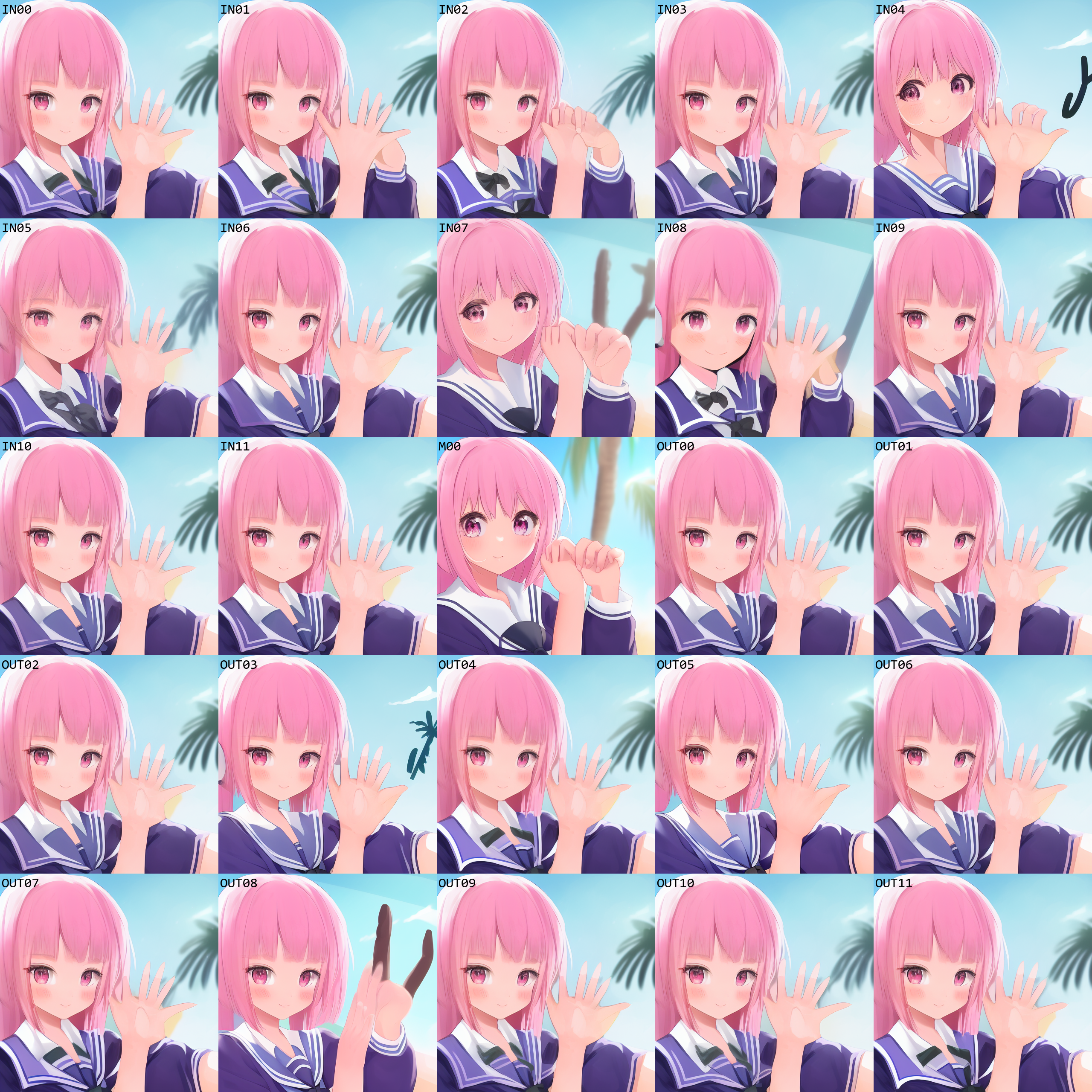
手に変化が見られるのは `IN01`, `IN04`, `IN05`, `IN07`, `IN08`, `M00`, `OUT03`, `OUT05`, `OUT07`, `OUT08`, `OUT09`。
|
||
|
||
`IN07`, `IN08`, `M00`, `OUT08` は顔も変化している。
|
||
|
||
|
||
|
||
`IN02`, `IN04`, `IN07`, `IN08`, `M00`, `OUT03`-`OUT06`, `OUT08`, `OUT09` で手が目に見えて変化している。
|
||
|
||
`IN04`, `IN05`, `IN07`, `IN08`, `M00` は顔も変化している。
|
||
|
||
`IN02`, `IN04`, `IN07`, `IN08`, `M00`, `OUT03`, `OUT08` では背景が変化している。
|
||
|
||

|
||
|
||
`IN04`, `IN05`, `IN07`, `IN08`, `M00` で変化が顕著。
|
||
|
||
## monochrome
|
||
|
||
```
|
||
基準プロンプト: a cute school girl, pink hair,
|
||
```
|
||
|
||
どうせ `M00` で変わるんでしょ……と思ったら全然違った。`IN07` が強く影響している。
|
||
|
||
学習データの影響か、comic の要素が入ってきているように見える。ちなみに grayscale でもほぼ同じ結果だった。
|
||
|
||

|
||
|
||
`IN07` の変化が目を惹く。他に変化が大きいのは `IN01`, `IN08`, `M00`, `OUT03`, `OUT05`, `OUT08`。
|
||
|
||
`IN08`, `OUT03`, `OUT05`, `OUT08` はいずれも同じような画像を生成している。
|
||
|
||

|
||
|
||
1枚目と似たような感じ。`M00`の変化はあまり大きくない。
|
||
|
||

|
||
|
||
これもそう。
|
||
|
||

|
||
|
||
微妙にリボン等が異なるが、`IN07` を除くと構図上の違いはほとんど無い。
|
||
|
||

|
||
|
||
同じく。
|
||
|
||
## monochrome 強調
|
||
|
||
適用するプロンプトを `(((((((monochrome)))))))` としたときの変化を見た。ちなみに `(monochrome:1.95)` とほぼ同じ。パーサ未対応のため一旦これで。
|
||
|
||
<ins datetime="2023-01-08">追記。(xxx:1.5) のような記法に対応した。区切り文字が <code>;</code> に変わっているので注意。詳細は <a href="https://github.com/hnmr293/stable-diffusion-webui-dumpunet/commit/2b63a22b8b456b52113ce7df96d685c6cc368a37">github</a> 参照。</ins>
|
||
|
||

|
||
|
||
もともと変化のあったブロックで、より変化が顕著になっている。
|
||
|
||
変化していなかったブロックについてはほぼ変化が見られない。
|
||
|
||
## monochrome 2ブロック指定
|
||
|
||
```
|
||
基準プロンプト: a cute school girl, pink hair,
|
||
```
|
||
|
||
2か所で指定を行った結果。シードは [monochrome](#monochrome) の1枚目、2枚目と同じ。
|
||
|
||

|
||
|
||
`IN07` でのみモノクロっぽくなっている。
|
||
|
||

|
||
|
||
`IN07` でのみモノクロっぽくなっている。
|
||
|
||
## monochrome 2ブロック除外
|
||
|
||
```
|
||
基準プロンプト: a cute school girl, pink hair,
|
||
```
|
||
|
||
逆に、2か所を除くブロックに monochrome を指定した場合の結果。シードは [monochrome](#monochrome) の1枚目、2枚目と同じ。
|
||
|
||

|
||
|
||
`IN07` でのみカラーっぽくなっている。
|
||
|
||

|
||
|
||
`IN07` でのみカラーっぽくなっている。
|
||
|
||
`IN01`, `IN08`, `M00`, `OUT05` でもわずかに色がついている。
|
||
|
||
|
||
## 画像生成条件詳細
|
||
|
||
```
|
||
Model: wd-v1-3-float16.ckpt (84692140)
|
||
SD VAE: None
|
||
Hypernetwork: None
|
||
Clip skip: 1
|
||
Eta noise seed delta: 31337
|
||
Sampling method: Euler a
|
||
Sampling steps: 20
|
||
Width: 512
|
||
Height: 512
|
||
Restore faces: False
|
||
Tiling: False
|
||
Highres. fix: False,
|
||
Batch count: 1
|
||
Batch size: 1
|
||
CFG scale: 7
|
||
Seed: -1
|
||
|
||
[Dynamic Prompts]
|
||
enabled: True
|
||
Enable Jinja template: True
|
||
Fixed Seed: True
|
||
他は全てオフ
|
||
|
||
[Dump U-Net]
|
||
Enable Layer Prompt: True
|
||
他は全てオフ
|
||
```
|