2.4 KiB
stable-diffusion-webui-distributed
This extension enables you to chain multiple webui instances together for txt2img and img2img generation tasks.
There is an emphasis on minimizing the perceived latency/lag of large batch jobs in the main sdwui instance.
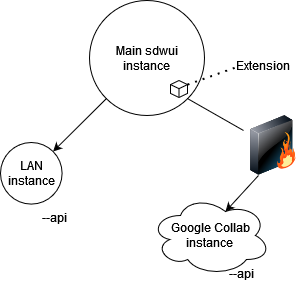
Diagram showing Master/slave architecture of the extension
Contributions and feedback are much appreciated!
Installation
On the master instance:
- Go to the extensions tab, and swap to the "available" sub-tab. Then, search "Distributed", and hit install on this extension.
- Ensure that you have setup your
COMMANDLINE_ARGSinclude the necessary info on your remote machines. Ex:
set COMMANDLINE_ARGS=--distributed-remotes laptop:192.168.1.3:7860 argon:fake.local:7860 --distributed-skip-verify-remotes --distributed-remotes-autosave
On each slave instance:
- enable the api by passing
--apiand ensure it is listening by using--listen - ensure all of the models, scripts, and whatever else you think you might request from them is present
Ie. if you're using sd-1.5 on the controlling instance, then the sd-1.5 model should also be present on each slave instance. Otherwise, the remote will fallback to some other model that is present.
if you want to sync models and etc. between a huge amount of nodes you might want to use something like rsync or winscp
Usage Notes
- This is not an always on script, you have to select it in the script dropdown of the tab you are in. This way, you can swap back to normal behavior mid-session if you so choose.
- If benchmarking fails, try hitting the Redo benchmark button under the script's Util tab.
- You need to have all of the workers you plan to use connected when benchmarking for things to work properly (will be fixed later).
- If any remote is taking far too long to returns its share of the batch, you can hit the Interrupt button in the Util tab.
Command-line arguments
--distributed-remotes Enter n pairs of sockets corresponding to remote workers in the form name:address:port
--distributed-skip-verify-remotes Disable verification of remote worker TLS certificates (useful for if you are using self-signed certs like with auto tls-https)
--distributed-remotes-autosave Enable auto-saving of remote worker generations
--distributed-debug Enable debug information