76 KiB
| title | language_tabs | language_clients | toc_footers | includes | headingLevel | ||||||||||||
|---|---|---|---|---|---|---|---|---|---|---|---|---|---|---|---|---|---|
| Stable Diffusion AWS extension API v2023-07-05 |
|
|
2 |
Stable Diffusion AWS extension API
Overview
This document describe all the api for Stable Diffusion AWS extension solution. This Solution contains two parts, one part is stable diffusion WebUI extension which is gradio based client to provide a user-friendly interface, another part is called middle-ware which is resources deploy on AWS cloud, the middleware provide several API interfaces to let stable diffusion aws extension client to interact services on AWS cloud like Sagemaker and S3 to do the model update/training and inference operations.
In order to support users who do not use stable diffusion aws extension. We provide this document to list all the API interfaces to help user understand how to call API methods to do the training or inference.
After user deployed solution middleware cloudformation, user can get the API URL and Token in the output part of the main stack. Please refer to this document
Base URLs:
Authentication
- API Key (api_key)
- Parameter Name: x-api-key, in: header.
User Scenarios
1. Deploy a new Endpoint
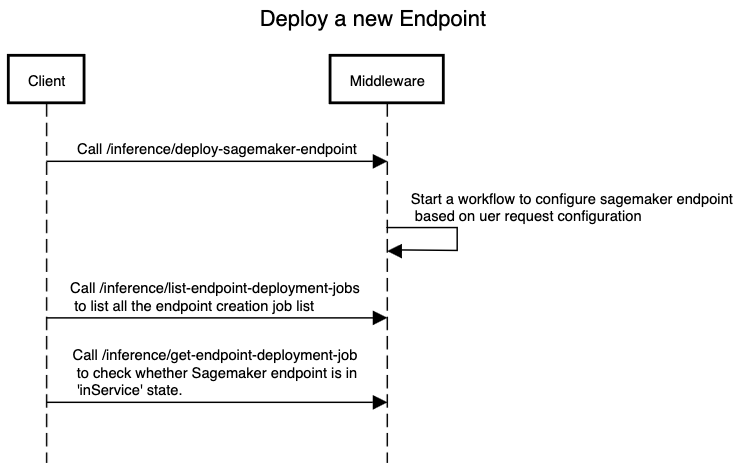
Call /inference/deploy-sagemaker-endpoint to create a new sagemaker endpoint, you need to specify two parameters for creating, one is instance_type, candidate values are "ml.g4dn.2xlarge","ml.g4dn.4xlarge","ml.g4dn.8xlarge","ml.g4dn.12xlarge", another is initial_instance_count, candidate values are 1|2|3|4.
After calling /inference/deploy-sagemaker-endpoint, you need to call /inference/list-endpoint-deployment-jobs to list all the endpoint status. Normally it took about more than 10 minutes to make a new Sagemaker endpoint change to inService status. The Sagemaker endpoint can only be used for inference when it is inService status.
If the endpoint is in failed status, you can call /inference/get-endpoint-deployment-job with parameter jobID, the response will show the reason why endpoint deployment is failed, normally it is caused by AWS account quota limitation.
sequence digram raw
title Create a Sagemaker Endpoint
Client->Middleware:Call /inference/deploy-sagemaker-endpoint Middleware->Middleware: Start a workflow to configure sagemaker endpoint \n based on uer request configuration Client->Middleware:Call /inference/list-endpoint-deployment-jobs \n to list all the endpoint creation job list Client->Middleware:Call /inference/get-endpoint-deployment-job \n to check whether Sagemaker endpoint is in \n 'inService' state.
2. Upload a model
3. Train a model
4. Do Inference
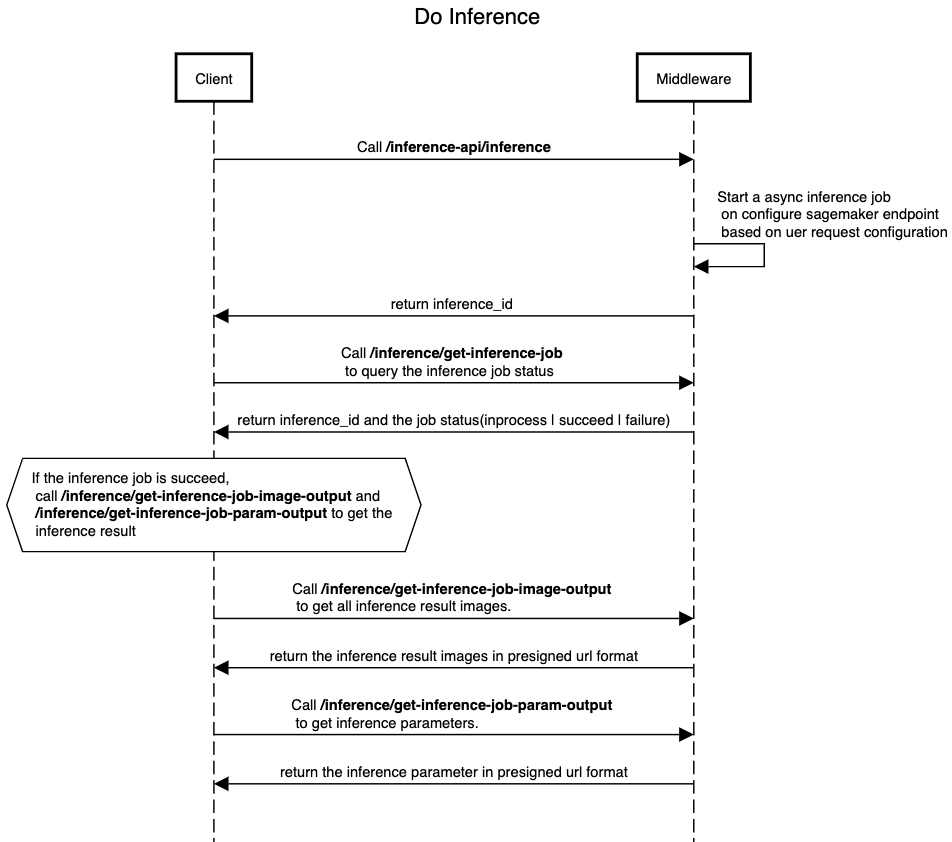 After Sagemaker endpoint is in inService status, you can call /inference-api/inference to do the txt2image or image2image inference. You specify the endpoint name in "sagemaker_endpoint" parameter in the post body of the request. Other required parameters are located in /inference-api/inference.
/inference-api/inference will return following json structure to client:
{
  "inference_id": "XXXXXXX",
  "status": "inprogress | failed",
  "endpoint_name": "NAME_OF_ENDPOINT",
  "output_path": "path_of_prediction_output"
}
Client then can call /inference/get-inference-job using the inference_id as parameter to query the inference job status. If the inference job has finished successfully(status is "succeed"), Client can use /inference/get-inference-job-image-output to get all inference result images, the images will be returned as S3 presigned url list so client can download. following is am example of get-inference-job-image-output result:
[
  "https://stable-diffusion-aws-extension-aigcbucketa457cb49-1tlr2pqwkosg3.s3.amazonaws.com/out/1f9679f3-25b8-4c44-8345-0a845da30094/result/image_0.jpg"
]
Also Client can call /inference/get-inference-job-param-output to get all the inference parameters, the response of /inference/get-inference-job-param-output is an S3 presigned url contains the json format of the parameters, following is an response example:
[
  "https://stable-diffusion-aws-extension-aigcbucketa457cb49-1tlr2pqwkosg3.s3.amazonaws.com/out/1f9679f3-25b8-4c44-8345-0a845da30094/result/1f9679f3-25b8-4c44-8345-0a845da30094_param.json"
]
sequence digram raw
title Do Inference
Client->Middleware:Call /inference-api/inference Middleware->Middleware: Start a async inference job \n on configure sagemaker endpoint \n based on uer request configuration Middleware->Client: return inference_id Client->Middleware:Call /inference/get-inference-job \n to query the inference job status Middleware->Client: return inference_id and the job status(inprocess | succeed | failure)
abox over Client: If the inference job is succeed, \n call /inference/get-inference-job-image-output and \n /inference/get-inference-job-param-output to get the \n inference result Client->Middleware:Call /inference/get-inference-job-image-output \n to get all inference result images.
Middleware->Client: return the inference result images in presigned url format
Client->Middleware:Call /inference/get-inference-job-param-output \n to get inference parameters.
Middleware->Client: return the inference parameter in presigned url format
| Index | Http Method | API Name | Description |
|---|---|---|---|
| 1 | GET | /inference/test-connection | Test whether client can connect to api and check the API_TOKEN is correct |
| 3 | GET | /inference/get-inference-job | Retrieves details of a specific inference job. |
| 4 | GET | /inference/get-inference-job-image-output | Gets image output of a specific inference job. |
| 5 | GET | /inference/get-inference-job-param-output | Gets parameter output of a specific inference job. |
| 6 | POST | /inference-api/inference | Run sagemaker inference using default parameters |
| 7 | POST | /inference/deploy-sagemaker-endpoint | Deploys a SageMaker endpoint. |
| 8 | POST | /inference/delete-sagemaker-endpoint | Deletes a SageMaker endpoint. |
| 9 | GET | /inference/list-endpoint-deployment-jobs | Lists all endpoint deployment jobs. |
| 10 | GET | /inference/get-endpoint-deployment-job | Gets a specific endpoint deployment job. |
| 11 | GET | /inference/generate-s3-presigned-url-for-uploading | Generates an S3 presigned URL for uploading. |
| 12 | GET | /inference/get-texual-inversion-list | Gets the list of textual inversions. |
| 13 | GET | /inference/get-lora-list | Gets the list of LoRa. |
| 14 | GET | /inference/get-hypernetwork-list | Gets the list of hypernetworks. |
| 15 | GET | /inference/get-controlnet-model-list | Gets the list of ControlNet models. |
| 16 | POST | /inference/run-model-merge | Runs a model merge. |
| 17 | POST | /model | Creates a new model. |
| 18 | PUT | /model | Upload the model file |
| 19 | GET | /models | Lists all models. |
| 20 | GET | /checkpoint | Gets a checkpoint. |
| 21 | PUT | /checkpoint | Updates a checkpoint. |
| 22 | GET | /checkpoints | Lists all checkpoints. |
| 23 | POST | /train | Starts a training job. |
| 24 | PUT | /train | Updates a training job. |
| 25 | GET | /trains | Lists all training jobs. |
| 26 | POST | /dataset | Creates a new dataset. |
| 27 | PUT | /dataset | Updates a dataset. |
| 28 | GET | /datasets | Lists all datasets. |
| 29 | GET | /{dataset_name}/data | Gets data of a specific dataset. |
/inference/test-connection
test middleware connection
Code samples :
Python example code:
import requests
headers = {
  'Accept': 'application/json',
  'x-api-key': 'API_TOKEN_VALUE'
}

r = requests.get('https://<Your API Gateway ID>.execute-api.<Your AWS Account Region>.amazonaws.com/{basePath}/inference/test-connection', headers = headers)

print(r.json())
Javascript example code:
const headers = {
  'Accept':'application/json',
  'x-api-key': 'API_TOKEN_VALUE'
};

fetch('https://<Your API Gateway ID>.execute-api.<Your AWS Account Region>.amazonaws.com/{basePath}/inference/test-connection',
{
  method: 'GET',

  headers: headers
})
.then(function(res) {
    return res.json();
}).then(function(body) {
    console.log(body);
});
GET /inference/test-connection
Example responses
200 Response
null
Responses
| Status | Meaning | Description | Schema |
|---|---|---|---|
| 200 | OK | Successful Response | Inline |
Response Schema
/inference-api/inference
Generate a new image from a text prompt.
Code samples :
Python example code:
import requests
headers = {
  "Content-Type": "application/json",
  "Accept": "application/json",
  'x-api-key': 'API_TOKEN_VALUE'
}
body = {
  "task_type": "txt2img",
  "models": {
    "Stable-diffusion": [
      "v1-5-pruned-emaonly.safetensors"
    ]
  },
  "sagemaker_endpoint_name": "infer-endpoint-cb821ea",
  "prompt": "a cute panda",
  "denoising_strength": 0.75
}

r = requests.post("https://<Your API Gateway ID>.execute-api.<Your AWS Account Region>.amazonaws.com/{basePath}/inference-api/inference", headers = headers, json = body)

print(r.json())
Javascript example code:
const inputBody = '{
  "task_type": "txt2img",
  "models": {
    "Stable-diffusion": [
      "v1-5-pruned-emaonly.safetensors"
    ]
  },
  "sagemaker_endpoint_name": "infer-endpoint-cb821ea",
  "prompt": "a cute panda",
  "denoising_strength": 0.75
}';
const headers = {
  "Content-Type":"application/json",
  "Accept":"application/json",
  'x-api-key': 'API_TOKEN_VALUE'
};

fetch("https://<Your API Gateway ID>.execute-api.<Your AWS Account Region>.amazonaws.com/{basePath}/inference-api/inference",
{
  method: "POST",
  body: inputBody,
  headers: headers
})
.then(function(res) {
    return res.json();
}).then(function(body) {
    console.log(body);
});
POST /inference-api/inference
Body parameter
{
  "task_type": "txt2img",
  "models": {
    "Stable-diffusion": [
      "v1-5-pruned-emaonly.safetensors"
    ]
  },
  "sagemaker_endpoint_name": "infer-endpoint-cb821ea",
  "prompt": "a cute panda",
  "denoising_strength": 0.75
}
Parameters
Parameter example
Below JSON shows the parameters with default value. sagemaker_endpoint_name, task_type, prompt and Stable-diffusion are mandatory, other parameters are optional.
{
  "sagemaker_endpoint_name": "infer-endpoint-ef3abcd",
  "task_type": "txt2img",
  "prompt": "",
  "models": {
    "Stable-diffusion": [
      "v1-5-pruned-emaonly.safetensors"
    ],
    "Lora": [
      "raidenshogun1-000009.safetensors"
    ]
  },
  "enable_hr": false,
  "denoising_strength": null,
  "firstphase_width": 0,
  "firstphase_height": 0,
  "hr_scale": 2.0,
  "hr_upscaler": "Latent",
  "hr_second_pass_steps": 0,
  "hr_resize_x": 0,
  "hr_resize_y": 0,
  "hr_sampler_name": null,
  "hr_prompt": "",
  "hr_negative_prompt": "",
  "prompt": "",
  "styles": [],
  "seed": -1,
  "subseed": -1,
  "subseed_strength": 0.0,
  "seed_resize_from_h": 0,
  "seed_resize_from_w": 0,
  "sampler_name": "Euler a",
  "batch_size": 1,
  "n_iter": 1,
  "steps": 28,
  "cfg_scale": 7.0,
  "width": 512,
  "height": 512,
  "restore_faces": false,
  "tiling": false,
  "do_not_save_samples": false,
  "do_not_save_grid": false,
  "negative_prompt": "",
  "eta": null,
  "s_min_uncond": 0.0,
  "s_churn": 0.0,
  "s_tmax": 1.0,
  "s_tmin": 0.0,
  "s_noise": 1.0,
  "override_settings": {},
  "override_settings_restore_afterwards": true,
  "script_args": [],
  "sampler_index": "Euler a",
  "script_name": null,
  "send_images": true,
  "save_images": false,
  "alwayson_scripts": {
    "controlnet": {
      "args": [
        {
          "enabled": false,
          "module": "none",
          "model": "None",
          "weight": 1,
          "image": null,
          "resize_mode": "Crop and Resize",
          "low_vram": false,
          "processor_res": -1,
          "threshold_a": -1,
          "threshold_b": -1,
          "guidance_start": 0,
          "guidance_end": 1,
          "pixel_perfect": false,
          "control_mode": "Balanced",
          "is_ui": true,
          "input_mode": "simple",
          "batch_images": "",
          "output_dir": "",
          "loopback": false
        }
      ]
    },
    "extra options": {
      "args": []
    }
  }
}
Example responses
200 Response
{
  "inference_id": "XXXXXXX",
  "status": "inprogress | failed",
  "endpoint_name": "NAME_OF_ENDPOINT",
  "output_path": "path_of_prediction_output"
}
Responses
| Status | Meaning | Description | Schema |
|---|---|---|---|
| 200 | OK | Successful Response | Inline |
/inference/deploy-sagemaker-endpoint
Code samples :
Python example code:
import requests
headers = {
  'Content-Type': 'application/json',
  'Accept': 'application/json',
  'x-api-key': 'API_TOKEN_VALUE'
}
inputBody = {
	"instance_type": "ml.g4dn.xlarge | ml.g4dn.2xlarge | ml.g4dn.4xlarge",
	"initial_instance_count": "1|2|3|4"
}

r = requests.post('https://<Your API Gateway ID>.execute-api.<Your AWS Account Region>.amazonaws.com/{basePath}/inference/deploy-sagemaker-endpoint', headers = headers, json = inputBody)

print(r.json())
Javascript example code:
const inputBody = '{
  "instance_type": "ml.g4dn.xlarge | ml.g4dn.2xlarge | ml.g4dn.4xlarge",
  "initial_instance_count": "1|2|3|4"
}';
const headers = {
  'Content-Type':'application/json',
  'Accept':'application/json',
  'x-api-key': 'API_TOKEN_VALUE'
};

fetch('https://<Your API Gateway ID>.execute-api.<Your AWS Account Region>.amazonaws.com/{basePath}/inference/deploy-sagemaker-endpoint',
{
  method: 'POST',
  body: inputBody,
  headers: headers
})
.then(function(res) {
    return res.json();
}).then(function(body) {
    console.log(body);
});
POST /inference/deploy-sagemaker-endpoint
Body parameter
{
  "instance_type": "ml.g4dn.xlarge | ml.g4dn.2xlarge | ml.g4dn.4xlarge",
  "initial_instance_count": "1|2|3|4"
}
Parameters
| Name | In | Type | Required | Description |
|---|---|---|---|---|
| body | body | object | false | none |
Example responses
200 Response
null
Responses
| Status | Meaning | Description | Schema |
|---|---|---|---|
| 200 | OK | Successful Response | Inline |
Response Schema
/inference/delete-sagemaker-endpoint
Code samples :
Python example code:
import requests
headers = {
  'Content-Type': 'application/json',
  'Accept': 'application/json',
  'x-api-key': 'API_TOKEN_VALUE'
}

inputBody = {
"delete_endpoint_list": [
  "infer-endpoint-XXXXXX",
  "infer-endpoint-YYYYYY"
]
}

r = requests.post('https://<Your API Gateway ID>.execute-api.<Your AWS Account Region>.amazonaws.com/{basePath}/inference/delete-sagemaker-endpoint', headers = headers, json = inputBody)

print(r.json())
Javascript example code:
const inputBody = '{
  "delete_endpoint_list": [
    "infer-endpoint-XXXXXX",
    "infer-endpoint-YYYYYY"
  ]
}';
const headers = {
  'Content-Type':'application/json',
  'Accept':'application/json',
  'x-api-key': 'API_TOKEN_VALUE'
};

fetch('https://<Your API Gateway ID>.execute-api.<Your AWS Account Region>.amazonaws.com/{basePath}/inference/delete-sagemaker-endpoint',
{
  method: 'POST',
  body: inputBody,
  headers: headers
})
.then(function(res) {
    return res.json();
}).then(function(body) {
    console.log(body);
});
POST /inference/delete-sagemaker-endpoint
Body parameter
{
  "delete_endpoint_list": [
    "infer-endpoint-XXXXXX",
    "infer-endpoint-YYYYYY"
  ]
}
Parameters
| Name | In | Type | Required | Description |
|---|---|---|---|---|
| body | body | object | false | none |
Example responses
200 Response
null
Responses
| Status | Meaning | Description | Schema |
|---|---|---|---|
| 200 | OK | Successful Response | Inline |
Response Schema
/inference/list-endpoint-deployment-jobs
Code samples :
Python example code:
import requests
headers = {
  'Accept': 'application/json',
  'x-api-key': 'API_TOKEN_VALUE'
}

r = requests.get('https://<Your API Gateway ID>.execute-api.<Your AWS Account Region>.amazonaws.com/{basePath}/inference/list-endpoint-deployment-jobs', headers = headers)

print(r.json())
Javascript example code:
const headers = {
  'Accept':'application/json',
  'x-api-key': 'API_TOKEN_VALUE'
};

fetch('https://<Your API Gateway ID>.execute-api.<Your AWS Account Region>.amazonaws.com/{basePath}/inference/list-endpoint-deployment-jobs',
{
  method: 'GET',

  headers: headers
})
.then(function(res) {
    return res.json();
}).then(function(body) {
    console.log(body);
});
GET /inference/list-endpoint-deployment-jobs
Example responses
200 Response
[
  {
    "EndpointDeploymentJobId": "e0f9ccfd-8d14-4e77-9e75-b340e1ef23c8",
    "startTime": "2023-07-04 08:00:35.171309",
    "endTime": "2023-07-04 08:00:37.158519",
    "error": "",
    "status": "failed"
  },
  {
    "EndpointDeploymentJobId": "1bd447d2-e561-4cb3-965d-2707b30aea81",
    "startTime": "2023-07-04 08:00:22.435828",
    "endTime": "2023-07-04 08:00:25.421777",
    "error": "",
    "status": "failed"
  },
  {
    "EndpointDeploymentJobId": "cb821ea9-e9d1-4bae-98f8-c20ecadf11e0",
    "startTime": "2023-07-04 08:00:47.736033",
    "endTime": "2023-07-04 08:12:55.148070",
    "endpoint_name": "infer-endpoint-cb821ea",
    "endpoint_status": "InService",
    "status": "success"
  }
]
Responses
| Status | Meaning | Description | Schema |
|---|---|---|---|
| 200 | OK | Successful Response | Inline |
Response Schema
/inference/list-inference-jobs
Code samples :
Python example code:
import requests
headers = {
  'Accept': 'application/json',
  'x-api-key': 'API_TOKEN_VALUE'
}

r = requests.get('https://<Your API Gateway ID>.execute-api.<Your AWS Account Region>.amazonaws.com/{basePath}/inference/list-inference-jobs', headers = headers)

print(r.json())
Javascript example code:
const headers = {
  'Accept':'application/json',
  'x-api-key': 'API_TOKEN_VALUE'
};

fetch('https://<Your API Gateway ID>.execute-api.<Your AWS Account Region>.amazonaws.com/{basePath}/inference/list-inference-jobs',
{
  method: 'GET',

  headers: headers
})
.then(function(res) {
    return res.json();
}).then(function(body) {
    console.log(body);
});
GET /inference/list-inference-jobs
Example responses
200 Response
[
  {
    "inference_info_name": "/tmp/417d8bc5-f6d0-49c6-9669-c981beeb602a_param.json",
    "startTime": "2023-07-04 09:14:21.170303",
    "taskType": "txt2img",
    "completeTime": "2023-07-04-09-14-26",
    "InferenceJobId": "417d8bc5-f6d0-49c6-9669-c981beeb602a",
    "status": "succeed",
    "sagemakerRaw": "",
    "image_names": [
      "image_0.jpg"
    ]
  },
  {
    "inference_info_name": "/tmp/1f9679f3-25b8-4c44-8345-0a845da30094_param.json",
    "startTime": "2023-07-05 06:38:45.752740",
    "taskType": "txt2img",
    "completeTime": "2023-07-05-06-38-49",
    "InferenceJobId": "1f9679f3-25b8-4c44-8345-0a845da30094",
    "status": "succeed",
    "sagemakerRaw": "{'awsRegion': 'us-west-2', 'eventTime': '2023-07-05T06:38:47.73Z', 'receivedTime': '2023-07-05T06:38:45.725Z', 'invocationStatus': 'Completed', 'requestParameters': {'accept': '*/*', 'endpointName': 'infer-endpoint-cb821ea', 'inputLocation': 's3://sagemaker-us-west-2-489670441870/async-endpoint-inputs/infer-endpoint-cb821ea-230705-0638/2023-07-05-06-38-45-445-81a1ec03-f000-4a20-9a60-032ab1558a9d'}, 'responseParameters': {'contentType': 'application/json', 'outputLocation': 's3://stable-diffusion-aws-extension-aigcbucketa457cb49-1tlr2pqwkosg3/sagemaker_output/211d2095-68bc-4404-a9e1-8a18a41f4dc7.out'}, 'inferenceId': '1f9679f3-25b8-4c44-8345-0a845da30094', 'eventVersion': '1.0', 'eventSource': 'aws:sagemaker', 'eventName': 'InferenceResult'}",
    "image_names": [
      "image_0.jpg"
    ]
  }
]
Responses
| Status | Meaning | Description | Schema |
|---|---|---|---|
| 200 | OK | Successful Response | Inline |
Response Schema
/inference/get-endpoint-deployment-job
Code samples :
Python example code:
import requests
headers = {
  'Accept': 'application/json',
  'x-api-key': 'API_TOKEN_VALUE'
}

r = requests.get('https://<Your API Gateway ID>.execute-api.<Your AWS Account Region>.amazonaws.com/{basePath}/inference/get-endpoint-deployment-job', params={
  'jobID': 'string'
}, headers = headers)

print(r.json())
Javascript example code:
const headers = {
  'Accept':'application/json',
  'x-api-key': 'API_TOKEN_VALUE'
};

fetch('https://<Your API Gateway ID>.execute-api.<Your AWS Account Region>.amazonaws.com/{basePath}/inference/get-endpoint-deployment-job?jobID=string',
{
  method: 'GET',

  headers: headers
})
.then(function(res) {
    return res.json();
}).then(function(body) {
    console.log(body);
});
GET /inference/get-endpoint-deployment-job
Parameters
| Name | In | Type | Required | Description |
|---|---|---|---|---|
| jobID | query | string | true | none |
Example responses
200 Response
{
  "EndpointDeploymentJobId": "cb821ea9-e9d1-4bae-98f8-c20ecadf11e0",
  "startTime": "2023-07-04 08:00:47.736033",
  "endTime": "2023-07-04 08:12:55.148070",
  "endpoint_name": "infer-endpoint-cb821ea",
  "endpoint_status": "InService",
  "status": "success"
}
Responses
| Status | Meaning | Description | Schema |
|---|---|---|---|
| 200 | OK | Successful Response | Inline |
| 422 | Unprocessable Entity | Validation Error | HTTPValidationError |
Response Schema
/inference/get-inference-job
Code samples :
Python example code:
import requests
headers = {
  'Accept': 'application/json',
  'x-api-key': 'API_TOKEN_VALUE'
}

r = requests.get('https://<Your API Gateway ID>.execute-api.<Your AWS Account Region>.amazonaws.com/{basePath}/inference/get-inference-job', headers = headers)

print(r.json())
Javascript example code:
const headers = {
  'Accept':'application/json',
  'x-api-key': 'API_TOKEN_VALUE'
};

fetch('https://<Your API Gateway ID>.execute-api.<Your AWS Account Region>.amazonaws.com/{basePath}/inference/get-inference-job',
{
  method: 'GET',

  headers: headers
})
.then(function(res) {
    return res.json();
}).then(function(body) {
    console.log(body);
});
GET /inference/get-inference-job
Parameters
| Name | In | Type | Required | Description |
|---|---|---|---|---|
| jobID | query | string | false | none |
Example responses
200 Response
{
  "inference_info_name": "/tmp/1f9679f3-25b8-4c44-8345-0a845da30094_param.json",
  "startTime": "2023-07-05 06:38:45.752740",
  "taskType": "txt2img",
  "completeTime": "2023-07-05-06-38-49",
  "InferenceJobId": "1f9679f3-25b8-4c44-8345-0a845da30094",
  "status": "succeed",
  "sagemakerRaw": "{'awsRegion': 'us-west-2', 'eventTime': '2023-07-05T06:38:47.73Z', 'receivedTime': '2023-07-05T06:38:45.725Z', 'invocationStatus': 'Completed', 'requestParameters': {'accept': '*/*', 'endpointName': 'infer-endpoint-cb821ea', 'inputLocation': 's3://sagemaker-us-west-2-489670441870/async-endpoint-inputs/infer-endpoint-cb821ea-230705-0638/2023-07-05-06-38-45-445-81a1ec03-f000-4a20-9a60-032ab1558a9d'}, 'responseParameters': {'contentType': 'application/json', 'outputLocation': 's3://stable-diffusion-aws-extension-aigcbucketa457cb49-1tlr2pqwkosg3/sagemaker_output/211d2095-68bc-4404-a9e1-8a18a41f4dc7.out'}, 'inferenceId': '1f9679f3-25b8-4c44-8345-0a845da30094', 'eventVersion': '1.0', 'eventSource': 'aws:sagemaker', 'eventName': 'InferenceResult'}",
  "image_names": [
    "image_0.jpg"
  ]
}
Responses
| Status | Meaning | Description | Schema |
|---|---|---|---|
| 200 | OK | Successful Response | Inline |
| 422 | Unprocessable Entity | Validation Error | HTTPValidationError |
Response Schema
/inference/get-inference-job-image-output
Code samples :
Python example code:
import requests
headers = {
  'Accept': 'application/json',
  'x-api-key': 'API_TOKEN_VALUE'
}

r = requests.get('https://<Your API Gateway ID>.execute-api.<Your AWS Account Region>.amazonaws.com/{basePath}/inference/get-inference-job-image-output', headers = headers)

print(r.json())
Javascript example code:
const headers = {
  'Accept':'application/json',
  'x-api-key': 'API_TOKEN_VALUE'
};

fetch('https://<Your API Gateway ID>.execute-api.<Your AWS Account Region>.amazonaws.com/{basePath}/inference/get-inference-job-image-output',
{
  method: 'GET',

  headers: headers
})
.then(function(res) {
    return res.json();
}).then(function(body) {
    console.log(body);
});
GET /inference/get-inference-job-image-output
Parameters
| Name | In | Type | Required | Description |
|---|---|---|---|---|
| jobID | query | string | false | none |
Example responses
200 Response
[
  "https://stable-diffusion-aws-extension-aigcbucketa457cb49-1tlr2pqwkosg3.s3.amazonaws.com/out/1f9679f3-25b8-4c44-8345-0a845da30094/result/image_0.jpg"
]
Responses
| Status | Meaning | Description | Schema |
|---|---|---|---|
| 200 | OK | Successful Response | Inline |
| 422 | Unprocessable Entity | Validation Error | HTTPValidationError |
Response Schema
Status Code 200
Response Get Inference Job Image Output Inference Get Inference Job Image Output Get
| Name | Type | Required | Restrictions | Description |
|---|---|---|---|---|
| Response Get Inference Job Image Output Inference Get Inference Job Image Output Get | [string] | false | none | none |
/inference/get-inference-job-param-output
Code samples :
Python example code:
import requests
headers = {
  'Accept': 'application/json',
  'x-api-key': 'API_TOKEN_VALUE'
}

r = requests.get('https://<Your API Gateway ID>.execute-api.<Your AWS Account Region>.amazonaws.com/{basePath}/inference/get-inference-job-param-output', headers = headers)

print(r.json())
Javascript example code:
const headers = {
  'Accept':'application/json',
  'x-api-key': 'API_TOKEN_VALUE'
};

fetch('https://<Your API Gateway ID>.execute-api.<Your AWS Account Region>.amazonaws.com/{basePath}/inference/get-inference-job-param-output',
{
  method: 'GET',

  headers: headers
})
.then(function(res) {
    return res.json();
}).then(function(body) {
    console.log(body);
});
GET /inference/get-inference-job-param-output
Parameters
| Name | In | Type | Required | Description |
|---|---|---|---|---|
| jobID | query | string | false | none |
Example responses
200 Response
[
  "https://stable-diffusion-aws-extension-aigcbucketa457cb49-1tlr2pqwkosg3.s3.amazonaws.com/out/1f9679f3-25b8-4c44-8345-0a845da30094/result/1f9679f3-25b8-4c44-8345-0a845da30094_param.json"
]
Responses
| Status | Meaning | Description | Schema |
|---|---|---|---|
| 200 | OK | Successful Response | Inline |
| 422 | Unprocessable Entity | Validation Error | HTTPValidationError |
Response Schema
Status Code 200
Response Get Inference Job Param Output Inference Get Inference Job Param Output Get
| Name | Type | Required | Restrictions | Description |
|---|---|---|---|---|
| Response Get Inference Job Param Output Inference Get Inference Job Param Output Get | [string] | false | none | none |
/inference/generate-s3-presigned-url-for-uploading
Code samples :
Python example code:
import requests
headers = {
  'Accept': 'application/json',
  'x-api-key': 'API_TOKEN_VALUE'
}

r = requests.get('https://<Your API Gateway ID>.execute-api.<Your AWS Account Region>.amazonaws.com/{basePath}/inference/generate-s3-presigned-url-for-uploading', headers = headers)

print(r.json())
Javascript example code:
const headers = {
  'Accept':'application/json',
  'x-api-key': 'API_TOKEN_VALUE'
};

fetch('https://<Your API Gateway ID>.execute-api.<Your AWS Account Region>.amazonaws.com/{basePath}/inference/generate-s3-presigned-url-for-uploading',
{
  method: 'GET',

  headers: headers
})
.then(function(res) {
    return res.json();
}).then(function(body) {
    console.log(body);
});
GET /inference/generate-s3-presigned-url-for-uploading
Parameters
| Name | In | Type | Required | Description |
|---|---|---|---|---|
| s3_bucket_name | query | string | false | none |
| key | query | string | false | none |
Example responses
200 Response
"https://stable-diffusion-aws-extension-aigcbucketa457cb49-1tlr2pqwkosg3.s3.amazonaws.com/config/aigc.json?XXX"
Responses
| Status | Meaning | Description | Schema |
|---|---|---|---|
| 200 | OK | Successful Response | string |
| 422 | Unprocessable Entity | Validation Error | HTTPValidationError |
/inference/get-texual-inversion-list
Code samples :
Python example code:
import requests
headers = {
  'Accept': 'application/json',
  'x-api-key': 'API_TOKEN_VALUE'
}

r = requests.get('https://<Your API Gateway ID>.execute-api.<Your AWS Account Region>.amazonaws.com/{basePath}/inference/get-texual-inversion-list', headers = headers)

print(r.json())
Javascript example code:
const headers = {
  'Accept':'application/json',
  'x-api-key': 'API_TOKEN_VALUE'
};

fetch('https://<Your API Gateway ID>.execute-api.<Your AWS Account Region>.amazonaws.com/{basePath}/inference/get-texual-inversion-list',
{
  method: 'GET',

  headers: headers
})
.then(function(res) {
    return res.json();
}).then(function(body) {
    console.log(body);
});
GET /inference/get-texual-inversion-list
Example responses
200 Response
null
Responses
| Status | Meaning | Description | Schema |
|---|---|---|---|
| 200 | OK | Successful Response | Inline |
Response Schema
/inference/get-lora-list
Code samples :
Python example code:
import requests
headers = {
  'Accept': 'application/json',
  'x-api-key': 'API_TOKEN_VALUE'
}

r = requests.get('https://<Your API Gateway ID>.execute-api.<Your AWS Account Region>.amazonaws.com/{basePath}/inference/get-lora-list', headers = headers)

print(r.json())
Javascript example code:
const headers = {
  'Accept':'application/json',
  'x-api-key': 'API_TOKEN_VALUE'
};

fetch('https://<Your API Gateway ID>.execute-api.<Your AWS Account Region>.amazonaws.com/{basePath}/inference/get-lora-list',
{
  method: 'GET',

  headers: headers
})
.then(function(res) {
    return res.json();
}).then(function(body) {
    console.log(body);
});
GET /inference/get-lora-list
Example responses
200 Response
null
Responses
| Status | Meaning | Description | Schema |
|---|---|---|---|
| 200 | OK | Successful Response | Inline |
Response Schema
/inference/get-hypernetwork-list
Code samples :
Python example code:
import requests
headers = {
  'Accept': 'application/json',
  'x-api-key': 'API_TOKEN_VALUE'
}

r = requests.get('https://<Your API Gateway ID>.execute-api.<Your AWS Account Region>.amazonaws.com/{basePath}/inference/get-hypernetwork-list', headers = headers)

print(r.json())
Javascript example code:
const headers = {
  'Accept':'application/json',
  'x-api-key': 'API_TOKEN_VALUE'
};

fetch('https://<Your API Gateway ID>.execute-api.<Your AWS Account Region>.amazonaws.com/{basePath}/inference/get-hypernetwork-list',
{
  method: 'GET',

  headers: headers
})
.then(function(res) {
    return res.json();
}).then(function(body) {
    console.log(body);
});
GET /inference/get-hypernetwork-list
Example responses
200 Response
null
Responses
| Status | Meaning | Description | Schema |
|---|---|---|---|
| 200 | OK | Successful Response | Inline |
Response Schema
/inference/get-controlnet-model-list
Code samples :
Python example code:
import requests
headers = {
  'Accept': 'application/json',
  'x-api-key': 'API_TOKEN_VALUE'
}

r = requests.get('https://<Your API Gateway ID>.execute-api.<Your AWS Account Region>.amazonaws.com/{basePath}/inference/get-controlnet-model-list', headers = headers)

print(r.json())
Javascript example code:
const headers = {
  'Accept':'application/json',
  'x-api-key': 'API_TOKEN_VALUE'
};

fetch('https://<Your API Gateway ID>.execute-api.<Your AWS Account Region>.amazonaws.com/{basePath}/inference/get-controlnet-model-list',
{
  method: 'GET',

  headers: headers
})
.then(function(res) {
    return res.json();
}).then(function(body) {
    console.log(body);
});
GET /inference/get-controlnet-model-list
Example responses
200 Response
null
Responses
| Status | Meaning | Description | Schema |
|---|---|---|---|
| 200 | OK | Successful Response | Inline |
Response Schema
/inference/run-model-merge
Code samples :
Python example code:
import requests
headers = {
  'Accept': 'application/json',
  'x-api-key': 'API_TOKEN_VALUE'
}

r = requests.post('https://<Your API Gateway ID>.execute-api.<Your AWS Account Region>.amazonaws.com/{basePath}/inference/run-model-merge', headers = headers)

print(r.json())
Javascript example code:
const headers = {
  'Accept':'application/json',
  'x-api-key': 'API_TOKEN_VALUE'
};

fetch('https://<Your API Gateway ID>.execute-api.<Your AWS Account Region>.amazonaws.com/{basePath}/inference/run-model-merge',
{
  method: 'POST',

  headers: headers
})
.then(function(res) {
    return res.json();
}).then(function(body) {
    console.log(body);
});
POST /inference/run-model-merge
Example responses
200 Response
{
  "primary_model_name": "primary_model_name,",
  "secondary_model_name": "secondary_model_name,",
  "tertiary_model_name": "teritary_model_name"
}
Responses
| Status | Meaning | Description | Schema |
|---|---|---|---|
| 200 | OK | Successful Response | Inline |
Response Schema
default
/model(POST)
Code samples :
Python example code:
import requests
headers = {
  'Content-Type': 'application/json',
  'Accept': 'application/json',
  'x-api-key': 'API_TOKEN_VALUE'
}

r = requests.post('https://<Your API Gateway ID>.execute-api.<Your AWS Account Region>.amazonaws.com/{basePath}/model', headers = headers)

print(r.json())
Javascript example code:
const inputBody = '{
  "model_type": "Stable-diffusion",
  "name": "testmodelcreation01",
  "filenames": [
    {
      "filename": "v1-5-pruned-emaonly.safetensors.tar",
      "parts_number": 5
    }
  ],
  "params": {
    "create_model_params": {
      "new_model_name": "testmodelcreation01",
      "ckpt_path": "v1-5-pruned-emaonly.safetensors",
      "from_hub": false,
      "new_model_url": "",
      "new_model_token": "",
      "extract_ema": false,
      "train_unfrozen": false,
      "is_512": true
    }
  }
}';
const headers = {
  'Content-Type':'application/json',
  'Accept':'application/json',
  'x-api-key':'API_TOKEN_VALUE'
};

fetch('https://<Your API Gateway ID>.execute-api.<Your AWS Account Region>.amazonaws.com/{basePath}/model',
{
  method: 'POST',
  body: inputBody,
  headers: headers
})
.then(function(res) {
    return res.json();
}).then(function(body) {
    console.log(body);
});
POST /model
Body parameter
{
  "model_type": "Stable-diffusion",
  "name": "testmodelcreation01",
  "filenames": [
    {
      "filename": "v1-5-pruned-emaonly.safetensors.tar",
      "parts_number": 5
    }
  ],
  "params": {
    "create_model_params": {
      "new_model_name": "testmodelcreation01",
      "ckpt_path": "v1-5-pruned-emaonly.safetensors",
      "from_hub": false,
      "new_model_url": "",
      "new_model_token": "",
      "extract_ema": false,
      "train_unfrozen": false,
      "is_512": true
    }
  }
}
Parameters
| Name | In | Type | Required | Description |
|---|---|---|---|---|
| body | body | object | false | none |
Example responses
200 Response
{
  "statusCode": 200,
  "job": {
    "id": "id",
    "status": "Initialed",
    "s3_base": "s3://S3_Location",
    "model_type": "Stable-diffusion",
    "params": {},
    "s3PresignUrl": [
      {
        "upload_id": "id",
        "bucket": "bucket name",
        "key": "object key"
      }
    ]
  }
}
500 Response
{
  "statusCode": 500,
  "error": "error_message"
}
Responses
| Status | Meaning | Description | Schema |
|---|---|---|---|
| 200 | OK | Successful response | Inline |
| 500 | Internal Server Error | Error response | Inline |
Response Schema
/model(PUT)
Code samples :
Python example code:
import requests
headers = {
  'Content-Type': 'application/json',
  'Accept': 'application/json',
  'x-api-key': 'API_TOKEN_VALUE'
}

inputBody = {
"model_id": "c9f59ee7-0672-4fd1-8a45-8a494de8a48d",
"status": "Creating",
"multi_parts_tags": {
  "v1-5-pruned-emaonly.safetensors.tar": [
    {
      "ETag": "cc95c41fa28463c8e9b88d67805f24e0",
      "PartNumber": 1
    },
    {
      "ETag": "e4378bd84b0497559c55be8373cb79d0",
      "PartNumber": 2
    },
    {
      "ETag": "815b68042f6ac5e60b9cff5c697ffea6",
      "PartNumber": 3
    },
    {
      "ETag": "2c6cfbd9bfbafd5664cdc8b3ba07df6d",
      "PartNumber": 4
    },
    {
      "ETag": "e613d37e5065b0cd63f1cad216423141",
      "PartNumber": 5
    }
  ]
}
}

r = requests.put('https://<Your API Gateway ID>.execute-api.<Your AWS Account Region>.amazonaws.com/{basePath}/model', headers = headers, json = inputBody)

print(r.json())
Javascript example code:
const inputBody = '{
  "model_id": "c9f59ee7-0672-4fd1-8a45-8a494de8a48d",
  "status": "Creating",
  "multi_parts_tags": {
    "v1-5-pruned-emaonly.safetensors.tar": [
      {
        "ETag": "cc95c41fa28463c8e9b88d67805f24e0",
        "PartNumber": 1
      },
      {
        "ETag": "e4378bd84b0497559c55be8373cb79d0",
        "PartNumber": 2
      },
      {
        "ETag": "815b68042f6ac5e60b9cff5c697ffea6",
        "PartNumber": 3
      },
      {
        "ETag": "2c6cfbd9bfbafd5664cdc8b3ba07df6d",
        "PartNumber": 4
      },
      {
        "ETag": "e613d37e5065b0cd63f1cad216423141",
        "PartNumber": 5
      }
    ]
  }
}';
const headers = {
  'Content-Type':'application/json',
  'Accept':'application/json',
  'x-api-key':'API_TOKEN_VALUE'
};

fetch('https://<Your API Gateway ID>.execute-api.<Your AWS Account Region>.amazonaws.com/{basePath}/model',
{
  method: 'PUT',
  body: inputBody,
  headers: headers
})
.then(function(res) {
    return res.json();
}).then(function(body) {
    console.log(body);
});
PUT /model
Body parameter
{
  "model_id": "c9f59ee7-0672-4fd1-8a45-8a494de8a48d",
  "status": "Creating",
  "multi_parts_tags": {
    "v1-5-pruned-emaonly.safetensors.tar": [
      {
        "ETag": "cc95c41fa28463c8e9b88d67805f24e0",
        "PartNumber": 1
      },
      {
        "ETag": "e4378bd84b0497559c55be8373cb79d0",
        "PartNumber": 2
      },
      {
        "ETag": "815b68042f6ac5e60b9cff5c697ffea6",
        "PartNumber": 3
      },
      {
        "ETag": "2c6cfbd9bfbafd5664cdc8b3ba07df6d",
        "PartNumber": 4
      },
      {
        "ETag": "e613d37e5065b0cd63f1cad216423141",
        "PartNumber": 5
      }
    ]
  }
}
Parameters
| Name | In | Type | Required | Description |
|---|---|---|---|---|
| body | body | object | false | none |
Example responses
200 Response
{
  "statusCode": 200,
  "job": {
    "output_path": "s3://S3_Location",
    "id": "job.id",
    "endpointName": "endpoint_name",
    "jobStatus": "Created",
    "jobType": "Stable-diffusion"
  }
}
500 Response
{
  "statusCode": 500,
  "error": "error_message"
}
Responses
| Status | Meaning | Description | Schema |
|---|---|---|---|
| 200 | OK | Successful response | Inline |
| 500 | Internal Server Error | Error response | Inline |
Response Schema
/models(GET)
Code samples :
Python example code:
import requests
headers = {
  'Accept': 'application/json',
  'x-api-key': 'API_TOKEN_VALUE'
}

r = requests.get('https://<Your API Gateway ID>.execute-api.<Your AWS Account Region>.amazonaws.com/{basePath}/models', headers = headers)

print(r.json())
Javascript example code:
const headers = {
  'Accept':'application/json',
  'x-api-key':'API_TOKEN_VALUE'
};

fetch('https://<Your API Gateway ID>.execute-api.<Your AWS Account Region>.amazonaws.com/{basePath}/models',
{
  method: 'GET',

  headers: headers
})
.then(function(res) {
    return res.json();
}).then(function(body) {
    console.log(body);
});
GET /models
Parameters
| Name | In | Type | Required | Description |
|---|---|---|---|---|
| types | query | array[string] | false | none |
Example responses
200 Response
{
  "statusCode": 200,
  "models": {
    "id": "id",
    "model_name": "name",
    "created": 12341234,
    "params": {},
    "status": "Initialed",
    "output_s3_location": "s3://S3_LOCATION/"
  }
}
500 Response
{
  "statusCode": 500,
  "error": "error_message"
}
Responses
| Status | Meaning | Description | Schema |
|---|---|---|---|
| 200 | OK | Successful response | Inline |
| 500 | Internal Server Error | Error response | Inline |
Response Schema
/checkpoint
Code samples :
Python example code:
import requests
headers = {
  'Content-Type': 'application/json',
  'Accept': 'application/json',
  'x-api-key': 'API_TOKEN_VALUE'
}

inputBody = {
"checkpoint_type": "Stable-diffusion",
"filenames": [
  {
    "filename": "v1-5-pruned-emaonly.safetensors",
    "parts_number": 5
  }
],
"params": {
  "new_model_name": "test_api",
  "number": 1,
  "string": "abc"
}
}

r = requests.post('https://<Your API Gateway ID>.execute-api.<Your AWS Account Region>.amazonaws.com/{basePath}/checkpoint', headers = headers, json = inputBody)

print(r.json())
Javascript example code:
const inputBody = '{
  "checkpoint_type": "Stable-diffusion",
  "filenames": [
    {
      "filename": "v1-5-pruned-emaonly.safetensors",
      "parts_number": 5
    }
  ],
  "params": {
    "new_model_name": "test_api",
    "number": 1,
    "string": "abc"
  }
}';
const headers = {
  'Content-Type':'application/json',
  'Accept':'application/json',
  'x-api-key':'API_TOKEN_VALUE'
};

fetch('https://<Your API Gateway ID>.execute-api.<Your AWS Account Region>.amazonaws.com/{basePath}/checkpoint',
{
  method: 'POST',
  body: inputBody,
  headers: headers
})
.then(function(res) {
    return res.json();
}).then(function(body) {
    console.log(body);
});
POST /checkpoint
Body parameter
{
  "checkpoint_type": "Stable-diffusion",
  "filenames": [
    {
      "filename": "v1-5-pruned-emaonly.safetensors",
      "parts_number": 5
    }
  ],
  "params": {
    "new_model_name": "test_api",
    "number": 1,
    "string": "abc"
  }
}
Parameters
| Name | In | Type | Required | Description |
|---|---|---|---|---|
| body | body | object | false | none |
Example responses
200 Response
{
  "statusCode": 200,
  "checkpoint": {
    "id": "id",
    "type": "Stable-diffusion",
    "s3_location": "s3://S3_Location",
    "status": "Initialed",
    "params": {}
  },
  "s3PresignUrl": [
    {
      "upload_id": "id,",
      "bucket": "bucket name,",
      "key": "key,"
    }
  ]
}
500 Response
{
  "statusCode": 500,
  "error": "error_message"
}
Responses
| Status | Meaning | Description | Schema |
|---|---|---|---|
| 200 | OK | Successful response | Inline |
| 500 | Internal Server Error | Error response | Inline |
Response Schema
/checkpoint(put)
Code samples :
Python example code:
import requests
headers = {
  'Content-Type': 'application/json',
  'Accept': 'application/json',
  'x-api-key': 'API_TOKEN_VALUE'
}

inputBody = {
"checkpoint_id": "906a5a1f-6833-45aa-8a10-fb0e983e0eae",
"status": "Active",
"multi_parts_tags": {
  "v1-5-pruned-emaonly.safetensors.tar": [
    {
      "ETag": "cc95c41fa28463c8e9b88d67805f24e0",
      "PartNumber": 1
    },
    {
      "ETag": "e4378bd84b0497559c55be8373cb79d0",
      "PartNumber": 2
    },
    {
      "ETag": "815b68042f6ac5e60b9cff5c697ffea6",
      "PartNumber": 3
    },
    {
      "ETag": "2c6cfbd9bfbafd5664cdc8b3ba07df6d",
      "PartNumber": 4
    },
    {
      "ETag": "e613d37e5065b0cd63f1cad216423141",
      "PartNumber": 5
    }
  ]
}
}

r = requests.put('https://<Your API Gateway ID>.execute-api.<Your AWS Account Region>.amazonaws.com/{basePath}/checkpoint', headers = headers, json = inputBody)

print(r.json())
Javascript example code:
const inputBody = '{
  "checkpoint_id": "906a5a1f-6833-45aa-8a10-fb0e983e0eae",
  "status": "Active",
  "multi_parts_tags": {
    "v1-5-pruned-emaonly.safetensors.tar": [
      {
        "ETag": "cc95c41fa28463c8e9b88d67805f24e0",
        "PartNumber": 1
      },
      {
        "ETag": "e4378bd84b0497559c55be8373cb79d0",
        "PartNumber": 2
      },
      {
        "ETag": "815b68042f6ac5e60b9cff5c697ffea6",
        "PartNumber": 3
      },
      {
        "ETag": "2c6cfbd9bfbafd5664cdc8b3ba07df6d",
        "PartNumber": 4
      },
      {
        "ETag": "e613d37e5065b0cd63f1cad216423141",
        "PartNumber": 5
      }
    ]
  }
}';
const headers = {
  'Content-Type':'application/json',
  'Accept':'application/json',
  'x-api-key':'API_TOKEN_VALUE'
};

fetch('https://<Your API Gateway ID>.execute-api.<Your AWS Account Region>.amazonaws.com/{basePath}/checkpoint',
{
  method: 'PUT',
  body: inputBody,
  headers: headers
})
.then(function(res) {
    return res.json();
}).then(function(body) {
    console.log(body);
});
PUT /checkpoint
Body parameter
{
  "checkpoint_id": "906a5a1f-6833-45aa-8a10-fb0e983e0eae",
  "status": "Active",
  "multi_parts_tags": {
    "v1-5-pruned-emaonly.safetensors.tar": [
      {
        "ETag": "cc95c41fa28463c8e9b88d67805f24e0",
        "PartNumber": 1
      },
      {
        "ETag": "e4378bd84b0497559c55be8373cb79d0",
        "PartNumber": 2
      },
      {
        "ETag": "815b68042f6ac5e60b9cff5c697ffea6",
        "PartNumber": 3
      },
      {
        "ETag": "2c6cfbd9bfbafd5664cdc8b3ba07df6d",
        "PartNumber": 4
      },
      {
        "ETag": "e613d37e5065b0cd63f1cad216423141",
        "PartNumber": 5
      }
    ]
  }
}
Parameters
| Name | In | Type | Required | Description |
|---|---|---|---|---|
| body | body | object | false | none |
Example responses
200 Response
{
  "statusCode": 200,
  "checkpoint": {
    "id": "id",
    "type": "Stable-diffusion",
    "s3_location": "s3://S3_Location",
    "status": "Active",
    "params": {}
  }
}
500 Response
{
  "statusCode": 500,
  "error": "error_message"
}
Responses
| Status | Meaning | Description | Schema |
|---|---|---|---|
| 200 | OK | Successful response | Inline |
| 500 | Internal Server Error | Error response | Inline |
Response Schema
/checkpoints
Code samples :
Python example code:
import requests
headers = {
  'Accept': 'application/json',
  'x-api-key': 'API_TOKEN_VALUE'
}

r = requests.get('https://<Your API Gateway ID>.execute-api.<Your AWS Account Region>.amazonaws.com/{basePath}/checkpoints', headers = headers)

print(r.json())
Javascript example code:
const headers = {
  'Accept':'application/json',
  'x-api-key':'API_TOKEN_VALUE'
};

fetch('https://<Your API Gateway ID>.execute-api.<Your AWS Account Region>.amazonaws.com/{basePath}/checkpoints',
{
  method: 'GET',

  headers: headers
})
.then(function(res) {
    return res.json();
}).then(function(body) {
    console.log(body);
});
GET /checkpoints
Parameters
| Name | In | Type | Required | Description |
|---|---|---|---|---|
| status | query | array[string] | false | none |
| types | query | array[string] | false | none |
Example responses
200 Response
{
  "statusCode": 200,
  "checkpoints": [
    {
      "id": "id",
      "s3Location": "s3://S3_Location",
      "type": "Stable-diffusion",
      "status": "Active",
      "name": [
        "object_1",
        "object_2"
      ],
      "created": 12341234
    }
  ]
}
500 Response
{
  "statusCode": 500,
  "error": "error_message"
}
Responses
| Status | Meaning | Description | Schema |
|---|---|---|---|
| 200 | OK | Successful response | Inline |
| 500 | Internal Server Error | Error response | Inline |
Response Schema
/train(POST)
Code samples :
Python example code:
import requests
headers = {
  'Content-Type': 'application/json',
  'Accept': 'application/json',
  'x-api-key': 'API_TOKEN_VALUE'
}

const inputBody = {
"train_type": "dreambooth",
"model_id": "36c9d05e-3445-42a6-8be1-d7d054df7b9d",
"params": {
  "train_params": {
    "training_instance_type": "ml.g4dn.2xlarge"
  },
  "test1": 2
},
"filenames": [
  "training_config.json",
  "images.tar"
]
}

r = requests.post('https://<Your API Gateway ID>.execute-api.<Your AWS Account Region>.amazonaws.com/{basePath}/train', headers = headers, json = inputBody)

print(r.json())
Javascript example code:
const inputBody = '{
  "train_type": "dreambooth",
  "model_id": "36c9d05e-3445-42a6-8be1-d7d054df7b9d",
  "params": {
    "train_params": {
      "training_instance_type": "ml.g4dn.2xlarge"
    },
    "test1": 2
  },
  "filenames": [
    "training_config.json",
    "images.tar"
  ]
}';
const headers = {
  'Content-Type':'application/json',
  'Accept':'application/json',
  'x-api-key':'API_TOKEN_VALUE'
};

fetch('https://<Your API Gateway ID>.execute-api.<Your AWS Account Region>.amazonaws.com/{basePath}/train',
{
  method: 'POST',
  body: inputBody,
  headers: headers
})
.then(function(res) {
    return res.json();
}).then(function(body) {
    console.log(body);
});
POST /train
Body parameter
{
  "train_type": "dreambooth",
  "model_id": "36c9d05e-3445-42a6-8be1-d7d054df7b9d",
  "params": {
    "train_params": {
      "training_instance_type": "ml.g4dn.2xlarge"
    },
    "test1": 2
  },
  "filenames": [
    "training_config.json",
    "images.tar"
  ]
}
Parameters
| Name | In | Type | Required | Description |
|---|---|---|---|---|
| body | body | object | false | none |
Example responses
200 Response
{
  "statusCode": 200,
  "job": {
    "id": "id",
    "status": "Initialed",
    "trainType": "Stable-diffusion",
    "params": {},
    "input_location": "s3://S3_Location"
  },
  "s3PresignUrl": [
    {
      "filename": "s3://S3_Location"
    }
  ]
}
500 Response
{
  "statusCode": 500,
  "error": "error_message"
}
Responses
| Status | Meaning | Description | Schema |
|---|---|---|---|
| 200 | OK | Successful response | Inline |
| 500 | Internal Server Error | Error response | Inline |
Response Schema
/train(PUT)
Code samples :
Python example code:
import requests
headers = {
  'Content-Type': 'application/json',
  'Accept': 'application/json',
  'x-api-key': 'API_TOKEN_VALUE'
}

inputBody = {
"train_job_id": "b5183dd3-0279-46ff-b64e-6cd687c0fe71",
"status": "Training"
}

r = requests.put('https://<Your API Gateway ID>.execute-api.<Your AWS Account Region>.amazonaws.com/{basePath}/train', headers = headers, json = inputBody)

print(r.json())
Javascript example code:
const inputBody = '{
  "train_job_id": "b5183dd3-0279-46ff-b64e-6cd687c0fe71",
  "status": "Training"
}';
const headers = {
  'Content-Type':'application/json',
  'Accept':'application/json',
  'x-api-key':'API_TOKEN_VALUE'
};

fetch('https://<Your API Gateway ID>.execute-api.<Your AWS Account Region>.amazonaws.com/{basePath}/train',
{
  method: 'PUT',
  body: inputBody,
  headers: headers
})
.then(function(res) {
    return res.json();
}).then(function(body) {
    console.log(body);
});
PUT /train
Body parameter
{
  "train_job_id": "b5183dd3-0279-46ff-b64e-6cd687c0fe71",
  "status": "Training"
}
Parameters
| Name | In | Type | Required | Description |
|---|---|---|---|---|
| body | body | object | false | none |
Example responses
200 Response
{
  "statusCode": 200,
  "job": {
    "id": "id",
    "status": "Training",
    "created": 12341234,
    "trainType": "Stable-diffusion",
    "params": {},
    "input_location": "s3://S3_Location"
  }
}
500 Response
{
  "statusCode": 500,
  "error": "error_message"
}
Responses
| Status | Meaning | Description | Schema |
|---|---|---|---|
| 200 | OK | Successful response | Inline |
| 500 | Internal Server Error | Error response | Inline |
Response Schema
/trains(GET)
Code samples :
Python example code:
import requests
headers = {
  'Accept': 'application/json',
  'x-api-key': 'API_TOKEN_VALUE'
}

r = requests.get('https://<Your API Gateway ID>.execute-api.<Your AWS Account Region>.amazonaws.com/{basePath}/trains', headers = headers)

print(r.json())
Javascript example code:
const headers = {
  'Accept':'application/json',
  'x-api-key':'API_TOKEN_VALUE'
};

fetch('https://<Your API Gateway ID>.execute-api.<Your AWS Account Region>.amazonaws.com/{basePath}/trains',
{
  method: 'GET',

  headers: headers
})
.then(function(res) {
    return res.json();
}).then(function(body) {
    console.log(body);
});
GET /trains
Parameters
| Name | In | Type | Required | Description |
|---|---|---|---|---|
| types | query | array[string] | false | none |
Example responses
200 Response
{
  "statusCode": "200,",
  "trainJobs": [
    {
      "id": "id",
      "modelName": "model_name",
      "status": "Complete",
      "trainType": "Stable-diffusion",
      "created": 1234124,
      "sagemakerTrainName": "sagemaker_train_name"
    }
  ]
}
500 Response
{
  "statusCode": 500,
  "error": "error_message"
}
Responses
| Status | Meaning | Description | Schema |
|---|---|---|---|
| 200 | OK | Successful response | Inline |
| 500 | Internal Server Error | Error response | Inline |
Response Schema
/dataset(POST)
Code samples :
Python example code:
import requests
headers = {
  'Content-Type': 'application/json',
  'Accept': 'application/json',
  'x-api-key': 'API_TOKEN_VALUE'
}

const inputBody = {
"dataset_name": "test_dataset",
"content": [
  {
    "filename": "/path/to/a/file.png",
    "name": "another_name",
    "type": "png"
  }
],
"params": {}
}

r = requests.post('https://<Your API Gateway ID>.execute-api.<Your AWS Account Region>.amazonaws.com/{basePath}/dataset', headers = headers, json = inputBody)

print(r.json())
Javascript example code:
const inputBody = '{
  "dataset_name": "test_dataset",
  "content": [
    {
      "filename": "/path/to/a/file.png",
      "name": "another_name",
      "type": "png"
    }
  ],
  "params": {}
}';
const headers = {
  'Content-Type':'application/json',
  'Accept':'application/json',
  'x-api-key':'API_TOKEN_VALUE'
};

fetch('https://<Your API Gateway ID>.execute-api.<Your AWS Account Region>.amazonaws.com/{basePath}/dataset',
{
  method: 'POST',
  body: inputBody,
  headers: headers
})
.then(function(res) {
    return res.json();
}).then(function(body) {
    console.log(body);
});
POST /dataset
Body parameter
{
  "dataset_name": "test_dataset",
  "content": [
    {
      "filename": "/path/to/a/file.png",
      "name": "another_name",
      "type": "png"
    }
  ],
  "params": {}
}
Parameters
| Name | In | Type | Required | Description |
|---|---|---|---|---|
| body | body | object | false | none |
Example responses
200 Response
{
  "statusCode": 200,
  "datasetName": "dataset_name",
  "s3PresignUrl": [
    {
      "filename": "s3://S3_Location"
    }
  ]
}
500 Response
{
  "statusCode": 500,
  "error": "error_message"
}
Responses
| Status | Meaning | Description | Schema |
|---|---|---|---|
| 200 | OK | Successful response | Inline |
| 500 | Internal Server Error | Error response | Inline |
Response Schema
/dataset(PUT)
Code samples :
Python example code:
import requests
headers = {
  'Content-Type': 'application/json',
  'Accept': 'application/json',
  'x-api-key': 'API_TOKEN_VALUE'
}

inputBody = {
"dataset_name": "test_dataset",
"status": "Enabled"
}

r = requests.put('https://<Your API Gateway ID>.execute-api.<Your AWS Account Region>.amazonaws.com/{basePath}/dataset', headers = headers, json = inputBody)

print(r.json())
Javascript example code:
const inputBody = '{
  "dataset_name": "test_dataset",
  "status": "Enabled"
}';
const headers = {
  'Content-Type':'application/json',
  'Accept':'application/json',
  'x-api-key':'API_TOKEN_VALUE'
};

fetch('https://<Your API Gateway ID>.execute-api.<Your AWS Account Region>.amazonaws.com/{basePath}/dataset',
{
  method: 'PUT',
  body: inputBody,
  headers: headers
})
.then(function(res) {
    return res.json();
}).then(function(body) {
    console.log(body);
});
PUT /dataset
Body parameter
{
  "dataset_name": "test_dataset",
  "status": "Enabled"
}
Parameters
| Name | In | Type | Required | Description |
|---|---|---|---|---|
| body | body | object | false | none |
Example responses
200 Response
{
  "statusCode": 200,
  "datasetName": "dataset_name",
  "status": "Enabled"
}
500 Response
{
  "statusCode": 500,
  "error": "error_message"
}
Responses
| Status | Meaning | Description | Schema |
|---|---|---|---|
| 200 | OK | Successful response | Inline |
| 500 | Internal Server Error | Error response | Inline |
Response Schema
/datasets(GET)
Code samples :
Python example code:
import requests
headers = {
  'Accept': 'application/json',
  'x-api-key': 'API_TOKEN_VALUE'
}

r = requests.get('https://<Your API Gateway ID>.execute-api.<Your AWS Account Region>.amazonaws.com/{basePath}/datasets', headers = headers)

print(r.json())
Javascript example code:
const headers = {
  'Accept':'application/json',
  'x-api-key':'API_TOKEN_VALUE'
};

fetch('https://<Your API Gateway ID>.execute-api.<Your AWS Account Region>.amazonaws.com/{basePath}/prod/datasets',
{
  method: 'GET',

  headers: headers
})
.then(function(res) {
    return res.json();
}).then(function(body) {
    console.log(body);
});
GET /prod/datasets
Parameters
| Name | In | Type | Required | Description |
|---|---|---|---|---|
| dataset_status | query | array[string] | false | none |
Example responses
200 Response
{
  "statusCode": 200,
  "datasets": [
    {
      "datasetName": "dataset_name",
      "s3": "s3://S3_Location",
      "status": "Enabled",
      "timestamp": 1234124
    }
  ]
}
500 Response
{
  "statusCode": 500,
  "error": "error_message"
}
Responses
| Status | Meaning | Description | Schema |
|---|---|---|---|
| 200 | OK | Successful response | Inline |
| 500 | Internal Server Error | Error response | Inline |
Response Schema
/{dataset_name}/data
Code samples :
Python example code:
import requests
headers = {
  'Accept': 'application/json',
  'x-api-key': 'API_TOKEN_VALUE'
}

r = requests.get('https://<Your API Gateway ID>.execute-api.<Your AWS Account Region>.amazonaws.com/{basePath}/{dataset_name}/data', headers = headers)

print(r.json())
Javascript example code:
const headers = {
  'Accept':'application/json',
  'x-api-key':'API_TOKEN_VALUE'
};

fetch('https://<Your API Gateway ID>.execute-api.<Your AWS Account Region>.amazonaws.com/{basePath}/{dataset_name}/data',
{
  method: 'GET',

  headers: headers
})
.then(function(res) {
    return res.json();
}).then(function(body) {
    console.log(body);
});
GET /{dataset_name}/data
Parameters
| Name | In | Type | Required | Description |
|---|---|---|---|---|
| dataset_name | path | string | true | none |
Example responses
200 Response
{
  "statusCode": 200,
  "dataset_name": "dataset_name",
  "data": [
    {
      "key": "key",
      "name": "file name",
      "type": "image",
      "preview_url": "https://presigned_s3_url",
      "dataStatus": "Enabled"
    }
  ]
}
500 Response
{
  "statusCode": 500,
  "error": "error_message"
}
Responses
| Status | Meaning | Description | Schema |
|---|---|---|---|
| 200 | OK | Successful response | Inline |
| 500 | Internal Server Error | Error response | Inline |
Response Schema
Schemas
Empty
{}
Empty Schema
Properties
None
HTTPValidationError
{
  "detail": [
    {
      "loc": [
        "string"
      ],
      "msg": "string",
      "type": "string"
    }
  ]
}
HTTPValidationError
Properties
| Name | Type | Required | Restrictions | Description |
|---|---|---|---|---|
| detail | [ValidationError] | false | none | none |
ValidationError
{
  "loc": [
    "string"
  ],
  "msg": "string",
  "type": "string"
}
ValidationError
Properties
| Name | Type | Required | Restrictions | Description |
|---|---|---|---|---|
| loc | [anyOf] | true | none | none |
anyOf
| Name | Type | Required | Restrictions | Description |
|---|---|---|---|---|
| » anonymous | string | false | none | none |
or
| Name | Type | Required | Restrictions | Description |
|---|---|---|---|---|
| » anonymous | integer | false | none | none |
continued
| Name | Type | Required | Restrictions | Description |
|---|---|---|---|---|
| msg | string | true | none | none |
| type | string | true | none | none |