361 lines
16 KiB
Markdown
361 lines
16 KiB
Markdown
# Dreambooth Extension for Stable-Diffusion-WebUI
|
|
|
|
This is a WIP port
|
|
of [Shivam Shriao's Diffusers Repo](https://github.com/ShivamShrirao/diffusers/tree/main/examples/dreambooth), which is
|
|
a modified version of the default [Huggingface Diffusers Repo](https://github.com/huggingface/diffusers) optimized for
|
|
better performance on lower-VRAM GPUs.
|
|
|
|
In addition, there are parts borrowed from [Koyha SS by BMaltais](https://github.com/bmaltais/kohya_ss).
|
|
|
|
It also adds several other features, including training multiple concepts simultaneously, and (Coming soon) Inpainting
|
|
training.
|
|
|
|
## Installation
|
|
|
|
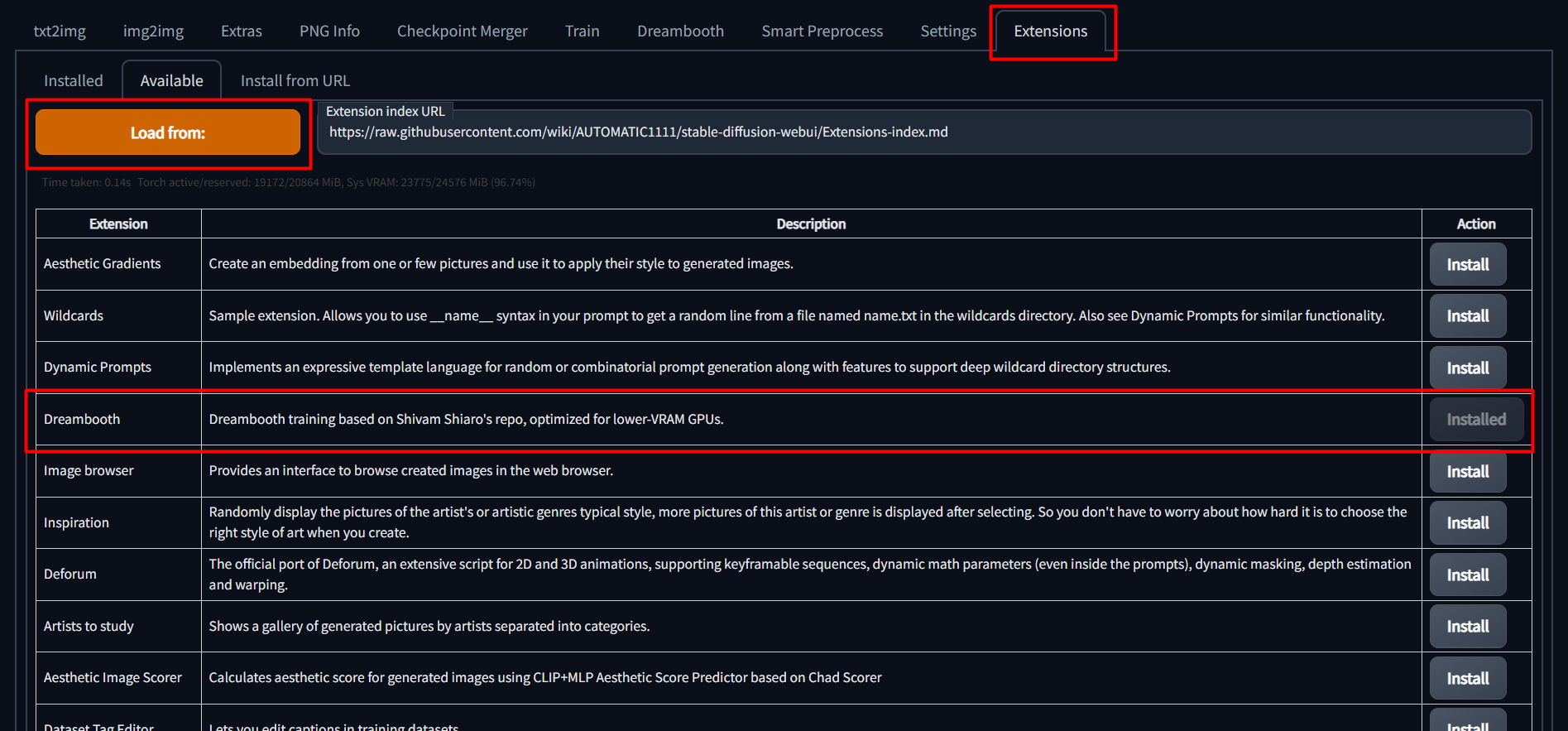
To install, simply go to the "Extensions" tab in the SD Web UI, select the "Available" sub-tab, pick "Load from:" to
|
|
load the list of extensions, and finally, click "install" next to the Dreambooth entry.
|
|
|
|
|
|
|
|
Once installed, you **must** restart the Stable-Diffusion WebUI completely. Reloading the UI will not install the
|
|
necessary requirements.
|
|
|
|
We also need a newer version of diffusers, as SD-WebUI uses version 0.3.0, while DB training requires >= 0.10.0. Not
|
|
having the right diffusers version is the cause of the 'UNet2DConditionModel' object has no attribute '
|
|
enable_gradient_checkpointing' error message, as well as safety checker warnings.
|
|
|
|
## IF YOU ARE HAVING ISSUES WITH REQUIREMENTS AFTER INSTALLING, LOOK BELOW
|
|
|
|
To force sd-web-ui to *only* install one set of requirements and resolve many issues on install, we can specify the
|
|
command line argument:
|
|
|
|
set/export REQS_FILE=.\extensions\sd_dreambooth_extension\requirements.txt
|
|
|
|
Refer to the appropriate script below for extra flags to install requirements:
|
|
|
|
https://github.com/d8ahazard/sd_dreambooth_extension/blob/main/webui-user-dreambooth.bat
|
|
https://github.com/d8ahazard/sd_dreambooth_extension/blob/main/webui-user-dreambooth.sh
|
|
|
|
And last, if you wish to completely skip the "native" install routine of Dreambooth, you can set the following
|
|
environment flag:
|
|
DREAMBOOTH_SKIP_INSTALL=True
|
|
|
|
This is ideal for "offline mode", where you don't want the script to constantly check things from pypi.
|
|
|
|
After installing via the WebUI, it is recommended to set the above flags and re-launch the entire
|
|
Stable-diffusion-webui, not just reload it.
|
|
|
|
## Several Tutorial Videos For Dreambooth
|
|
|
|
[](https://youtu.be/Bdl-jWR3Ukc) [](https://youtu.be/s25hcW4zq4M)
|
|
[](https://youtu.be/O01BrQwOd-Q) [](https://youtu.be/Tb4IYIYm4os)
|
|
[](https://youtu.be/sRdtVanSRl4) [](https://youtu.be/pom3nQejaTs)
|
|
|
|
## Usage
|
|
|
|
### Create a Model
|
|
|
|
1. Go to the Dreambooth tab.
|
|
|
|
2. Under the "Create Model" sub-tab, enter a new model name and select the source checkpoint to train from.
|
|
If you want to use a model from the HF Hub instead, specify the model URL and token. URL format should be '
|
|
runwayml/stable-diffusion-v1-5'
|
|
|
|
The source checkpoint will be extracted to models\dreambooth\MODELNAME\working.
|
|
|
|
3. Click "Create". This will take a minute or two, but when done, the UI should indicate that a new model directory has
|
|
been set up.
|
|
|
|
## Various Top Buttons
|
|
|
|
*Save Params* - Save current training parameters for the current model.
|
|
|
|
*Load Params* - Load training parameters from the currently selected model. Use this to copy params from one model to
|
|
another.
|
|
|
|
*Generate Ckpt* - Generate a checkpoint from the currently saved weights at the current revision.
|
|
|
|
Generate Samples* - Click this while training to generate samples before the next interval.
|
|
|
|
*Cancel* - Cancels training after the current step.
|
|
|
|
*Train* - Starts training.
|
|
|
|
## Model Section
|
|
|
|
*Model* - The model to use. Training parameters will not be automatically loaded to the UI when changing models.
|
|
|
|
*Lora Model* - An existing lora checkpoint to load if resuming training, or to merge with the base model if generating a
|
|
checkpoint.
|
|
|
|
*Half Model* - Enable this to save the model using half precision. Results in a smaller checkpoint with little
|
|
noticeable difference in image output.
|
|
|
|
*Save Checkpoint to Subdirectory* - Save the checkpoint to a subdirectory using the model name.
|
|
|
|
## Training Parameters
|
|
|
|
*Performance Wizard (WIP)* - Tries to set the optimal training parameters based on the amount of VRAM for your GPU and
|
|
number of instance images.
|
|
|
|
Probably not perfect, but at least a good starting point.
|
|
|
|
### Intervals
|
|
|
|
This section contains parameters related to when things happen during training.
|
|
|
|
*Training Steps Per Image (Epochs)* - As the name would imply, an epoch is one training run over the entire set of
|
|
instance images.
|
|
So, if we want to train 100 steps per image, we can set this value to 100 and we're ready to go. No math required.
|
|
|
|
*Pause After N Epochs* - When set to a value higher than 0, training will pause for the time specified.
|
|
|
|
*Amount of time to pause between Epochs, in Seconds* - How long to pause between "N" epochs when N is greater than zero,
|
|
in seconds.
|
|
|
|
*Use Concepts* - Whether to use a JSON file or string with multiple concepts, or the individual settings below.
|
|
|
|
*Save Model/Preview Frequency (Epochs)* - The save checkpoint and preview frequencies will be per epoch, not steps.
|
|
|
|
### Batching
|
|
|
|
*Batch size* - How many training steps to process simultaneously. You probably want to leave this at 1.
|
|
|
|
*Gradient Accumulation Steps* - This should probably be set to the same value as the training batch size.
|
|
|
|
*Class batch size* - How many classification images to generate simultaneously. Set this to whatever you can safely
|
|
process at once using Txt2Image, or just leave it alone.
|
|
|
|
*Set Gradients to None When Zeroing* - instead of setting to zero, set the grads to None. This will in general have
|
|
lower memory footprint, and can modestly improve performance.
|
|
https://pytorch.org/docs/stable/generated/torch.optim.Optimizer.zero_grad.html
|
|
|
|
*Gradient Checkpointing* - Enable this to save VRAM at the cost of a bit of speed.
|
|
https://arxiv.org/abs/1604.06174v2
|
|
|
|
*Max Grad Norms* - The maximum number of gradient normalizati
|
|
|
|
### Learning Rate
|
|
|
|
This section contains parameters related to the learning rate.
|
|
|
|
*Learning rate* - The strength at which training impacts the new model. A higher learning rate requires less training
|
|
steps, but can cause over-fitting more easily. Recommended between .000006 and .00000175
|
|
|
|
*Scale Learning Rate* - Adjusts the learning rate over time.
|
|
|
|
*Learning Rate Scheduler* - The scheduler used with the learning rate.
|
|
|
|
*Learning Rate Warmup Steps* - How many steps to run before scaling the learning rate. I think.
|
|
|
|
### Image Processing
|
|
|
|
Here, you'll find settings related to the handling of images.
|
|
|
|
*Resolution* - The resolution your instance images are set to. This should probably be 512 or 768. Using a resolution
|
|
higher than 512 will result in more vram usage.
|
|
|
|
*Center Crop* - Enable this to automatically use "dumb cropping" when input images are larger than the specified
|
|
resolution.
|
|
|
|
*Apply Horizontal Flip* - When enabled, instance images will be randomly flipped horizontally during training. This can
|
|
allow for better editability, but may require a larger number of training steps, as we're effectively increasing our
|
|
dataset size.
|
|
|
|
### Miscellaneous
|
|
|
|
Other random stuff that doesn't fit well into any other category.
|
|
|
|
*Pretrained VAE Name or Path* - Enter the full path to an existing vae .bin file, and it will be used instead of the VAE
|
|
from the source checkpoint.
|
|
|
|
*Use Concepts List* - Enable this to ignore the concepts tab and load training data from a JSON file instead.
|
|
|
|
*Concepts List* - The path to a json file containing the concepts to train.
|
|
|
|
## Advanced Settings
|
|
|
|
Here you will find more performance-related settings. Changing these will likely impact the amount of VRAM required for
|
|
training.
|
|
|
|
### Tuning
|
|
|
|
*Use CPU Only* - As indicated, this is more of a last resort if you can't get it to train with any other settings. Also,
|
|
as indicated, it will be abysmally slow.
|
|
Also, you *cannot* use 8Bit-Adam with CPU Training, or you'll have a bad time.
|
|
|
|
*Use EMA* - Use estimated moving averages when training the unet. Purportedly, this is better for generating images, but
|
|
seems to have a minimal effect on training results. Uses more VRAM.
|
|
|
|
*Mixed Precision* - When using 8bit AdamW, you *must* set this to fp16 or bf16. Bf16 precision is only supported by newer
|
|
GPUs, and enabled/disabled by default.
|
|
|
|
*Memory Attention* - Type of attention to use. Choices are: 'default': usually fastest, but use most VRAM; 'xformers':
|
|
slower, uses less VRAM, can only be used with *Mixed Precision* = 'fp16' (no impact on Apple Silicon); 'flash_attention': slowest, requires lowest
|
|
VRAM.
|
|
|
|
*Don't Cache Latents* - Why is this not just called "cache" latents? Because that's what the original script uses, and
|
|
I'm trying to maintain the ability to update this as easily as possible. Anyway...when this box is *checked* latents
|
|
will not be cached. When latents are not cached, you will save a bit of VRAM, but train slightly slower.
|
|
|
|
*Train Text Encoder* - Not required, but recommended. Requires more VRAM, may not work on <12 GB GPUs. Drastically
|
|
improves output results.
|
|
|
|
*Prior Loss Weight* - The weight to use when calculating prior loss. You probably want to leave this at 1.
|
|
|
|
*Center Crop* - Crop images if they aren't the right dimensions? I don't use this, and I recommend you just crop your
|
|
images "right".
|
|
|
|
*Pad Tokens* - Pads the text tokens to a longer length for some reason.
|
|
|
|
*Shuffle Tags* - Enable this to treat input prompts as a comma-separated list, and to shuffle that list, which can lead
|
|
to better editability.
|
|
|
|
*Max Token Length* - raise the tokenizer's default limit above 75. Requires Pad Tokens for > 75.
|
|
|
|
*AdamW Weight Decay* - The weight decay of the AdamW Optimizer used for training. Values closer to 0 closely match your
|
|
training dataset, and values closer to 1 generalize more and deviate from your training dataset. Default is 1e-2, values
|
|
lower than 0.1 are recommended.
|
|
|
|
## Concepts
|
|
|
|
The UI exposes three concepts, which seemed like a reasonable number of items to train on at once.
|
|
|
|
If you wish to use more than three concepts at once, you can ignore this section entirely, and instead use
|
|
the "Use Concepts List" option from the Miscellaneous section under the Parameters tab.
|
|
|
|
You can refer to
|
|
the [Example Concepts List](https://github.com/d8ahazard/sd_dreambooth_extension/blob/main/dreambooth/concepts_list.json)
|
|
for a sample of the JSON format. You can theoretically use any number of concepts this way.
|
|
|
|
### Concept Parameters
|
|
|
|
Below is a list of the various parameters that can be used to train a concept.
|
|
|
|
*Maximum Training Steps* - The total number of lifetime training steps to train the concept until. Leave at -1 to use
|
|
the global value.
|
|
|
|
*Dataset Directory* - The directory in which the instance images are located.
|
|
|
|
*Classification Dataset Directory* The directory in which class images are stored. Leave empty to save to model
|
|
directory.
|
|
|
|
#### Filewords
|
|
|
|
The below values will be used in conjunction with the [filewords] tag in prompts to append/remove tags. See the
|
|
'Using [filewords]' section below for more information.
|
|
|
|
*Instance Token* The unique identifier for your subject. (sks, xyz). Leave blank for fine-tuning.
|
|
|
|
*Class Token* What your subject is. If a xyz is a person, this could be person/man/woman.
|
|
|
|
### Prompts
|
|
|
|
*Instance Prompt* - A prompt used for your instance images. Use [filewords] to insert or combine existing tags with
|
|
tokens.
|
|
|
|
*Class Prompt* - A prompt used for generating and training class images. Use [filewords] to insert or combine existing
|
|
tags with tokens.
|
|
|
|
*Classification Image Negative Prompt* - When generating class images, this is the negative prompt that will be used to
|
|
guide image generation.
|
|
|
|
*Sample Image Prompt* - A prompt used when generating sample images. Use [filewords] to insert or combine existing tags
|
|
with tokens.
|
|
|
|
*Sample Prompt Template File* - An existing txt file used to generate sample images. [filewords] and [names] will be
|
|
replaced with the instance token.
|
|
|
|
*Sample Image Negative Prompt* - When generating sample images, this is the negative prompt that will be used to guide
|
|
image generation.
|
|
|
|
### Image Generation
|
|
|
|
*Total Number of Class/Reg Images* - How many classification images will be generated. Leave at 0 to disable prior
|
|
preservation.
|
|
|
|
*Classification/Sample CFG Scale* - The Classifier Free Guidance scale to use when generating images.
|
|
|
|
*Classification/Sample Steps* - The number of steps to use when generating respective images.
|
|
|
|
*Number of Samples to Generate* - How many sample images to generate.
|
|
|
|
*Sample Seed* - A seed to use for consistent sample generation. Set to -1 to use a random seed.
|
|
|
|
#### Using [filewords]
|
|
|
|
Each concept allows you to use prompts from image filenames or accompanying text files for instance and class images.
|
|
|
|
To instruct the trainer to use prompts from existing files, use '[filewords]' (no quotes) for the instance/class/sample
|
|
prompts.
|
|
|
|
In order to properly insert and remove words from existing prompts, we need to let the trainer know what words indicate
|
|
what our subject name and class are.
|
|
|
|
To do this, we specify an instance and class token. If your subject were called 'zxy' and it was a man,
|
|
then your instance token would be 'zxy', and your class token would be 'man'.
|
|
|
|
Now, when building your respective prompts, the subject and class can be inserted or removed as necessary.
|
|
|
|
## Debugging
|
|
|
|
Here's a bunch of random stuff I added that seemed useful, but didn't seem to fit anywhere else.
|
|
|
|
*Preview Prompts* - Return a JSON string of the prompts that will be used for training. It's not pretty, but you can
|
|
tell if things are going to work right.
|
|
|
|
*Generate Sample Image* - Generate a sample using the specified seed and prompt below.
|
|
|
|
*Sample Prompt* - What the sample should be.
|
|
|
|
*Sample Seed* - The seed to use for your sample. Leave at -1 to use a random seed.
|
|
|
|
*Train Imagic Only* - Imagic is basically dreambooth, but uses only one image and is significantly faster.
|
|
|
|
If using Imagic, the first image in the first concept's Instance Data Dir will be used for training.
|
|
|
|
See here for more details:
|
|
|
|
https://github.com/ShivamShrirao/diffusers/tree/main/examples/imagic
|
|
|
|
### Continuing Training
|
|
|
|
Once a model has been trained for any number of steps, a config file is saved which contains all of the parameters from
|
|
the UI.
|
|
|
|
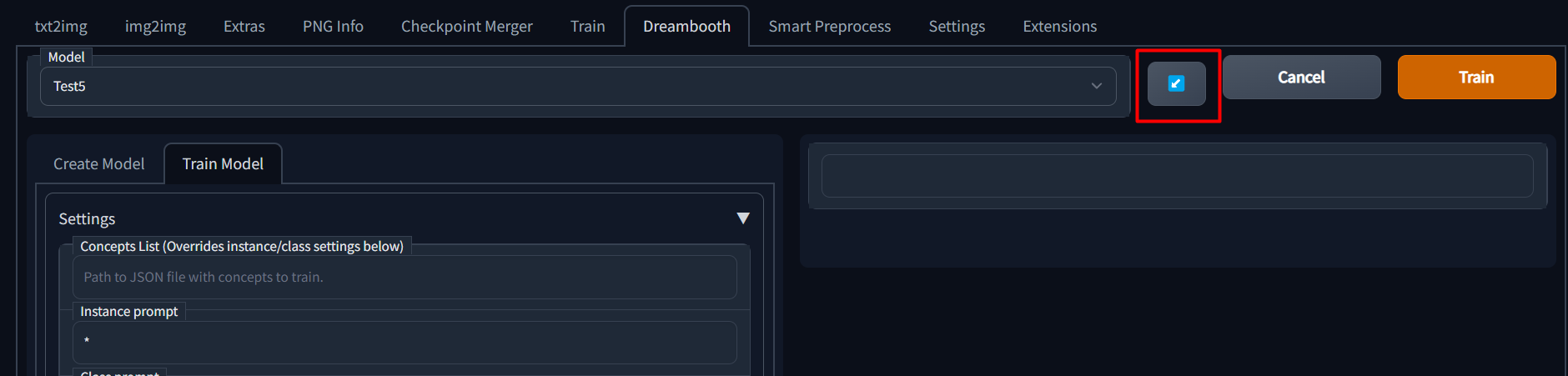
If you wish to continue training a model, you can simply select the model name from the dropdown and then click the blue
|
|
button next to the model name dropdown to load previous parameters.
|
|
|
|
|
|
|
|
## Memory and Optimization
|
|
|
|
As this is based on ShivamShiaro's repo, it should be able to run under the same GPU constraints, but is not guaranteed.
|
|
|
|
Please check out the [discussions](https://github.com/d8ahazard/sd_dreambooth_extension/discussions) page to find some
|
|
possible tips and tricks to help you get this running on your setup - or share what you've done to get it working.
|
|
|
|
## Issues
|
|
|
|
Please be sure to use an issue template when asking for help. Some of the questions may be tedious, but I promise,
|
|
they'll help me help you faster.
|
|
|
|
[Bug Report](https://github.com/d8ahazard/sd_dreambooth_extension/issues/new?assignees=&labels=&template=bug_report.md&title=)
|
|
|
|
[Feature Request](https://github.com/d8ahazard/sd_dreambooth_extension/issues/new?assignees=&labels=&template=feature_request.md&title=)
|
|
|
|
[Discord](https://discord.gg/q8dtpfRD5w)
|
|
|
|
# Credits
|
|
|
|
[Huggingface.co](https://huggingface.co) - All the things
|
|
|
|
[CloneOfSimo](https://github.com/cloneofsimo/lora) - LORA
|
|
|
|
[ShivamShrirao](https://github.com/ShivamShrirao/diffusers/tree/main/examples/dreambooth) - Multiple concepts,
|
|
optimizations.
|
|
|
|
[Bmalthais](https://github.com/bmaltais/kohya_ss) - Optimizations, Features
|
|
|
|
[Automatic1111](https://github.com/AUTOMATIC1111/stable-diffusion-webui) - Base app
|