6.1 KiB
6.1 KiB
StableSR for Stable Diffusion WebUI
Licensed under S-Lab License 1.0

English|中文
- StableSR is a competitive super-resolution method originally proposed by Jianyi Wang et al.
- This repository is a migration of the StableSR project to the Automatic1111 WebUI.
Relevant Links
Click to view high-quality official examples!
If you find this project useful, please give me & Jianyi Wang a star! ⭐
Usage
1. Installation
⚪ Method 1: URL Install
- Open Automatic1111 WebUI -> Click Tab "Extensions" -> Click Tab "Install from URL" -> type in https://github.com/pkuliyi2015/sd-webui-stablesr.git -> Click "Install"
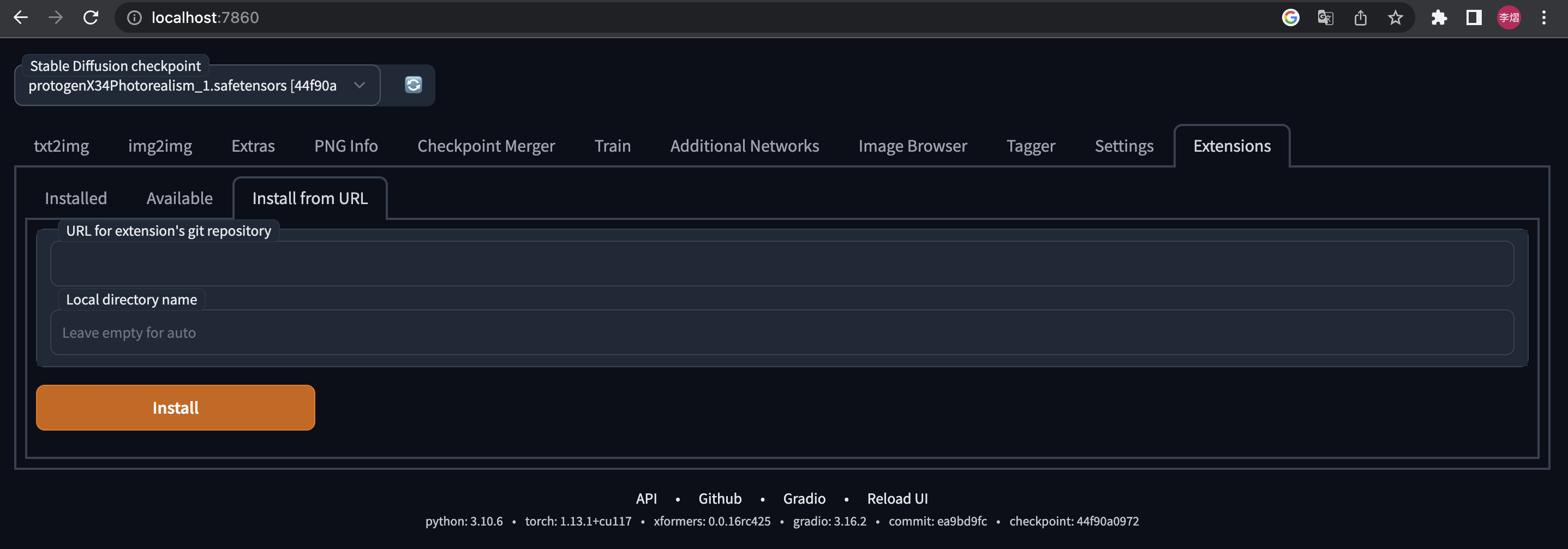
⚪ Method 2: In progress...
After sucessful installation, you should see "StableSR" in img2img Scripts dropdown list.
2. Download the main components
- You MUST use the Stable Diffusion V2.1 512 EMA checkpoint (~5.21GB) from StabilityAI
- You can download it from HuggingFace
- Put into stable-diffusion-webui/models/Stable-Diffusion/
- Download the pruned StableSR module (~
400MB)
- Official resources: In Progress
- My resources: <GoogleDrive> <百度网盘-提取码aguq>
- Put into stable-diffusion-webui/extensions/sd-webui-stablesr/models/
3. Optional components
- Install Tiled Diffusion & VAE extension
- The original StableSR easily gets OOM for large images > 512.
- For better quality and less VRAM usage, we recommend Tiled Diffusion & VAE.
- Use the Official VQGAN VAE (~700MB)
- Official resources: In Progress
- My resources: <GoogleDrive> <百度网盘-提取码83u9>
- Put it in your stable-diffusion-webui/models/VAE
4. Extension Usage
- At the top of the WebUI, select the v2-1_512-ema-pruned checkpoint you downloaded.
- Switch to img2img tag. Find the "Scripts" dropdown at the bottom of the page.
- Select the StableSR script.
- Click the refresh button and select the StableSR checkpoint you have downloaded.
- Choose a scale factor.
- Upload your image and start generation (can work without prompts).
5. Useful Tips
- Euler a sampler is recommended. Steps >= 20.
- For output image size > 512, we recommend using Tiled Diffusion & VAE, otherwise, the image quality may not be ideal, and the VRAM usage will be huge.
- Here are the Tiled Diffusion settings that replicate the official behavior in the paper.
- Method = Mixture of Diffusers
- Latent tile size = 64, Latent tile overlap = 32
- Latent tile batch size as large as possible before Out of Memory.
- Upscaler MUST be None.
- What is "Pure Noise"?
- Pure Noise refers to starting from a fully random noise tensor instead of your image. This is the default behavior in the StableSR paper.
- When enabling it, the script ignores your denoising strength and gives you much more detailed images, but also changes the color & sharpness significantly
- When disabling it, the script starts by adding some noise to your image. The result will be not fully detailed, even if you set denoising strength = 1 (but maybe aesthetically good). See Comparison.
- If you disable Pure Noise, we recommend denoising strength=1
6. Important Notice
Why my results are different from the offical examples?
- It is not your or our fault.
- This extension has the same UNet model weights as the StableSR if installed correctly.
- If you install the optional VQVAE, the whole model weights will be the same as the official model with fusion weights=0.
- However, your result will be not as good as the official results, because:
- Sampler Difference:
- The official repo does 100 or 200 steps of legacy DDPM sampling with a custom timestep scheduler, and samples without negative prompts.
- However, WebUI doesn't offer such a sampler, and it must sample with negative prompts. This is the main difference.
- VQVAE Decoder Difference:
- The official VQVAE Decoder takes some Encoder features as input.
- However, in practice, I found these features are astonishingly huge for large images. (>10G for 4k images even in float16!)
- Hence, I removed the CFW component in VAE Decoder. As this lead to inferior fidelity in details, I will try to add it back later as an option.
- Sampler Difference:
License
This project is licensed under:
- S-Lab License 1.0.
- Creative Commons Attribution-NonCommercial-ShareAlike 4.0 International License, due to the use of the NVIDIA SPADE module.

Disclaimer
- All code in this extension is for research purposes only.
- The commercial use of the code and checkpoint is strictly prohibited.
Important Notice for Outcome Images
- Please note that the CC BY-NC-SA 4.0 license in the NVIDIA SPADE module also prohibits the commercial use of outcome images.
- Jianyi Wang may change the SPADE module to a commercial-friendly one but he is busy.
- If you wish to speed up his process for commercial purposes, please contact him through email: iceclearwjy@gmail.com
Acknowledgments
I would like to thank Jianyi Wang et al. for the original StableSR method.