125 lines
5.1 KiB
Markdown
125 lines
5.1 KiB
Markdown
# Openpose Editor for ControlNet in Stable Diffusion WebUI
|
|
This extension is specifically build to be integrated into Stable Diffusion
|
|
WebUI's ControlNet extension.
|
|
|
|

|
|
|
|
# Translations of README.md
|
|
- [English](./README.md)
|
|
- [Chinese](./README.zh.md)
|
|
- [Japanese](./README.ja.md)
|
|
|
|
# Prerequisite
|
|
[ControlNet](https://github.com/Mikubill/sd-webui-controlnet) `1.1.216`+
|
|
|
|
# Installation
|
|

|
|

|
|
|
|
On UI restart, the extension will try to download the compiled Vue app from
|
|
Github. Check whether `stable-diffusion-webui\extensions\sd-webui-openpose-editor\dist`
|
|
exists and has content in it.
|
|
|
|
Some users in China have reported having issue downloading dist with the autoupdate
|
|
script. In such situtations, the user has 2 following options to get dist
|
|
manually:
|
|
|
|
### Option1: Build the application
|
|
Make sure you have nodeJS environment ready and follow `Development` section.
|
|
Run `npm run build` to compile the application.
|
|
|
|
### Option2: Download the compiled application
|
|
You can download the compiled application(`dist.zip`) from the
|
|
[release](https://github.com/huchenlei/sd-webui-openpose-editor/releases) page.
|
|
Unzip the package in the repository root and make sure hte unziped directory is
|
|
named `dist`.
|
|
|
|
# Usage
|
|
The openpose editor core is build with Vue3. The gradio extension script is
|
|
a thin wrapper that mounts the Vue3 Application on `/openpose_editor_index`.
|
|
|
|
The user can directly access the editor at `localhost:7860/openpose_editor_index`
|
|
or `https://huchenlei.github.io/sd-webui-openpose-editor/`
|
|
if desired, but the main entry point is invoking the editor in the ControlNet
|
|
extension. In ControlNet extension, select any openpose preprocessor, and hit
|
|
the run preprocessor button. A preprocessor result preview will be genereated.
|
|
Click `Edit` button at the bottom right corner of the generated image will bring
|
|
up the openpose editor in a modal. After the edit, clicking the
|
|
`Send pose to ControlNet` button will send back the pose to ControlNet.
|
|
|
|
Following demo shows the basic workflow:
|
|
<!-- https://youtu.be/WEHVpPNIh8M -->
|
|
[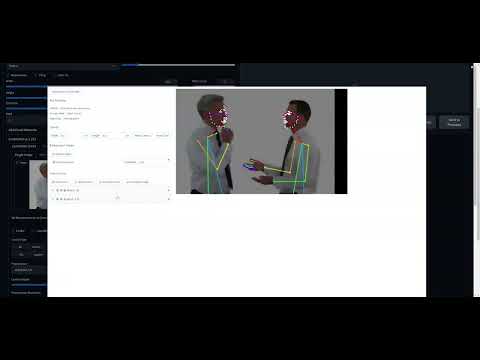](http://www.youtube.com/watch?v=WEHVpPNIh8M)
|
|
|
|
# Features
|
|
1. Support for face/hand used in controlnet.
|
|
- The extension recognizes the face/hand objects in the controlnet preprocess
|
|
results.
|
|
- The user can add face/hand if the preprocessor result misses them. It can
|
|
be done by either
|
|
- Add Default hand (Face is not supported as face has too many keypoints (70 keypoints),
|
|
which makes adjust them manually really hard.)
|
|
- Add the object by uploading a pose JSON. The corresponding object of
|
|
the first person will be used.
|
|
1. Visibility toggle
|
|
- If a keypoint is not recognized by ControlNet preprocessor, it will have
|
|
`(-1, -1)` as coordinates. Such invalid keypoints will be set as invisible
|
|
in the editor.
|
|
- If the user sets a keypoint as invisible and send the pose back to
|
|
controlnet, the limb segments that the keypoint connects will not be rendered.
|
|
Effectively this is how you remove a limb segment in the editor.
|
|
1. Group toggle
|
|
- If you don't want to accidentally select and modify the keypoint of an
|
|
canvas object (hand/face/body). You can group them. The grouped object will
|
|
act like it is a single object. You can scale, rotate, skew the group.
|
|
|
|
# Development
|
|
## Recommended IDE Setup
|
|
|
|
[VSCode](https://code.visualstudio.com/) + [Volar](https://marketplace.visualstudio.com/items?itemName=Vue.volar) (and disable Vetur) + [TypeScript Vue Plugin (Volar)](https://marketplace.visualstudio.com/items?itemName=Vue.vscode-typescript-vue-plugin).
|
|
|
|
## Type Support for `.vue` Imports in TS
|
|
|
|
TypeScript cannot handle type information for `.vue` imports by default, so we replace the `tsc` CLI with `vue-tsc` for type checking. In editors, we need [TypeScript Vue Plugin (Volar)](https://marketplace.visualstudio.com/items?itemName=Vue.vscode-typescript-vue-plugin) to make the TypeScript language service aware of `.vue` types.
|
|
|
|
If the standalone TypeScript plugin doesn't feel fast enough to you, Volar has also implemented a [Take Over Mode](https://github.com/johnsoncodehk/volar/discussions/471#discussioncomment-1361669) that is more performant. You can enable it by the following steps:
|
|
|
|
1. Disable the built-in TypeScript Extension
|
|
1) Run `Extensions: Show Built-in Extensions` from VSCode's command palette
|
|
2) Find `TypeScript and JavaScript Language Features`, right click and select `Disable (Workspace)`
|
|
2. Reload the VSCode window by running `Developer: Reload Window` from the command palette.
|
|
|
|
## Customize configuration
|
|
|
|
See [Vite Configuration Reference](https://vitejs.dev/config/).
|
|
|
|
## Project Setup
|
|
|
|
```sh
|
|
npm install
|
|
```
|
|
|
|
### Compile and Hot-Reload for Development
|
|
|
|
```sh
|
|
npm run dev
|
|
```
|
|
|
|
### Type-Check, Compile and Minify for Production
|
|
|
|
```sh
|
|
npm run build
|
|
```
|
|
|
|
### Run Unit Tests with [Vitest](https://vitest.dev/)
|
|
|
|
```sh
|
|
npm run test:unit
|
|
```
|
|
|
|
### Lint with [ESLint](https://eslint.org/)
|
|
|
|
```sh
|
|
npm run lint
|
|
```
|