125 lines
5.3 KiB
Markdown
125 lines
5.3 KiB
Markdown
# Agent Scheduler
|
||
|
||
Introducing AgentScheduler, an A1111/Vladmandic Stable Diffusion Web UI extension to power up your image generation workflow!
|
||
|
||
## Table of Content
|
||
|
||
- [Compatibility](#compatibility)
|
||
- [Functionality](#functionality--as-of-current-version-)
|
||
- [Installation](#installation)
|
||
- [Using the built-in extension list](#using-the-built-in-extension-list)
|
||
- [Manual clone](#manual-clone)
|
||
- [Road Map](#road-map)
|
||
- [Contributing](#contributing)
|
||
- [License](#license)
|
||
- [Disclaimer](#disclaimer)
|
||
|
||
---
|
||
|
||
## Compatibility
|
||
|
||
This version of AgentScheduler is compatible with:
|
||
|
||
- A1111: [commit 5ab7f213](https://github.com/AUTOMATIC1111/stable-diffusion-webui/commit/5ab7f213bec2f816f9c5644becb32eb72c8ffb89)
|
||
- Vladmandic: [commit 0a46f8ad](https://github.com/vladmandic/automatic/commit/0a46f8ada7751ee993c565198ec4c3327ff43c04)
|
||
|
||
> Older versions may not working properly.
|
||
|
||
## Functionality [as of current version]
|
||
|
||
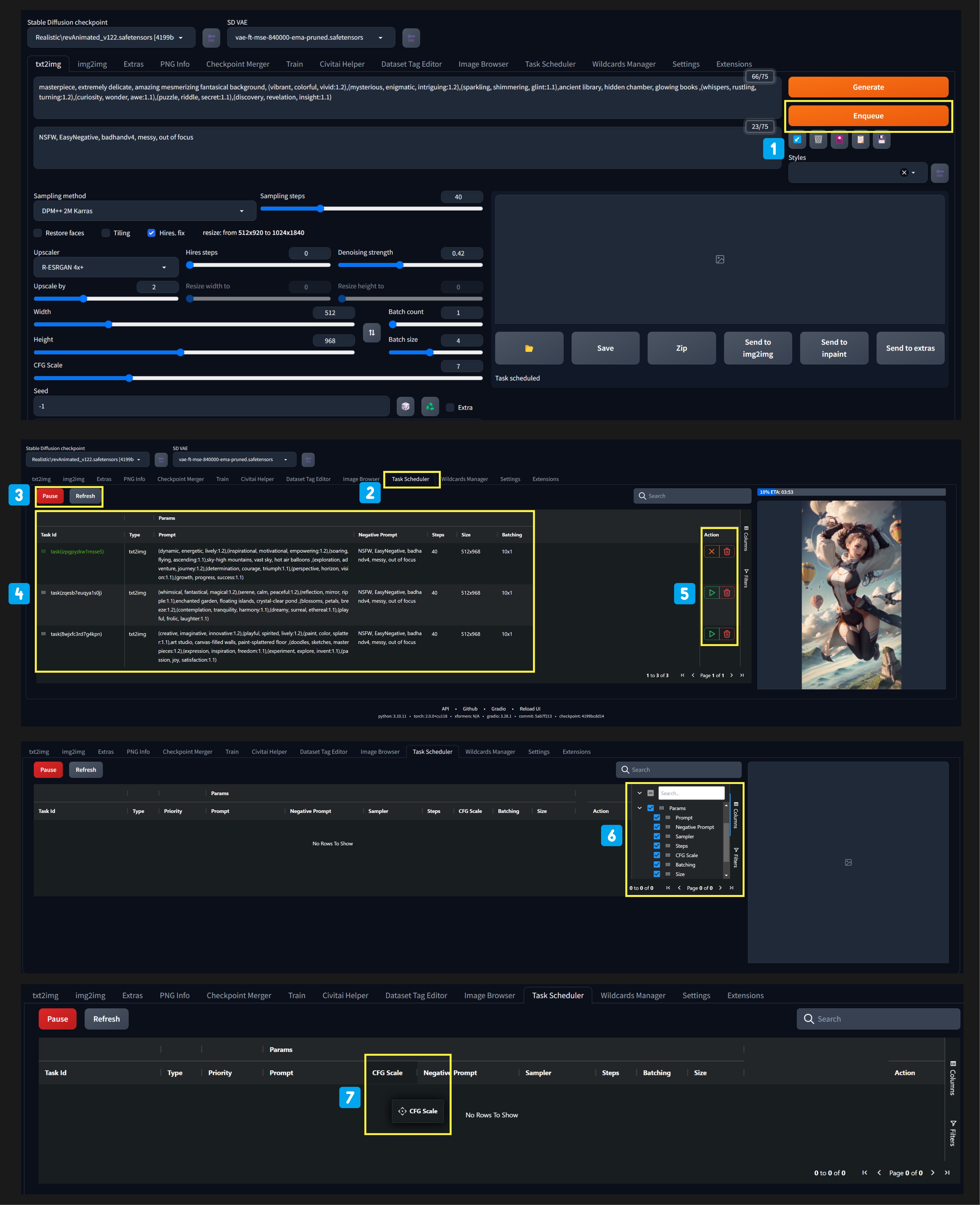
|
||
|
||
1️⃣ Input your usual Prompts & Settings. **Enqueue** to send your current prompts, settings, controlnets to **AgentScheduler**.
|
||
|
||
2️⃣ **AgentScheduler** Tab Navigation.
|
||
|
||
3️⃣ **Pause** function to stop auto generation. **Refresh** to update.
|
||
|
||
4️⃣ See all queued tasks, current image being generated and tasks' associated information.
|
||
|
||
5️⃣ **Delete** tasks that you no longer want. Press ▶️ to prioritize selected task.
|
||
|
||
6️⃣ **Show/Hide** Column of Information that you want.
|
||
|
||
7️⃣ **Drag and Drop** to reorder columns.
|
||
|
||
https://github.com/ArtVentureX/sd-webui-agent-scheduler/assets/133728487/50c74922-b85f-493c-9be8-b8e78f0cd061
|
||
|
||
## Road Map
|
||
|
||
To list possible feature upgrades for this extension
|
||
|
||
- Sync with GenAI Management Platform **ArtVenture**
|
||
- See history of completed jobs (Logs)
|
||
|
||
## Installation
|
||
|
||
### Using the built-in extension list
|
||
|
||
1. Open the Extensions tab
|
||
2. Open the "Install From URL" sub-tab
|
||
3. Paste the repo url: https://github.com/ArtVentureX/sd-webui-agent-scheduler.git
|
||
4. Click "Install"
|
||
|
||

|
||
|
||
### Manual clone
|
||
|
||
```bash
|
||
git clone "https://github.com/ArtVentureX/sd-webui-agent-scheduler.git" extensions/agent-scheduler
|
||
```
|
||
|
||
(The second argument specifies the name of the folder, you can choose whatever you like).
|
||
|
||
## Contributing
|
||
|
||
We welcome contributions to the Agent Scheduler Extension project! Please feel free to submit issues, bug reports, and feature requests through the GitHub repository.
|
||
|
||
Please give us a ⭐ if you find this extension helpful!
|
||
|
||
## License
|
||
|
||
This project is licensed under the Apache License 2.0.
|
||
|
||
## Disclaimer
|
||
|
||
The author(s) of this project are not responsible for any damages or legal issues arising from the use of this software. Users are solely responsible for ensuring that they comply with any applicable laws and regulations when using this software and assume all risks associated with its use. The author(s) are not responsible for any copyright violations or legal issues arising from the use of input or output content.
|
||
|
||
---
|
||
|
||
## CRAFTED BY THE PEOPLE BUILDING **ARTVENTURE**, [**ATHERLABS**](https://atherlabs.com/) & [**SIPHER ODYSSEY**](http://playsipher.com/)
|
||
|
||
### About ArtVenture (coming soon™️)
|
||
|
||
ArtVenture offers powerful collaboration features for Generative AI Image workflows. It is designed to help designers and creative professionals of all levels collaborate more efficiently, unleash their creativity, and have full transparency and tracking over the creation process.
|
||
|
||

|
||
|
||

|
||
|
||
### Current Features
|
||
|
||
ArtVenture offers the following key features:
|
||
|
||
- Seamless Access: available on desktop and mobile
|
||
- Multiplayer & Collaborative UX. Strong collaboration features, such as real-time commenting and feedback, version control, and image/file/project sharing.
|
||
- Powerful semantic search capabilities.
|
||
- Building on shoulders of Giants, leveraging A1111/Vladnmandic and other pioneers, provide collaboration process from Idea (Sketch/Thoughts/Business Request) to Final Results(Images/Copywriting Post/TaskCompleted) in 1 platform
|
||
- Automation tooling for certain repeated tasks
|
||
- Secure and transparent, leveraging hasing and metadata to track the origin and history of models, loras, images to allow for tracability and ease of collaboration.
|
||
- Personalize UX for both beginner and experienced users to quickly remix existing SD images by editing prompts and negative prompts, selecting new training models and output quality as desired.
|
||
|
||
### Target Audience
|
||
|
||
ArtVenture is designed for the following target audiences:
|
||
|
||
- Casual Creators
|
||
- Small Design Teams or Freelancers
|
||
- Design Agencies & Studios
|
||
|
||
## 🎉 Stay Tuned for Updates
|
||
|
||
We hope you find this extension to be useful. We will be adding new features and improvements over time as we enhance this extension to support our creative workflows.
|
||
|
||
To stay up-to-date with the latest news and updates, be sure to follow us on GitHub and Twitter (coming soon™️). We welcome your feedback and suggestions, and are excited to hear how AgentScheduler can help you streamline your workflow and unleash your creativity!
|