19 KiB
Civitai Shortcut
Stable Diffusion Webui Extension for Civitai, to download civitai shortcut and models.
Install
Stable Diffusion Webui의 Extension 탭에서 'URL에서 설치' 서브 탭으로 이동하세요. 해당 프로젝트의 URL을 복사하여 붙여넣고 '설치'를 클릭하세요.
git clone https://github.com/sunnyark/civitai-shortcut
Usage instructions
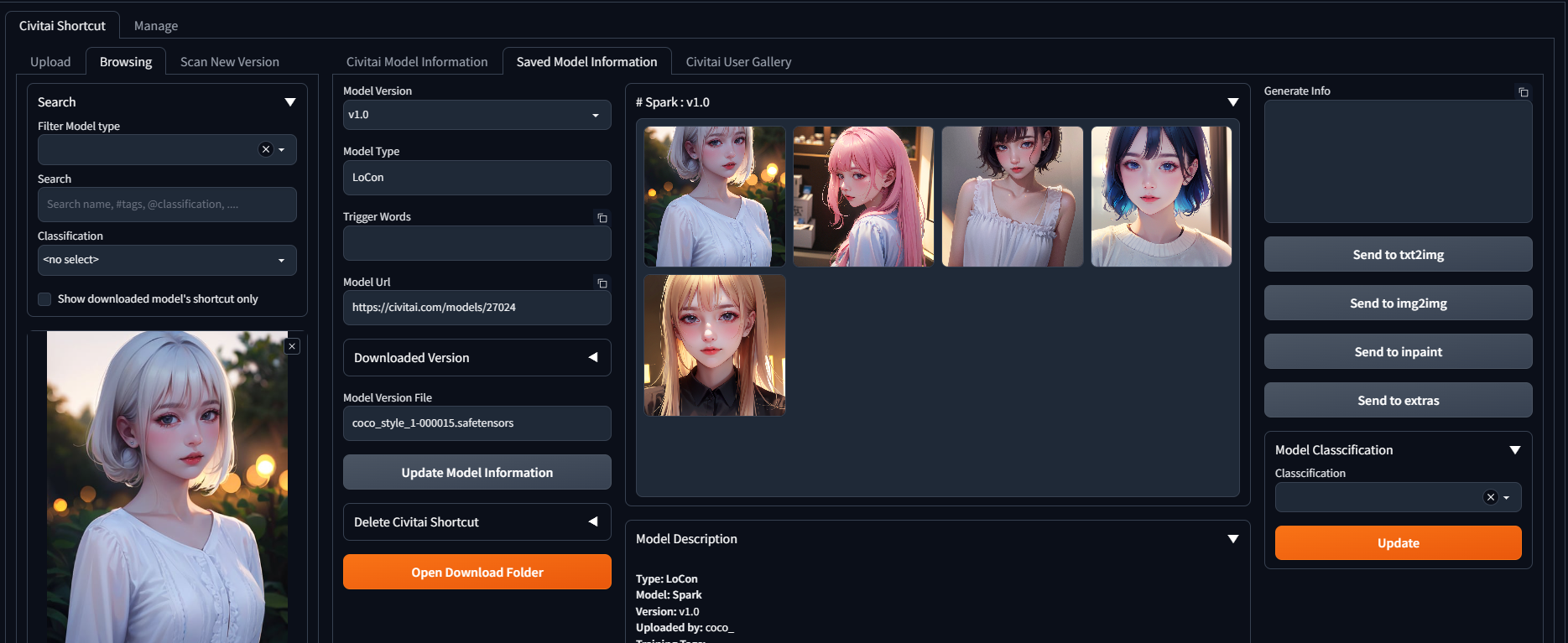
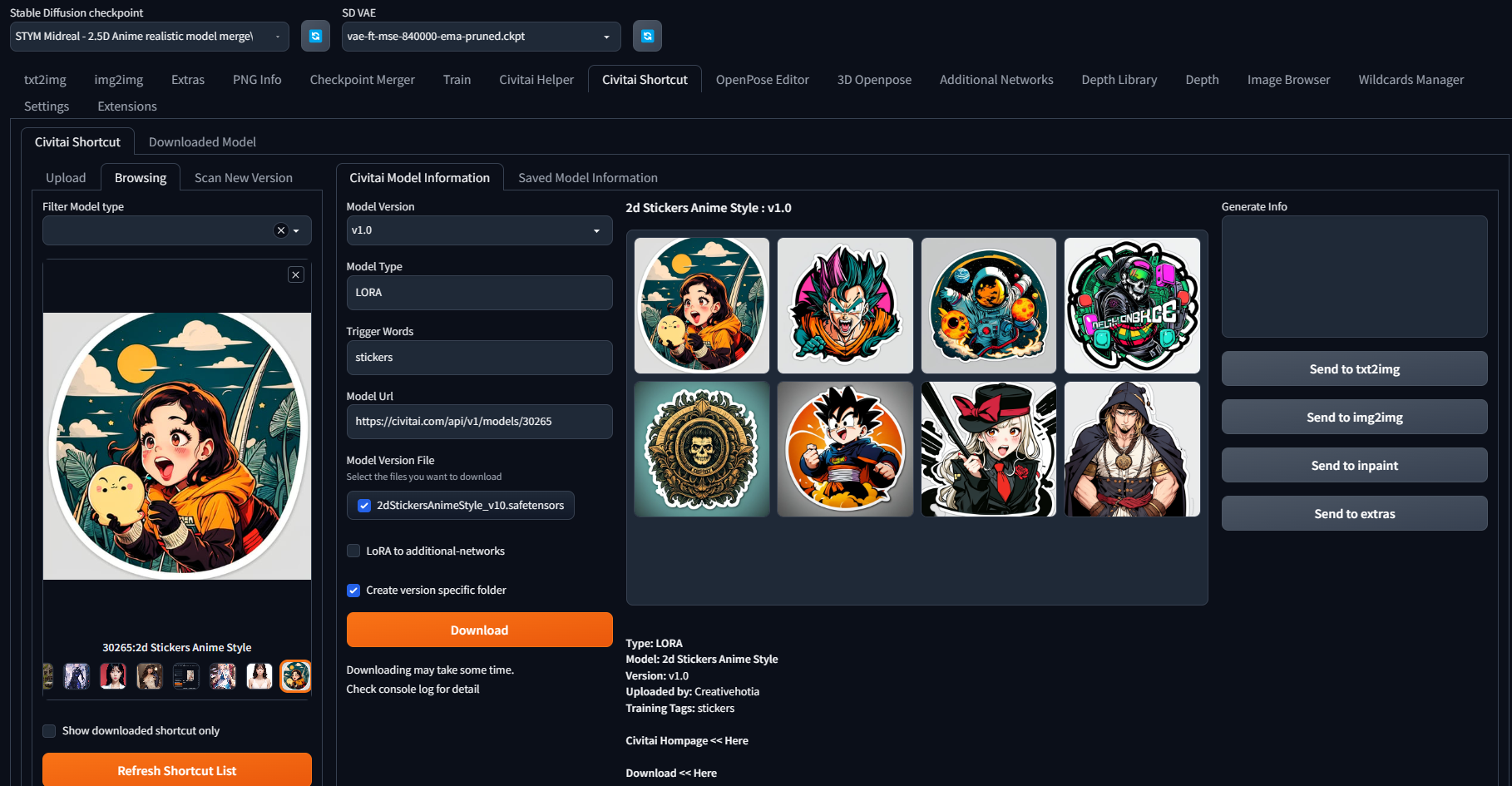
- The information in the Civitai model information tab is obtained in real-time from the Civitai website. Download : downloads the model for the selected version. You can choose to create specific folders for each version. The downloaded model will be automatically saved in the appropriate location, and a preview image and info will be generated together with it.
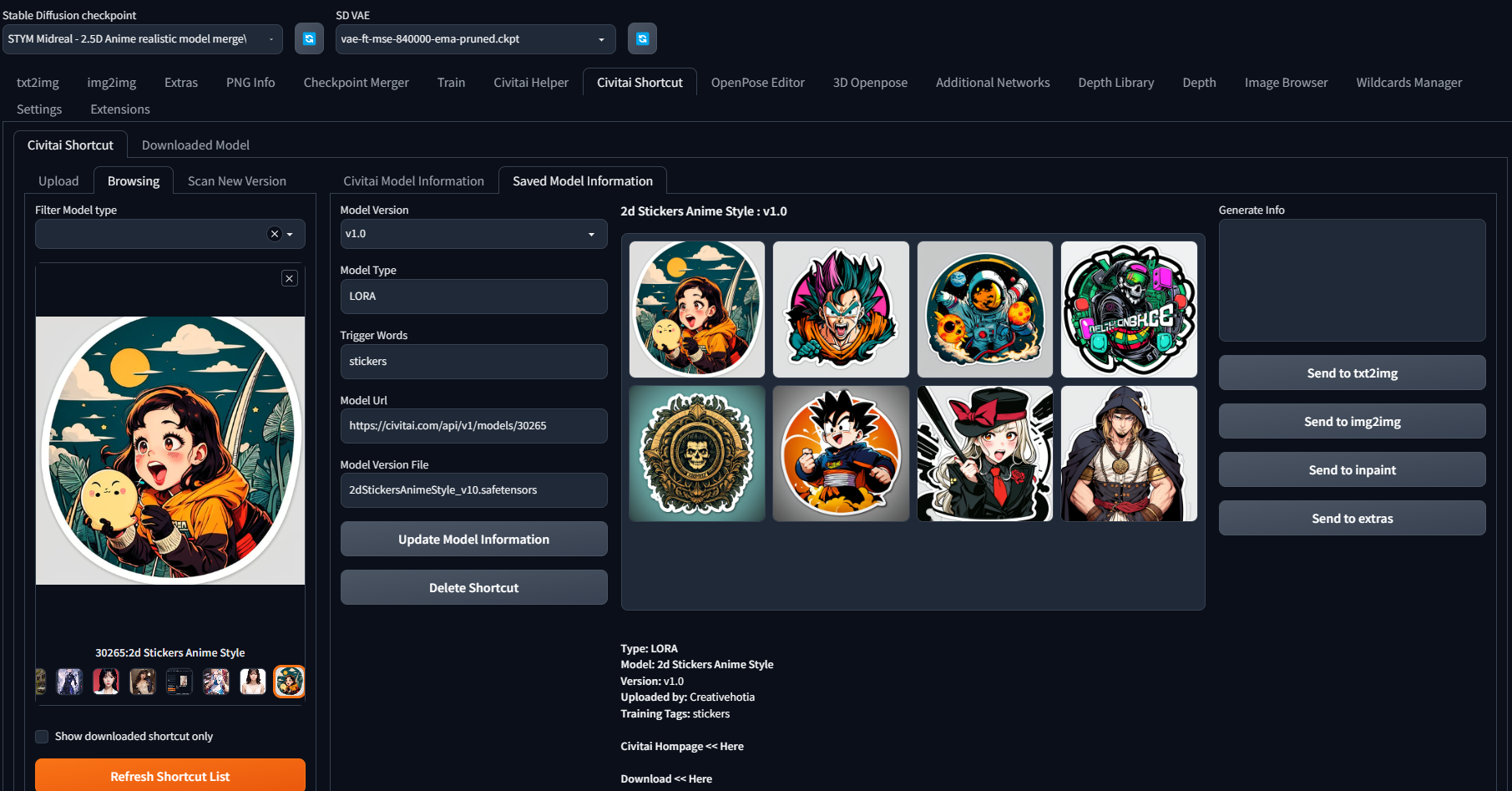
- The information in the Saved model information tab are composed of the information saved on the Civitai website when creating the shortcut. Update Model Information : updates the information of an individual shortcut to the latest information. This function only works when the site is functioning normally. Delete Shortcut : deletes the information of a registered shortcut.
- Civitai User Gallery : The Civitai User Gallery allows users to view uploaded images.


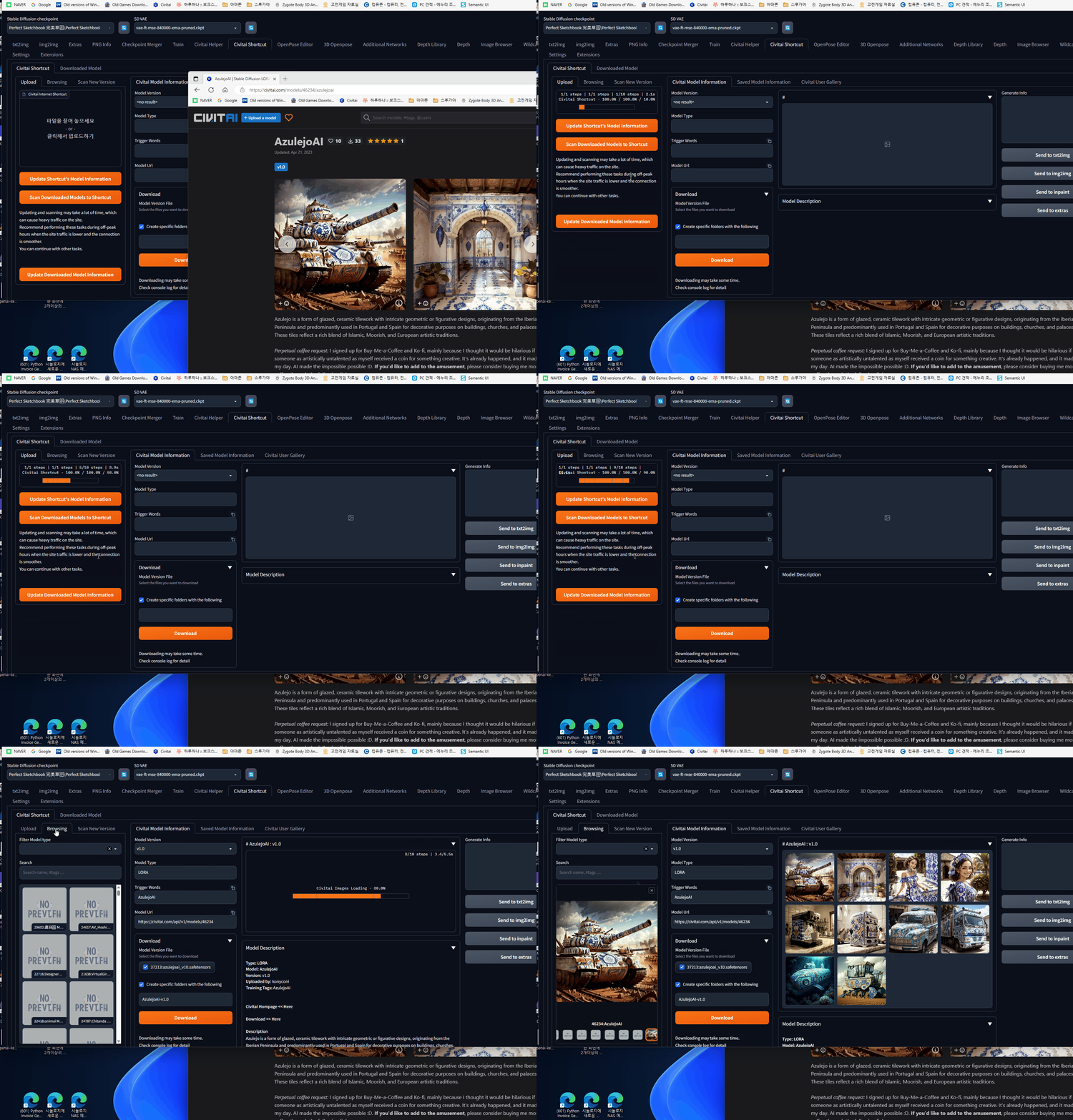
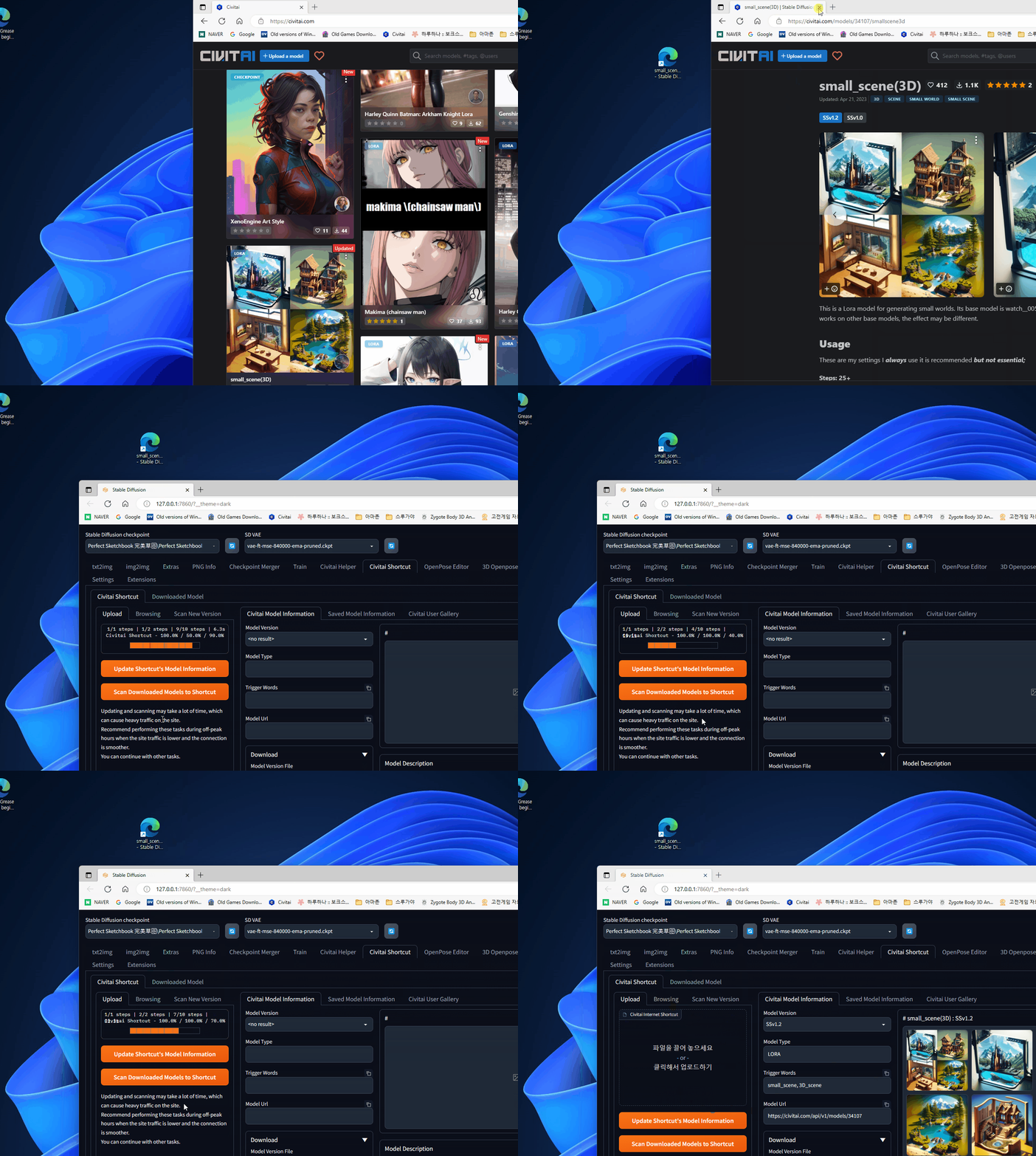
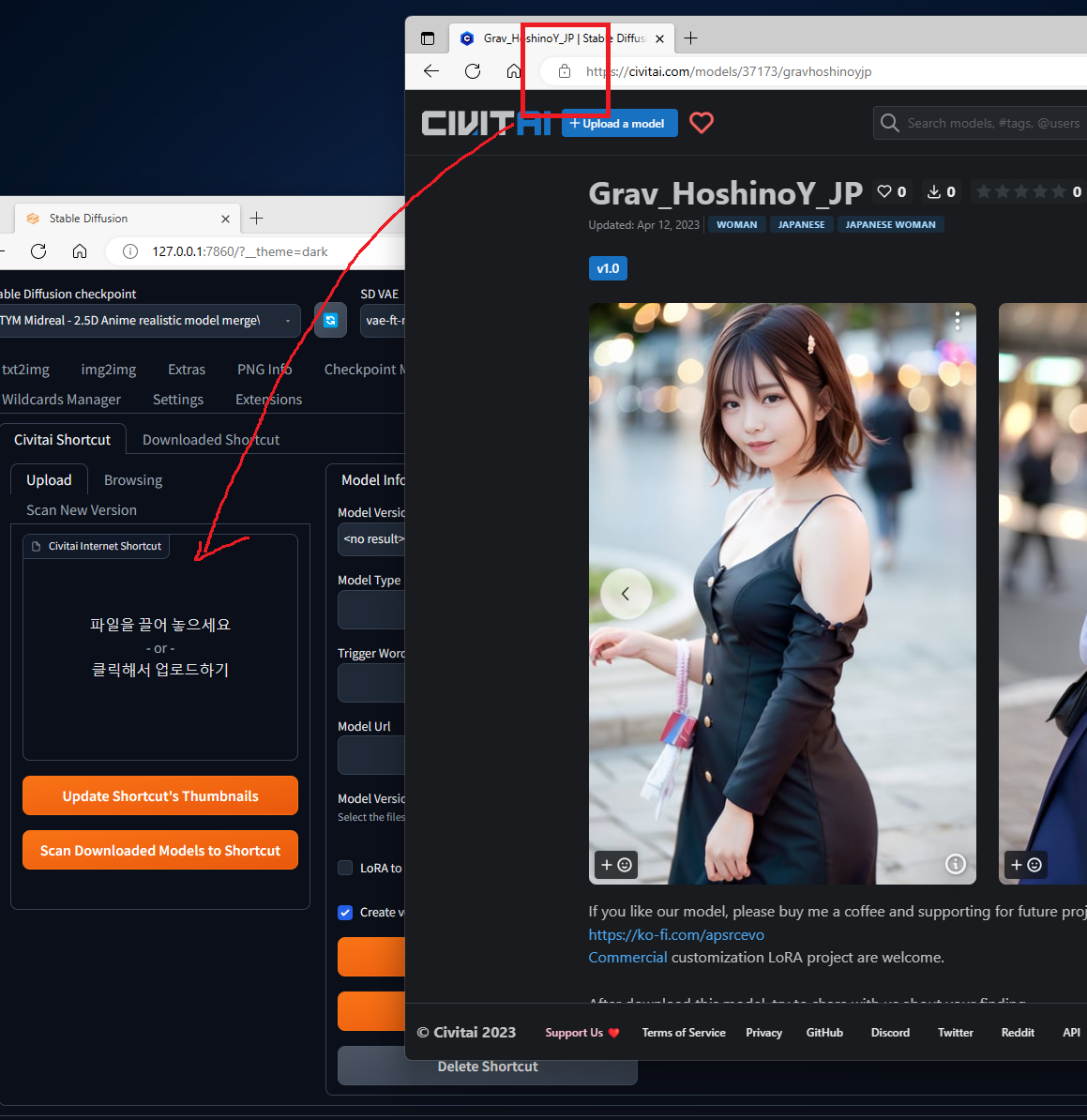
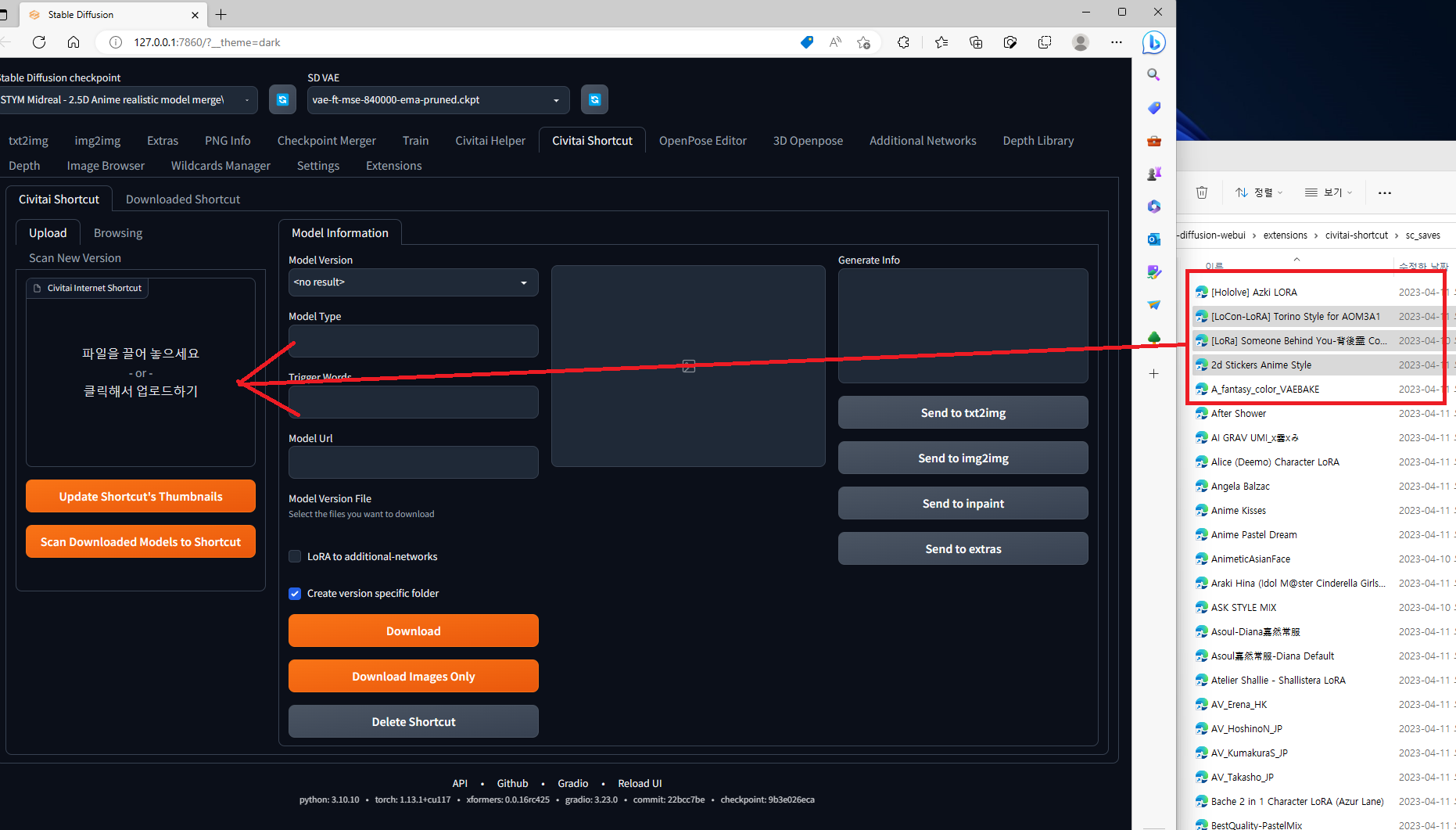
- Upload : This function creates a shortcut that can be used by the extension when you enter the Civitai site's model URL. It only works when the site is functioning properly. You can either click and drag the URL from the address bar or drag and drop saved internet shortcuts. You can also select multiple internet shortcuts and drop them at once.
- Browsing : This function displays the registered shortcuts in thumbnail format, and when selected, displays their details on the right-hand side of the window. This function works independently of the Civitai site.
- Scan New Version : This is a function that searches for the latest version of downloaded models on the Civitai site. It retrieves information from the site and only functions properly when the site is operational.
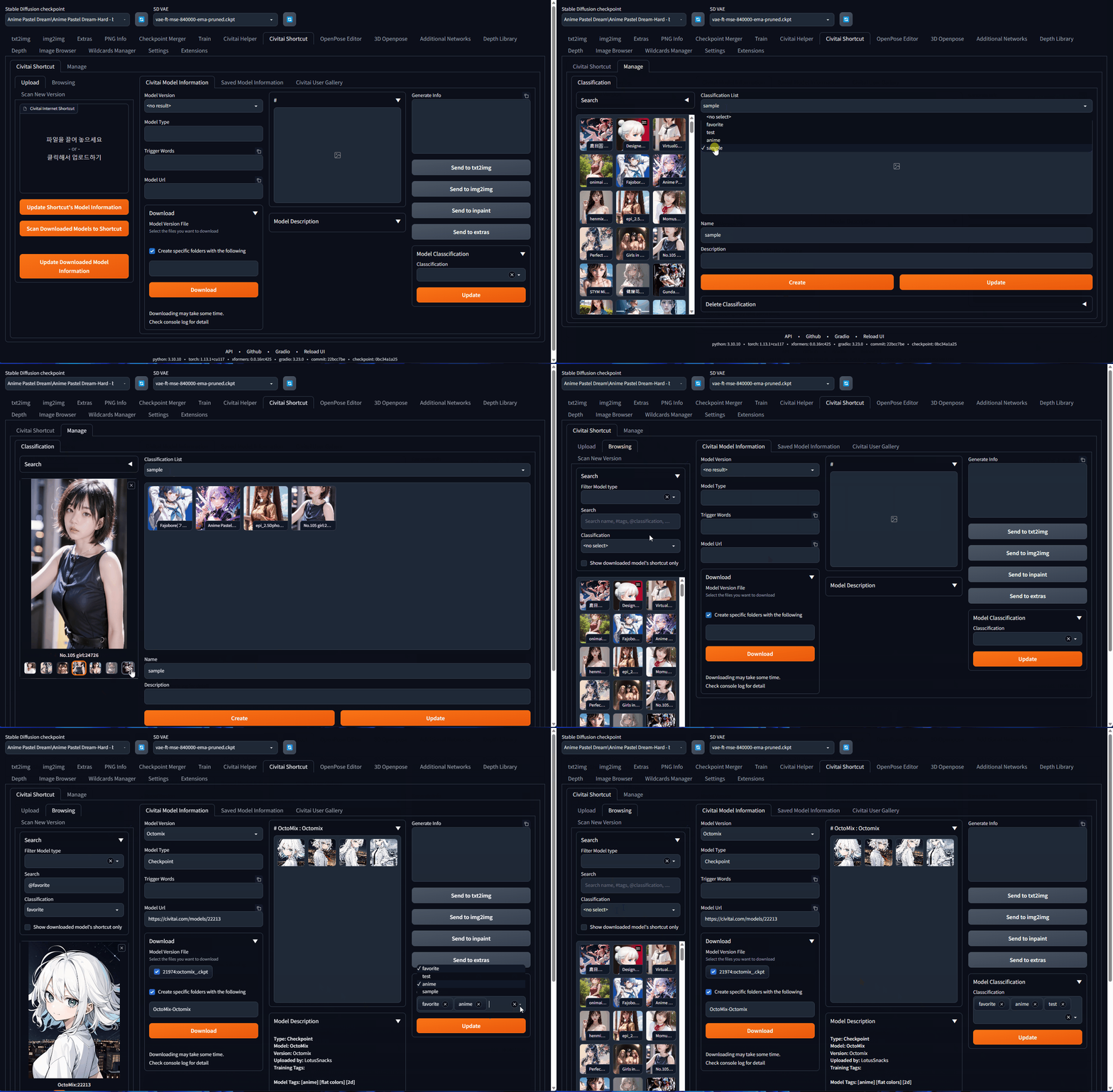
- Classification : Function for managing shortcuts by classification.
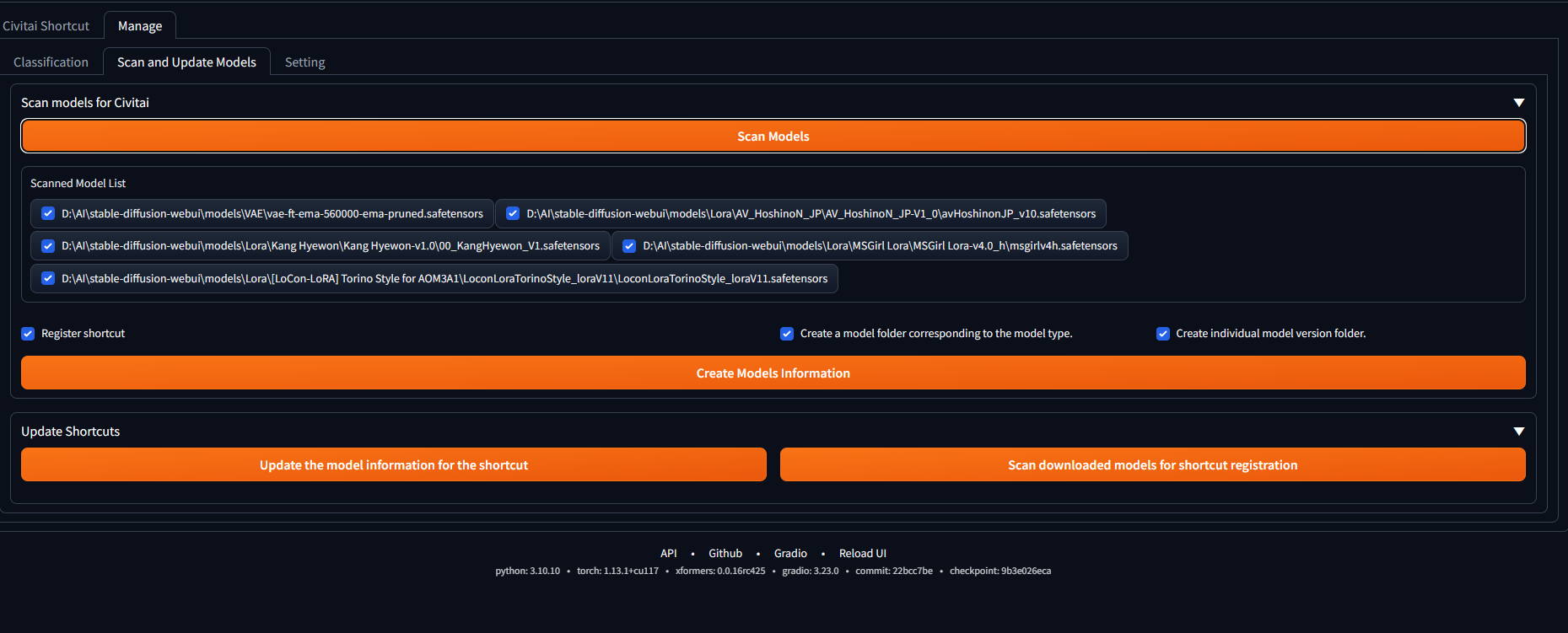
- Scan and Update Models Scan Models for Civitai - Scan and register shortcut for models without model information that are currently held. Update Shortcut - Move the shortcut update function from the Upload tab. Update the model information for the shortcut - Update the information of registered shortcuts with the latest information. Scan downloaded models for shortcut registration - Register new shortcuts for downloaded models that have been deleted or have missing model information.
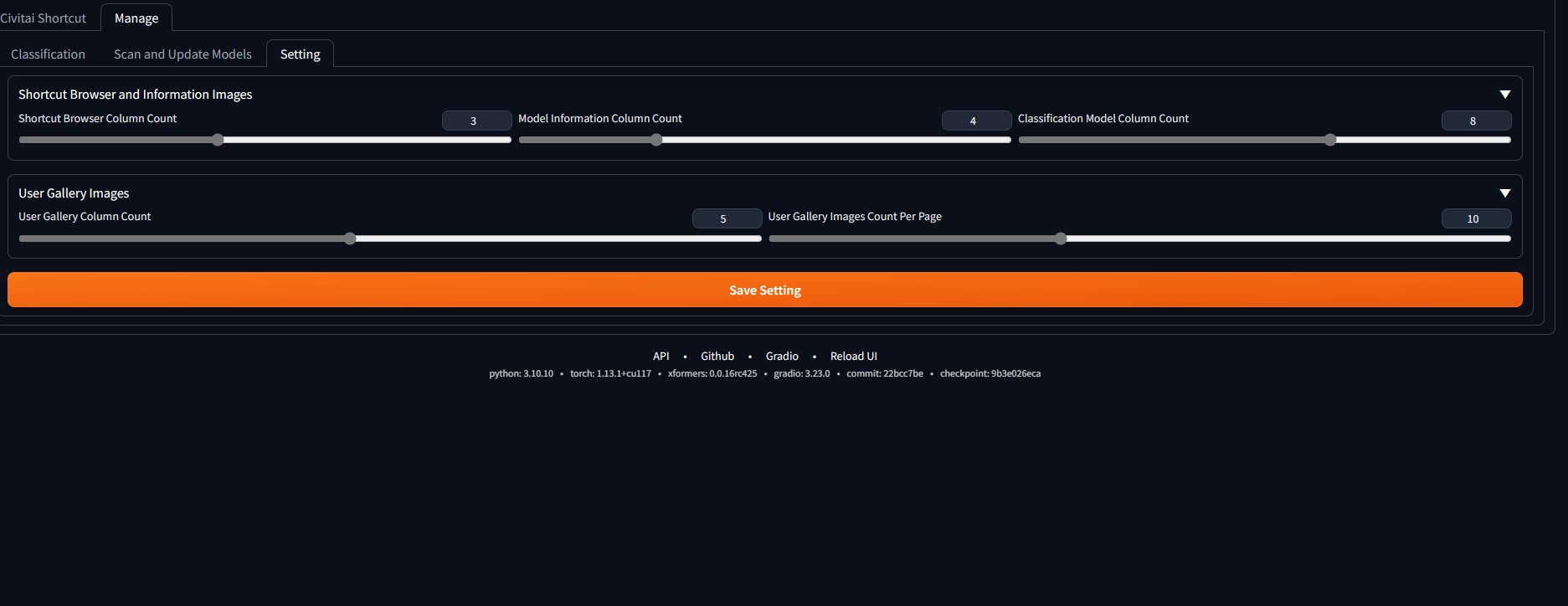
- Setting tab - Set the number of columns in the image gallery.
Features
Civitai 사이트의 모델 URL을 저장하여 나중에 참조하고 보관할 수 있습니다.
이를 통해 필요할 때 모델을 다운로드하고 모델이 최신 버전으로 업데이트되었는지 확인할 수 있습니다. 다운로드 된 모델은 지정된 저장 위치에 저장됩니다.
Notice
세개의 폴더와 두개의 json 파일이 생성되며 각각의 역할은 다음과 같습니다.
- sc_saves : 등록된 model url이 백업되는 폴더, 등록된 모든 url이 저장되는 폴더
- sc_thumb_images : 등록된 url의 thumbnail이 저장되는 폴더
- sc_infos : 등록시 모델정보와 이미지가 저장되는 폴더
- CivitaiShortCut.json : 등록된 model url 을 기록 관리 하는 json 파일
- CivitaiShortCutClassification.json: 분류항목을 관리하는 파일
- CivitaiShortCutSetting.json: a JSON file that records setting.
Change Log
v 1.4a
-
인터페이스 디자인 인이 변경되었습니다.
-
다운 받을 파일에 대한 좀더 자세한 정보를 제공하도록 변경되었습니다.
-
파일을 선택하지 않고 다운로드 시에도 version information 파일과 preview 이미지를 생성 하도록 변경하였습니다.
-
실제 파일을 다운 로드 하지 않고도 Downloaded Model Information을 이용하실수 있습니다.
-
파일을 다운 받지 않았어도 다운 받은걸로 인식되므로 참고 부탁드립니다.
-
인포메이션탭에서 제공하는 open folder 기능은 여러곳에 중복 다운로드했을시 부정확할수 있습니다. 정확한 내용을 알고 싶으시면 Downloaded Model Information tab 을 활용해주세요.
-
Downloaded Model Information tab 에서 파일명이 동일한 파일을 다운 받을 경우 모두 다은받은걸로 인식되는 오류가 있습니다.
-
Manage -> Classification 디자인 과 기능에 일부 변경이 있습니다.
-
Classification 의 생성 수정 삭제 업데이트 기능이 좌측의 Shortcut Item 항목과 통합되었습니다.
- Update 기능은 classification 의 이름과 설명의 Update만 합니다.
- classification에 등록되는 shortcut Item 의 저장은 Save Classification Shortcuts 을 이용하셔야 합니다.
-
Manage -> Setting 에 Screen Style 항목이 추가되었습니다. Shortcut Brower 와 Information Tab 간의 비율을 설정할수있습니다. 자신의 모니터나 작업취향에 따라 적절한 비율을 선택하시고 적용할수 있습니다. Shortcut Browser and Information Images 항목과 적절히 조합하시길 추천드립니다.
-
Download Folder for Extensions 에 LyCORIS의 다운로드 위치를 설정할수 있는 항목이 추가 되었습니다. 기존에 는 LoRA 폴더를 같이 이용했지만 LyCORIS확장을 사용하시면 extra networks 에서도 인식되는것을 알게되어 적절히 수정 하실수 있게 추가 하였습니다. (알려주시어 감사합니다.)
-
Reload UI 버튼이 추가 되었습니다. SDUI 를 리로드 시킵니다. 단 setting을 저장하는 기능은 넣지 않았습니다. 저장은 옆의 Save Setting 버튼을 이용해주세요. :)
-
Upload 항목에 업로드 되는 파일의 내부 형식을 조금 변경하였습니다.
- url=civitai model url 의 구성을하면 인식되도록 수정하였습니다.
- e.g.) sample.txt : url=https://civitai.com/models/64863/cute-oil-impasto-chibi url=https://civitai.com/models/64850/koga-tomoe-from-bunny-girl-senpai url=https://civitai.com/models/64849/blackwhite
-
Upload 의 드래그 & 드롭이 리눅스 환경에서 제대로 작동 되지 않습니다. 불편하시겠지만 당분간 윗쪽의 Textbox 를 활용해주세요.
v 1.4
-
인포메이션 탭에 Downloaded Model Information 탭이 추가 되었습니다. 현재 다운로드한 파일의 정보를 확인 할 수 있는 탭입니다. 다운로드한 모델의 버전 리스트가 나타나며 선택시 하단에 세부 정보가 나타납니다. 세부표시 항목에서는 실제 다운 로드한 파일의 정보를 확인할수 있으며 다운로드된 폴더에 접근할수 있습니다. 파일 중복등의 사유로 다소 부정확할수 있습니다. 또한 해당버전의 Civitai 제공 정보를 json형태로 확인 하실수 있습니다. 모든 Open Folder 기능은 해당 폴더가 존재 할때만 작동됩니다.
- Open Download Image Folder : 다운로드한 이미지들이 포함되어 있는 폴더를 열어줍니다.
- Open Saved Information Folder : Shortcut 등록시 모델의 정보파일과 이미지들이 다운로드 되는 폴더를 열어줍니다. 삭제시 되었을시 Civitai Shortcut->Saved Model Inforamtion : Update Model Information 이나 Manage->Scan and Update Models->Update Shortcuts : Update the model information for the shortcut 으로 복구할 수 있습니다.
-
좌측의 shortcut browser의 표시 방식을 설정할 수 있습니다. Manage->Setting->Shortcut Browser and Information Images : Shortcut Browser Thumbnail Count per Page 항목에서 설정할 수 있으며 0으로 설정시 기존의 방식처럼 전체 리스트가 출력됩니다.
-
추가 기능 설명 1 (Update the model information for the shortcut) Manage->Scan and Update Models->Update Shortcuts : Update the model information for the shortcut 기능은 이미등록된 shortcut 의 정보를 최신 정보로 업데이트 하는 기능입니다. 이는 등록된 모든 숏컷을 대상으로 합니다. 숏컷의 개별적인 업데이트는 Civitai Shortcut->Saved Model Inforamtion : Update Model Information 에서 할수 있습니다.
-
추가 기능 설명 2 (Scan new version model) Civitai Shortcut->Scan New Version : Scan new version model: 의 기능은 다운 로드된 모델 버전파일의 새로운 버전이 있는지 스캔하는 기능입니다. 다운로드하지 않은 모델은 검색하지 않습니다.
v 1.3ss
-
모델의 다운로드 규칙, 방법에 변경이 있습니다. 다운로드시 폴더를 지정할수 있습니다. 사용자 분류 항목을 모델의 다운로드 항목으로 설정할수있습니다.
-
사용자가 등록한 분류 항목으로 설정하면 하위폴더는 작성할 수 없으며 사용자가 지정한 분류항목의 폴더가 model type base folder(e.g. model/lora) 에 만들어지고 다운로드 됩니다.
-
"Create Model Name Folder" 선택하면 model type base folder(e.g. model/lora) 에 모델명을 베이스로 폴더가 만들어지며 버전에 따라 서브폴더를 원하는 이름으로 만들수 있습니다.
-
다운로드된 모델파일은 원하는 폴더로 자유롭게 이동하셔도 됩니다. 본 확장프로그램은 파일의 다운로드의 편의를 돕기만할뿐 다운로드된 파일을 관리 하지는 않습니다. 편하게 이동 하셔도 문제 없습니다.
-
이미지 다운로드는 기본으로 outputs/download-images 에 다운 로드되며 setting->download for extension->Download Images Folder 에서 설정할수 있습니다. 시스템에따라 접근권한의 설정이 필요할수 있습니다.
-
사용자 정의 분류항목이 폴더명으로 사용되어지므로 폴더생성에 사용하기 어려운 문자는 변경을 권장드립니다. 폴더 생성시 "-" 문자로 대체됩니다.
-
thumbnail 이미지의 display type 을 변경할수 있습니다. setting->Shortcut Browser and Information Images->Gallery Thumbnail Image Style 에서 설정할수 있습니다.
-
쇼컷 등록시 다운로드 되는 이미지의 수를 설정할수 있습니다. setting->Shortcut Browser and Information Images->Maximum number of download images per version 에서 절정하룻 있으며 0일때는 모두 다운로드 됩니다.
v 1.3c
- Manage tab 에 scan and update models 와 setting 탭추가
- Scan and Update Models tab Scan Models for Civitai - 보유하고 있는 모델중 모델 정보가 없는 파일을 스캔하고 숏컷으로 등록 함 Update Shortcut - Upload tab 에 있던 shortcut update 기능을 옯겨옴 Update the model information for the shortcut - 등록된 shortcut의 정보를 최신정보로 업데이트함 Scan downloaded models for shortcut registration - 다운 로드 받았지만 삭제되었거나 모델 정보가 있는 모델의 shortcut을 새로이 등록해줌
- Setting tab Shortcut Browser and Information Images,User Gallery Images - 이미지 갤러리의 컬럼의 수를 설정함. Download Folder for Extensions - 특정 확장프로그램의 다운로드 경로를 설정함
- 모델의 정보를 기록하는 모델 인포 파일의 이름이 변경되었습니다. 이에 따라 정상적인 model info 파일이 있는 모델도 "Scan Models for Civitai" 작업시 새로운 폴더로 이동되어질수 있습니다. "Create a model folder corresponding to the model type." 옵션을 해제 하시면 이동을 막을수 있습니다.
v 1.3a
- A new feature has been added that allows you to manage and classify items. You can add, delete, and update classification items in the "manage" -> "classification" tab. To add a shortcut, select the desired classification item in the center top and click on the list on the left to register the desired shortcut. When you click, the registered shortcut appears in the center of the screen, and you can remove it by clicking on the registered shortcut. Click the "update" button to complete the registration. In the "civitai shortcut" -> "information" tab, a "model classification" item has been added on the right side, and you can perform registration and deletion of shortcuts for the model corresponding to the desired classification item. After modification, click the "update" button to complete the task.
- In the browsing "search" feature, you can check the items registered in the classification. When you select a classification item from the dropdown list, the selected item appears in the list and works in conjunction with the "filter model type" and "search" features. The "search" feature works by entering items such as tags, classification, and search keywords. The tags, classification, and search keywords are applied with "and" operation, and each item is applied with "or" operation. Each item is separated by ",". Although only one item can be selected from the classification dropdown list, you can enter multiple items by using the "@" prefix.
v 1.2a
- Saved Model Information tab 과 중복되는 기능을 가진 Downloaded Model tab이 제거되었습니다.
- 이미지 생성정보 적용방식이 내부적으로 변경되었습니다. 이미지외에 civitai 의 information 정보에서도 가져오도록 수정되었습니다. 이에따라 내부적으로 이미지 저장명의 변경이 있었습니다. "Update Shortcut's Model Information" 으로 이미지 업데이트가 필요합니다.
v 1.2
- Civitai User Gallery 탭이 추가 되었습니다.
- 모델의 Gallery 의 정보를 확인 할수 있습니다. 해당모델 갤러리에 이미지가 없으면 아무것도 나타나지 않을수 있습니다. 또한 api로 제공되는 데이터와 시간차가 있기도 하더군요. 어떤 기능을 넣으면 좋을지 아이디어를 구하고 있습니다.
- 좌측에 Upload 하단에 "Update Downloaded Model Information" 버튼이 추가 되었습니다. Stable Diffusion 작동중에 임의로 폴더명을 바꾸거나 했을때 내부 정보를 갱신 시켜줍니다.
- 다운로드 부분에 더이상 Additional networks 로 선택해서 다운 로드 하는 항목을 제거 하였습니다. 효용성도 떨어지고 Settings->Additional Networks 원하시는 폴더를 지정하면 되기때문에 필요없다 생각했습니다. 저는 models\Lora 입력하여 같이 사용중에 있습니다.
- 모델을 개별폴더에 다운 받을 때 폴더명을 직접 지정할수 있습니다. 기존 적으로는 "모델명-버전명" 형시으로 보여지며 원하는 값으로 입력해주시면 됩니다. 공백으로 하면 "모델명-버전명"으로 만들어 집니다. 제시되는 폴더명은 다르게 나타날수도 있는데, 같은 버전의 모델을 다운 받은 폴더가 해당 모델 폴더 하위에 있으면 그 이름이 나타납니다.
- 그 외에 소소하게 디자인 이 변경되었습니다.
- 버그 :많은 버그가 있지만 ; , 갤러리의 이미지를 full size로 볼때 information 쪽과 Browsing 쪽의 이미지와 제어가 섞입니다.
v 1.1c
- information 로딩에 병목현상을 일부 완화
- Search 에 #tags 검색 기능 추가 "," 구분되며 search keywords 끼리는 or, tags 끼리도 or , search keyword와 tags는 and 이 적용됩니다.
- Tags검색 기능 추가를 위해 shortcut 저장 테이블이 변경되었습니다. 기존의 shortcut은 tag 검색을 위해 Update Shortcut's Model Information 이 필요합니다.
v 1.1
- Shortcut 등록 시 모델정보와 이미지가 별도의 폴더에 저장됩니다.
- 이를 통해 사용자는 Civitai 사이트에 연결되지 않은 경우에도Saved Model Information 탭에서 모델 정보에 액세스할 수 있습니다.
- 모델 정보와 이미지를 최신 상태로 유지하기 위해 "Thumbnail Update" 버튼이 제거되고 "Update Shortcut's Model Information" 버튼으로 대체됩니다.
- 섬네일 업데이트 버튼을 삭제하고 shortcut 의 모델 정보와 이미지를 최신 정보로 유지하기위한 Update Shortcut's Model Information 버튼을 추가
- 라이브로 접속 가능한 "Civitai Model Information" 탭에서 Download images Only 버튼이 제거되고, Delete shortcut 버튼이 Saved Model Information 탭으로 이동됩니다.
- Delete shortcut는 sc_infos에 저장된 모델 정보와 이미지를 한 번에 제거합니다. *전체 모델 정보를 업데이트하는 "Update Shortcut's Model Information" 버튼 외에 개별적으로 모델 정보를 업데이트할 수 있는 "Update Model Information" 버튼이 "Saved Model Information" 탭에 추가됩니다.
Screenshot