 ae2193d3c6
moved to wiki |
||
|---|---|---|
| doc | ||
| scripts | ||
| README.md | ||
| install.py | ||
| preload.py | ||
README.md
stable-diffusion-webui-distributed
This extension enables you to chain multiple webui instances together for txt2img and img2img generation tasks.
There is an emphasis on minimizing the perceived latency/lag of large batch jobs in the main sdwui instance.
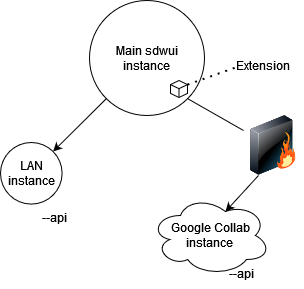
Diagram showing Master/slave architecture of the extension
Contributions and feedback are much appreciated!
Installation
On the master instance:
- Go to the "Extensions" tab and then swap to the "Install from URL" tab
- Paste https://github.com/papuSpartan/stable-diffusion-webui-distributed.git into "URL for extension's git repository" and click install
- Ensure that you have setup your
COMMANDLINE_ARGSinclude the necessary info on your remote machines. Ex:
set COMMANDLINE_ARGS=--distributed-remotes laptop:192.168.1.3:7860 argon:fake.local:7860 --distributed-skip-verify-remotes --distributed-remotes-autosave
On each slave instance:
- enable the api by passing
--apiand ensure it is listening by using--listen - ensure all of the models, scripts, and whatever else you think you might request from them is present
Ie. if you're using sd-1.5 on the controlling instance, then the sd-1.5 model should also be present on each slave instance. Otherwise, the remote will fallback to some other model that is present.
if you want to sync models and etc. between a huge amount of nodes you might want to use something like rsync or winscp
Usage Notes
- If benchmarking fails, try hitting the Redo benchmark button under the script's Util tab.
- You need to have all of the workers you plan to use connected when benchmarking for things to work properly (will be fixed later).
- If any remote is taking far too long to returns its share of the batch, you can hit the Interrupt button in the Util tab.
Command-line arguments
--distributed-remotes Enter n pairs of sockets corresponding to remote workers in the form name:address:port
--distributed-skip-verify-remotes Disable verification of remote worker TLS certificates (useful for if you are using self-signed certs like with auto tls-https)
--distributed-remotes-autosave Enable auto-saving of remote worker generations
--distributed-debug Enable debug information