 6614af6f21
|
||
|---|---|---|
| doc | ||
| scripts | ||
| README.md | ||
| preload.py | ||
README.md
stable-diffusion-webui-distributed
This extension enables you to form a distributed computing system by connecting multiple stable-diffusion-webui instances together.
The main goal is to maximize concurrency and minimize the latency of large-scale image generation in the main sdwui instance.
In practice, this means being able to tell a bunch of machines to generate images at the same time and have them sent right back to your controlling machine.
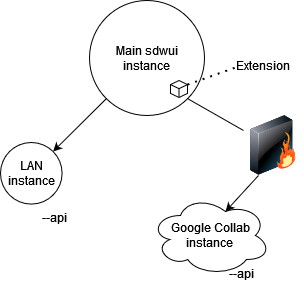
Diagram showing Master/slave architecture of the extension
Contributions and feedback are much appreciated!
Installation
DISCLAIMER - I do NOT recommend casual users use this yet unless you are okay with the possibility of severe instability
On the master instance:
- Install the patch
- Go to the "Extensions" tab and then swap to the "Install from URL" tab
- Paste https://github.com/papuSpartan/stable-diffusion-webui-distributed.git into "URL for extension's git repository" and click install
- Ensure that you have setup your
COMMANDLINE_ARGSinclude the necessary info on your remote machines. Ex:
set COMMANDLINE_ARGS=--distributed-remotes laptop:192.168.1.3:7860 argon:fake.local:7860 --distributed-skip-verify-remotes --distributed-remotes-autosave
On each slave instance:
- enable the api by passing
--apiand ensure it is listening by using--listen - ensure all of the models, scripts, and whatever else you think you might request from the master is present
if you want to sync models and etc. between a huge amount of nodes you might want to use something like rsync or winscp
Usage Notes
- If benchmarking fails, just delete the workers.json file generated in the extension folder and try again.
- You need to have all of the workers you plan to use connected when benchmarking for things to work properly (will be fixed later).
Command-line arguments
--distributed-remotes Enter n pairs of sockets corresponding to remote workers in the form name:address:port
--distributed-skip-verify-remotes Disable verification of remote worker TLS certificates (useful for if you are using self-signed certs like with auto tls-https)
--distributed-remotes-autosave Enable auto-saving of remote worker generations
--distributed-debug Enable debug information
How it works
Say you want to generate 12 images and you hit the generate button on the master instance:
- If there is no workers.json file, it will benchmark every machine(worker) and save that information to workers.json
- Assume we have 3 workers, with each worker measured to run at ~20ipm. Images will be split equally among them.
- The master instance (the UI you are looking at) will begin generating its portion of the images(4) like it would if you had set the batch_size slider to 4 normally
- Once the 4 images are done and the image viewer appears, the extension will start adding all of the images received from the remote machines to the gallery.
- Profit?
That was the simple case though, step 2 gets much more complicated if the machines' compute speeds and/or memory sizes are much different. For example, a setup which utilizes 3 distinct workers that operate at 5, 15, and 20 ipm each would have the following job assignment if the master instance requests 12 images:
After job optimization, job layout is the following:
worker 'master' - 8 images
worker 'laptop' - 12 images
worker 'argon' - 3 images
The reason it works like this is the following:
- 'laptop' is the fastest real-time worker at 20 ipm so it (initially) gets dealt an equal share of 4 images
- both of the other workers are considered 'complementary' workers because they cannot keep up with 'laptop' enough*
- because of my goal for this extension, both 'complementary' workers will calculate how much, in addition, they can make in the time that 'laptop' will take to make the main 12.