# model-keyword
Automatic1111 WEBUI extension to autofill keyword for custom stable diffusion models.
[model-keyword-github.webm](https://user-images.githubusercontent.com/1288793/205525862-a8eaebfe-1860-41d1-bc66-335896b467dd.webm)
## Installation
Copy the url of the repository ( https://github.com/mix1009/model-keyword ) into the extension tab and press "Install"
 From "Extensions/Installed" tab press "Apply and restart UI".
 ## Usage
From txt2img, img2img tab, "Model Keyword" section is added. Model keyword extension is enabled by default. Click Model Keyword or triangle to reveal options.
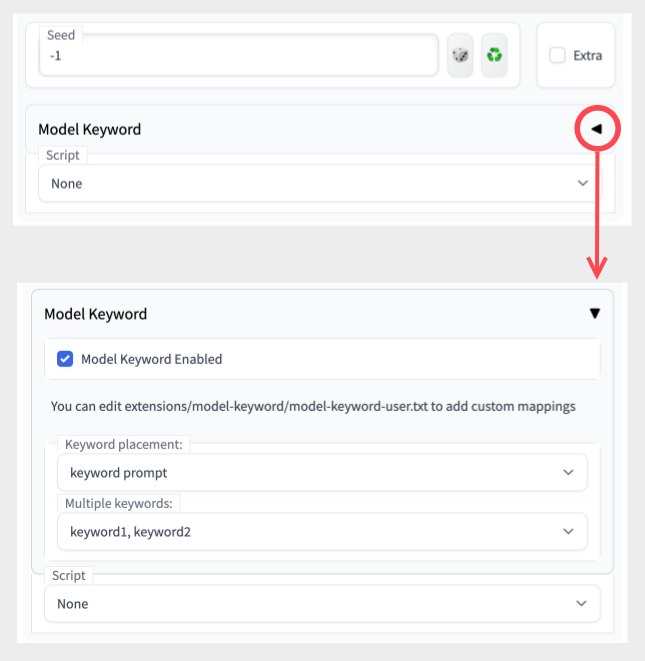
When generating image, the extension will try to figure out which model is used and insert matching keyword to the prompt:
## Usage
From txt2img, img2img tab, "Model Keyword" section is added. Model keyword extension is enabled by default. Click Model Keyword or triangle to reveal options.

When generating image, the extension will try to figure out which model is used and insert matching keyword to the prompt:
 ### Keyword placement
 ### Multiple keywords
 ## Adding custom mappings
Edit extensions/model-keyword/model-keyword-user.txt . model-keyword-user.txt is a csv file.
* Format is model_hash, keyword_or_keywords, optional_ckpt_filename for each line.
* keywords are separated by pipe character |.
* do NOT edit model-keyword.txt . It can be overwritten or cause conflict while upgrading.
```
# csv file for adding custom model_hash to keyword mapping
# line starting with # is ignored.
# model_hash, keyword
41fef4bd, nousr robot
# model provides multiple keywords
4d5cca44, TinyPlanet|TinyCityPlanet
# in case there is a hash collision. it will use the closest matching filename.ckpt
# model_hash, keyword, filename.ckpt
a2a802b2, SKSKS app icon, App_Icons_V1_PublicPrompts.ckpt
a2a802b2, 16-bit-landscape pixel art style, 16-bit-landscape_PublicPrompts.ckpt
```
## Adding custom mappings
Edit extensions/model-keyword/model-keyword-user.txt . model-keyword-user.txt is a csv file.
* Format is model_hash, keyword_or_keywords, optional_ckpt_filename for each line.
* keywords are separated by pipe character |.
* do NOT edit model-keyword.txt . It can be overwritten or cause conflict while upgrading.
```
# csv file for adding custom model_hash to keyword mapping
# line starting with # is ignored.
# model_hash, keyword
41fef4bd, nousr robot
# model provides multiple keywords
4d5cca44, TinyPlanet|TinyCityPlanet
# in case there is a hash collision. it will use the closest matching filename.ckpt
# model_hash, keyword, filename.ckpt
a2a802b2, SKSKS app icon, App_Icons_V1_PublicPrompts.ckpt
a2a802b2, 16-bit-landscape pixel art style, 16-bit-landscape_PublicPrompts.ckpt
```